On Monday the owner of a three-person design studio walks a client through a kitchen remodel for two hours. On Tuesday a supplier calls her cell about a delayed cabinet order, and on Wednesday the team has a Zoom with the contractor. By Friday the client asks why the quote changed, and nobody can remember exactly what was agreed in the kitchen.
Small businesses meet everywhere: on site, on the phone, on Zoom. There is no IT department, no procurement team and no spare budget, and every subscription comes out of the owner’s pocket. The conversations that matter most, the ones where prices, scope and deadlines get agreed, often happen standing up in a client’s home or shop. This roundup compares four tools on that job: Otter, Fireflies, Plaud and AmyNote, using only what each vendor publishes about itself.
Quick Verdict
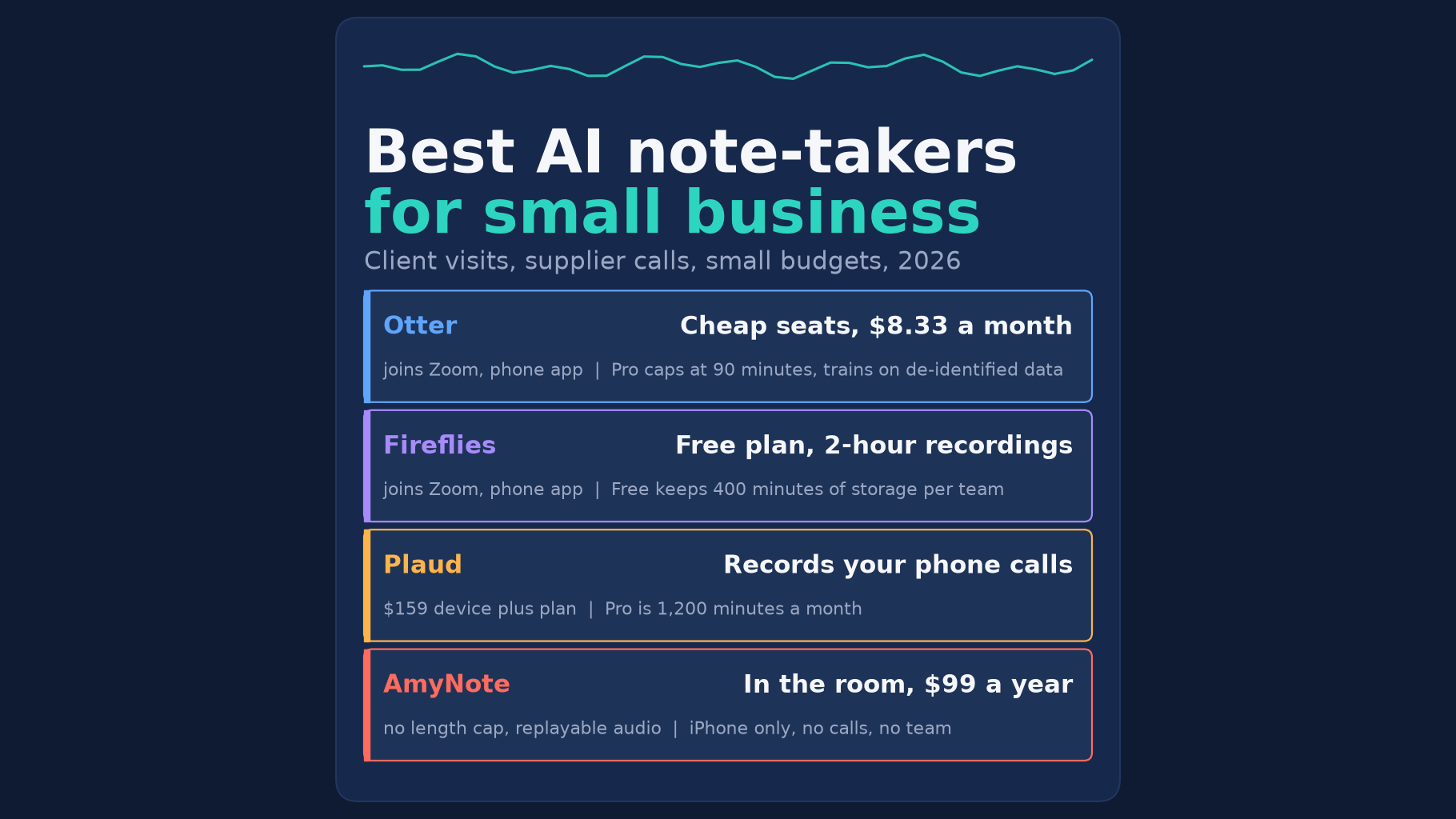
- Best free start for Zoom and in-person: Fireflies. The Free plan has unlimited transcription and a phone app for in-person meetings, but it keeps only 400 minutes of storage per team and stops recordings at 2 hours.
- Best cheap team plan: Otter Pro. It is $8.33 a user a month billed yearly for up to 5 users, with a phone app and a Zoom bot. Each meeting stops at 90 minutes.
- Best for phone calls: Plaud. Its Plaud Note recorder attaches to your phone and records calls as well as meetings. You pay for the device first.
- Best for long in-person meetings on an iPhone: AmyNote. It costs $99 a year, lists no length cap and keeps replayable audio on the phone. It does not record calls, has no team workspace and runs on iPhone and iPad only.
What We Compared
We read each vendor’s pricing, product and privacy pages on October 22, 2026, and asked five questions:
- Where it records. On site, on a phone call, on Zoom?
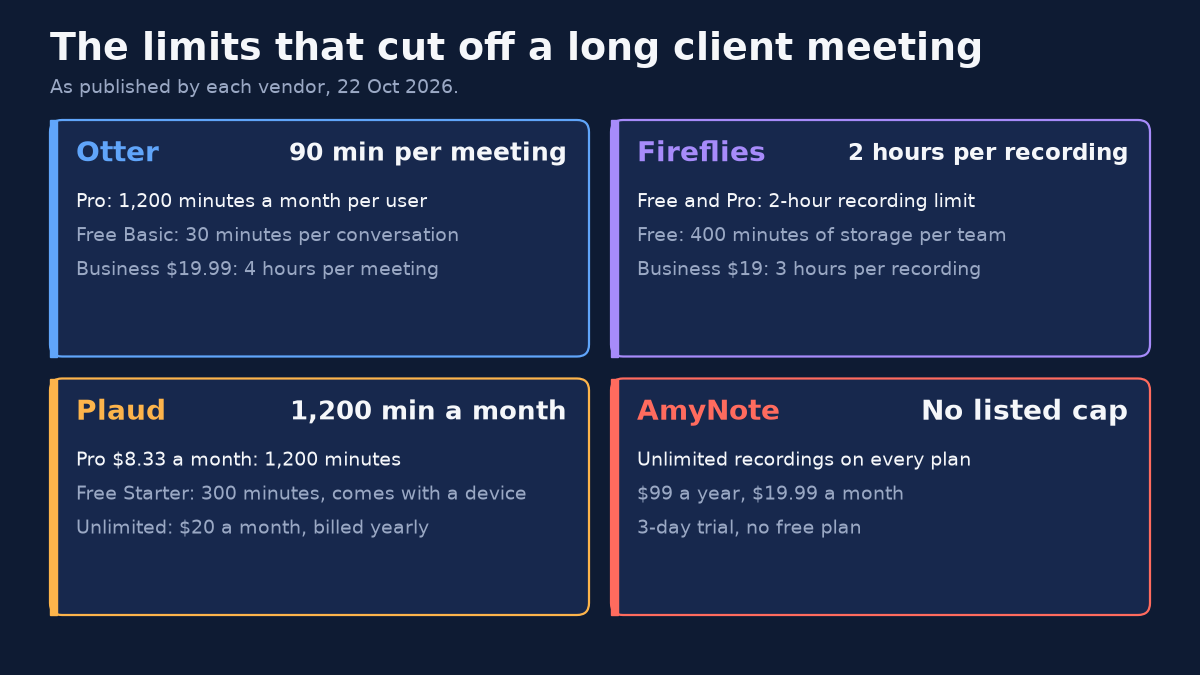
- Length. Will it cut off a two-hour client meeting?
- Hardware. Does it need a device you have to buy?
- Sharing. Can the owner and staff see the same notes?
- Privacy. Does the vendor train AI on what your clients say?
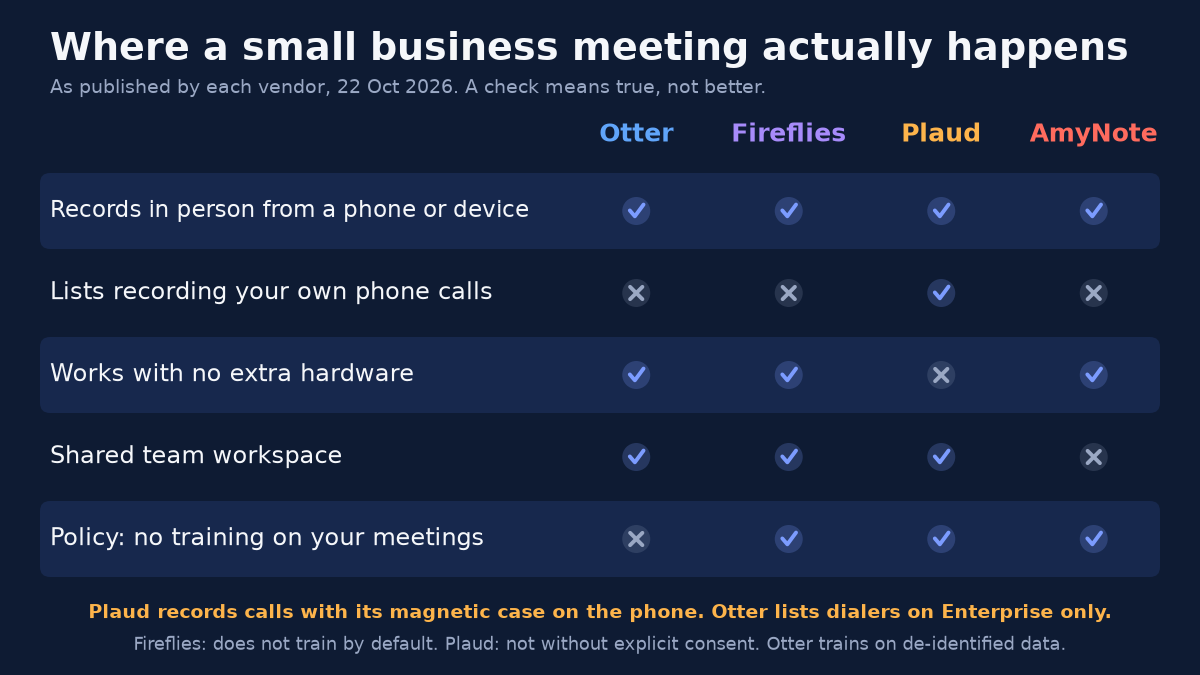
We also priced the owner plus two staff for one year. We did not test transcript accuracy, and we did not use any vendor’s own time-saved claims. A check in the chart below means the vendor says the feature exists, not that it works better than the others.
Otter: Cheap Seats, Short Meetings
Strengths. Otter Pro costs $8.33 a user a month billed yearly, $16.99 monthly, and a workspace holds up to 5 billed users. That fits a small team. Its iOS and Android apps record in-person meetings, and its bot joins Zoom, Google Meet and Microsoft Teams. Pro includes Zapier, so notes can flow into a CRM, a project board or a shared drive without anyone copying and pasting.
Weaknesses. Pro stops each conversation at 90 minutes, so a two-hour client walkthrough gets cut short. The free Basic plan stops at 30 minutes. Business lifts the cap to 4 hours at $19.99 a user a month. Dialer integrations are listed on Enterprise only, so a supplier call on your cell is out of reach for a small team. Otter’s privacy policy says it trains its AI on de-identified audio and transcripts.
Fireflies: A Real Free Plan, with a Storage Ceiling
Strengths. Fireflies Free includes unlimited transcription and a mobile app that records in-person conversations from your phone. It also joins Zoom, Google Meet and Teams and transcribes 100+ languages. Fireflies says it does not train on your data by default, and lists SOC 2 Type II and GDPR. For an owner who wants to try AI notes before paying anything, that is the lowest-risk start in this roundup.
Weaknesses. The Free plan keeps only 400 minutes of storage for the whole team, about three long client meetings. Pro costs $10 a seat a month billed yearly, $18 monthly, with 8,000 minutes of storage per seat. Free and Pro stop a recording at 2 hours, and Business raises that to 3 hours. HIPAA is on Enterprise only, which matters if your small business is a clinic, a therapy practice or anything else that handles health information.
Plaud: The Recorder That Catches Phone Calls
Strengths. Plaud is the only tool here that lists recording your phone calls. The $159 Plaud Note clips to the back of a phone with a magnetic case and switches between call and meeting modes. Plaud’s privacy policy says it will never use your content to train AI without your explicit consent. Its plan page lists ISO 27001, SOC 2 Type II, GDPR and HIPAA, the strongest compliance list in this roundup.
Weaknesses. You buy hardware before you use the software. The free Starter plan comes with the device and gives 300 minutes a month. Pro is $8.33 a month billed yearly for 1,200 minutes, and Unlimited is $20 a month. Each person who records needs a device, and Plaud says transcription needs a paired phone and an internet connection.
AmyNote: For the Room, Not the Phone Line
Weaknesses first. AmyNote does not record phone calls, has no team workspace and does not join Zoom. It runs on iPhone and iPad only, with no Android, web or desktop app. To share notes with staff, you export a PDF, TXT or Word file. There is no free plan beyond a 3-day trial, and AmyNote lists no SOC 2, ISO 27001 or HIPAA certification.
Strengths. AmyNote records an in-person meeting on the phone in your pocket, and lists no length cap. The two-hour kitchen walkthrough is captured whole, with no device to buy. The audio stays replayable, so when the client asks what was agreed, you can play back the exact words instead of arguing from memory. It transcribes 140+ languages and translates into 100+, which helps when a client or a subcontractor is more comfortable in another language. Pricing is $99 a year, $19.99 a month or $12.99 a week, with unlimited recordings.
Privacy. AmyNote says it does not use your data to train AI models and does not sell meeting content. Transcription and AI run through Microsoft Azure, OpenAI and Anthropic’s Claude, with TLS in transit, which AmyNote says is not end-to-end encryption. The saved library lives on the owner’s iPhone. Local-first does not mean local-only: when a transcript or summary runs, the audio or text is uploaded, and a processing copy may be kept in AmyNote’s cloud.
Side-by-Side Comparison
- In-person meetings: all four, from a phone app or, for Plaud, its device.
- Phone calls: Plaud, with the magnetic case. Otter lists dialers on Enterprise only. AmyNote and Fireflies do not list it.
- Length cap on the cheapest paid plan: Otter Pro 90 minutes. Fireflies Pro 2 hours. Plaud Pro 1,200 minutes a month. AmyNote lists none.
- Extra hardware: Plaud only, from $159.
- Sharing: Otter, Fireflies and Plaud Team have shared workspaces. AmyNote shares by file export only.
- Trains on your meetings: Fireflies, Plaud and AmyNote say no. Otter trains on de-identified data.
- Owner plus two staff, one year: AmyNote $297, as three subscriptions. Otter Pro $299.88. Fireflies Pro $360. Plaud $746.97 for three Plaud Note and Pro bundles at $248.99.
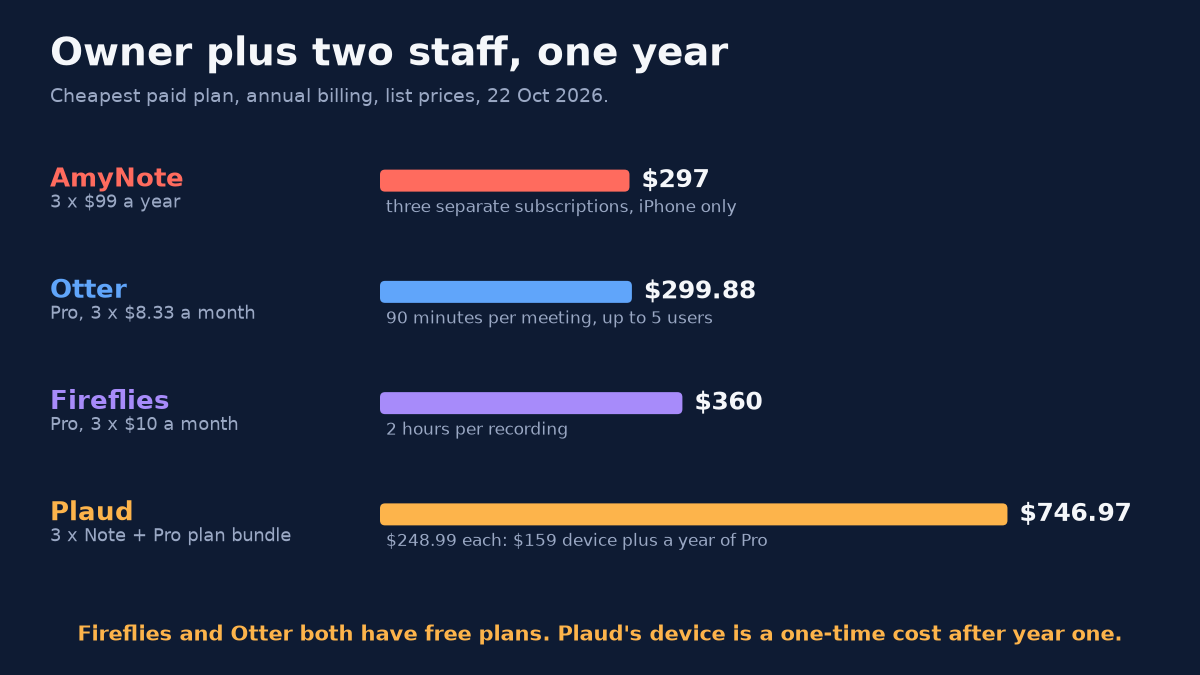
The first three totals sit within $63 of each other, so price alone will not decide this. Plaud costs more than twice as much in year one, but most of that is the device, which you do not buy again in year two. The real differences are where each tool records and how long it keeps going.
Which Tool Fits Which Business
Start from where your important conversations happen and who needs to read the notes afterwards.
- An agency or consultancy that lives on Zoom. Fireflies Free covers it while you find out whether the team actually reads the notes. Move to Pro when the 400 minutes fill up.
- A small team that shares notes every week. Otter Pro gives up to 5 people one workspace for under $100 each a year, as long as your meetings stay under 90 minutes.
- A trade or service business that runs on the phone. Plaud is the only tool here built to record your own calls with suppliers and customers. Budget for one device per person who takes those calls.
- An owner who does the selling in person. The site visit, the consultation, the walkthrough that runs long. AmyNote records the whole thing on the iPhone already in your pocket, with nothing extra to carry.
Before You Record a Client
Whichever tool you pick, tell the people in the room that the meeting is being recorded and why, and stop if anyone objects. Recording-consent rules vary by state and country, and some require every party on a call to agree, so check the rules where you and your client are before you record a phone call. A transcript helps you remember what was agreed, but it does not replace a written quote, a change order or a signed contract. Use the recording to get the paperwork right, then send the paperwork.
Think about where the audio goes, too. Clients share budgets, addresses and sometimes personal details during a walkthrough. The privacy rows above tell you which vendors say they train on that material and which say they do not.
The Bottom Line
If most of your meetings are on Zoom, start with Fireflies Free and move to Pro when the 400 minutes fill up. If your team wants the cheapest shared workspace and meetings stay under 90 minutes, Otter Pro is hard to beat. If your business runs on phone calls, Plaud is the only one here built to catch them, and it is worth the device.
AmyNote is for the owner who does the important talking in person: the site visit, the client consultation, the walkthrough that runs long. It costs $99 a year, keeps replayable audio on the iPhone and does not train on what your clients say. It will not record your calls or share a workspace. It has a 3-day trial on the App Store.
Originally published as an X Article by @AmyNoteApp.