A freelance designer has three client calls on Tuesday. One is on the client’s Zoom, one is a coffee-shop kickoff, and one is a phone call from the car. By Friday the client says the logo brief never mentioned a dark version. The freelancer needs the exact words, and there is no IT department to ask, no shared drive full of meeting minutes and no colleague who was also in the room.
Most “best AI note-taker” lists are written for sales teams buying 50 seats. A freelancer buys one seat, pays for it personally and answers to clients who never agreed to be recorded by a stranger. Seat minimums, admin consoles and CRM sync stop mattering. What matters is what one person pays in year one, whether the tool works where the meeting actually happens, and what happens to a client’s words once they are recorded. That changes which tool wins.
Quick Verdict
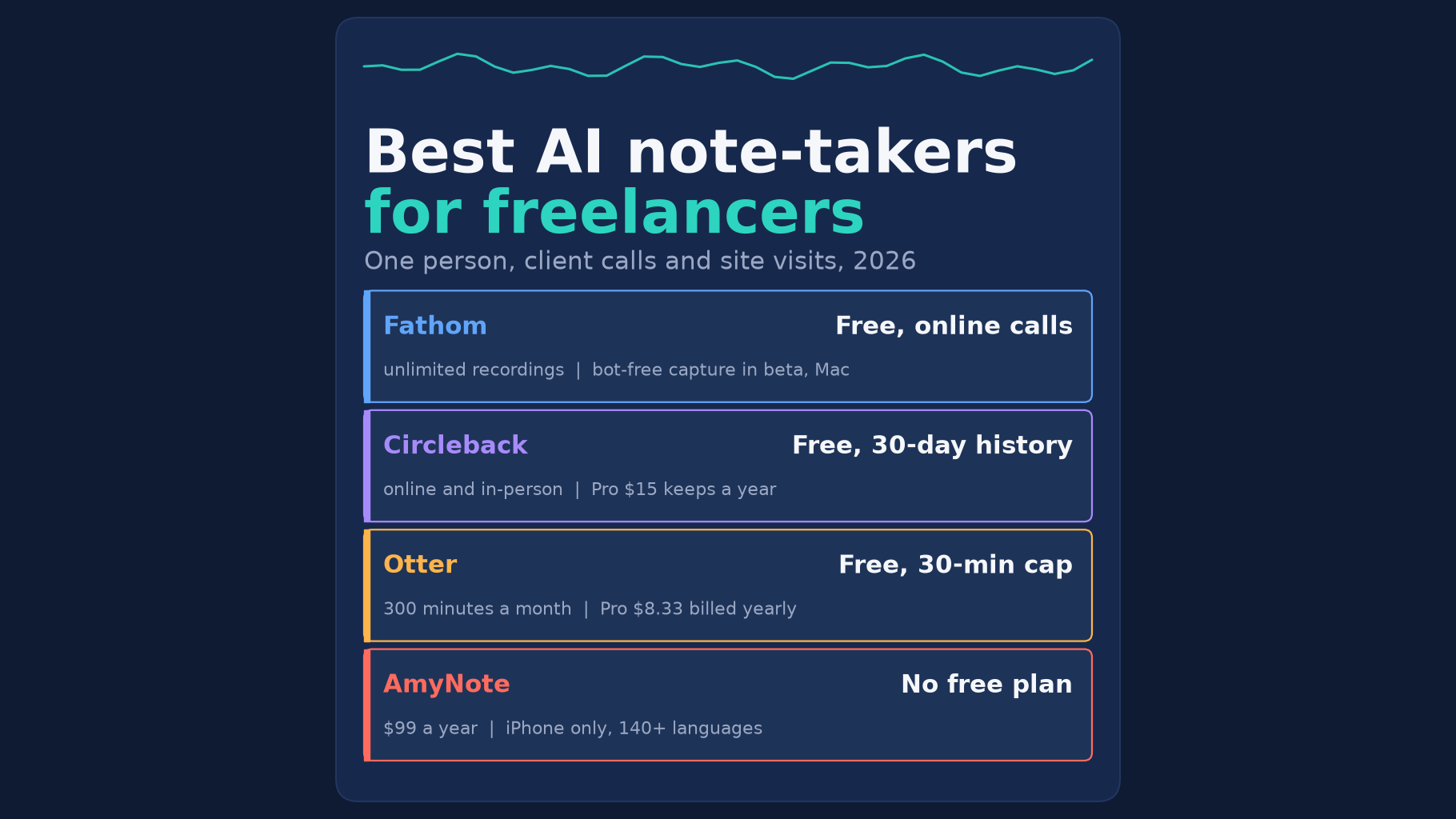
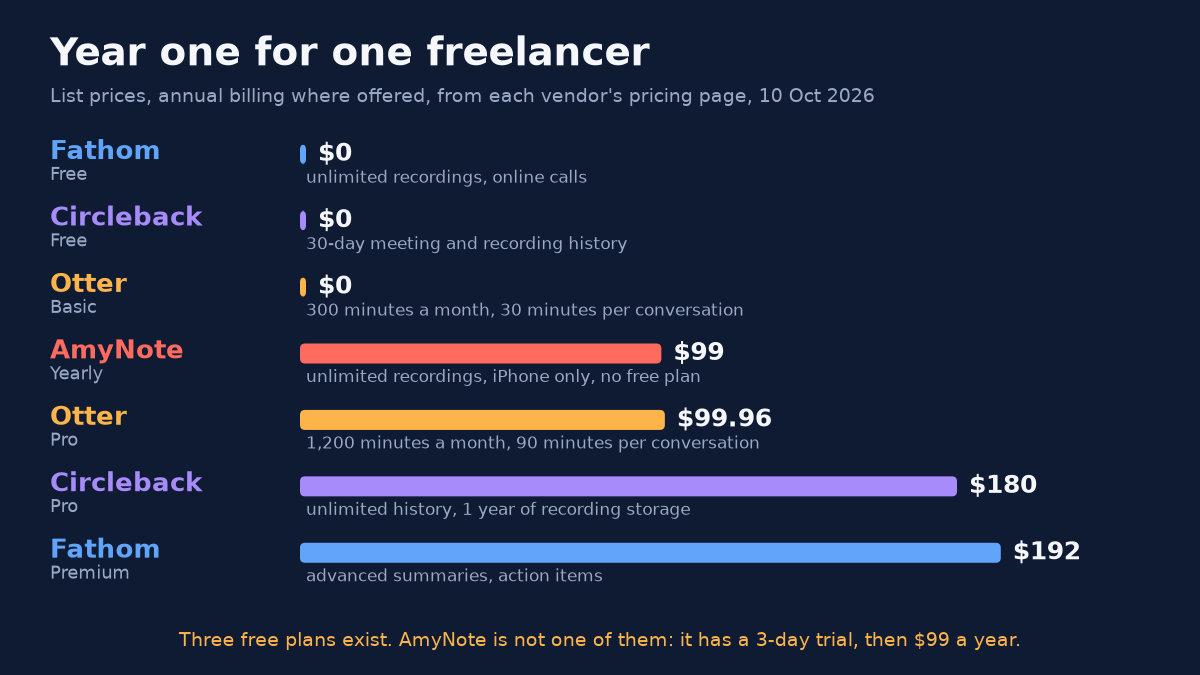
- Best free pick for online calls: Fathom. The free plan promises unlimited recordings and transcriptions, and nothing on the free card caps meeting length.
- Best free pick if you also meet in person: Circleback. The free plan covers online and in-person meetings, but history lasts 30 days.
- Cheapest paid upgrade: Otter Pro at $8.33 a month billed yearly. Just watch the 90-minute cap per conversation.
- Best for a phone-first, multilingual freelancer who wants the library on their own device: AmyNote. It has no free plan and runs only on iPhone and iPad.
What We Compared
We read each vendor’s own pricing page, privacy policy and product pages on October 10, 2026. We scored four things a solo worker actually feels:
- Year-one cost for one person. No seat minimums, no team discounts.
- Where meetings happen. The client’s video call, an in-person meeting, or a phone call.
- What happens to the client’s words. Training on meeting content, retention and where the archive lives.
- Honest gaps. What each tool cannot do for a one-person business.
Every price below is a list price as printed by the vendor on that date. Where a vendor offers both, we used annual billing, because a freelancer who settles on a tool usually keeps it for the year. Prices and plan limits change often, so treat the figures as a snapshot and check the vendor’s page before you pay.
Fathom: The Strongest Free Plan for Online Calls
Strengths. Fathom’s Free plan is labelled “Free forever” and lists “Unlimited recordings + transcriptions”, instant AI call summaries, and clips and search across calls. For a freelancer whose clients all live on Zoom, Meet or Teams, that is hard to beat at $0. You can choose bot capture or bot-free capture, so the client does not have to see a note-taker join.
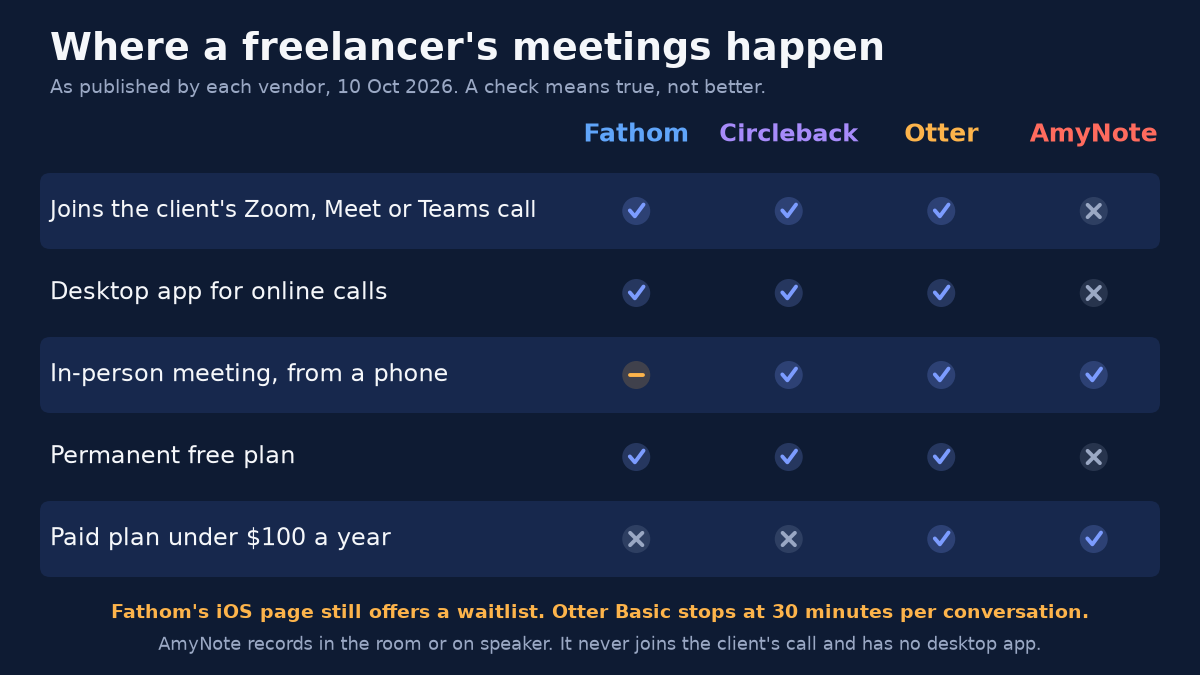
Weaknesses. The bot-free option is marked as a beta feature for Mac. Fathom’s iPhone page talks about capturing in-person meetings, yet the same page still asks visitors to join a waitlist for the official iOS app, so check the App Store before you count on it for site visits.
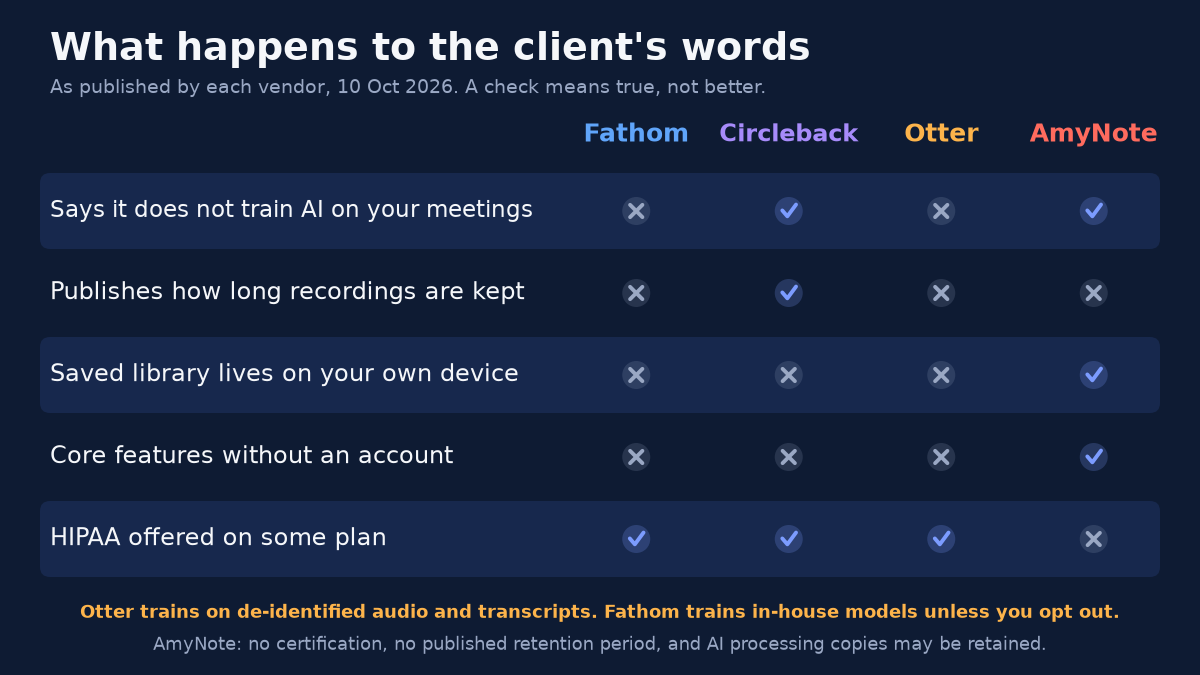
On privacy, Fathom’s policy says it may use de-identified data from meeting content to train its in-house AI models. To its credit, you can opt out in your account settings, and it does not let third parties such as OpenAI or Anthropic train on that content. Retention is “as long as necessary”, with no fixed number. Premium costs $16 a month billed yearly or $20 monthly, which makes it the most expensive year one in this list at $192.
Who it fits. A developer, copywriter or consultant whose client work happens almost entirely on video calls from a laptop. Turn the training setting off on day one and the free plan may be all you ever need.
Circleback: Free In-Person Capture With a 30-Day Memory
Strengths. Circleback’s Free plan covers “Online and in-person meetings”, offers “A bot or the bot-free desktop app for online meetings”, and adds mobile and Apple Watch apps for in-person meetings. Its FAQ answers the training question in one line: “No. We don’t train AI models on customer data.” It also lists support for over 100 languages.
Weaknesses. The free plan keeps a 30-day meeting and recording history. Pro removes that limit with unlimited meeting history and one year of recording storage, at $15 per user per month billed yearly, or $180 for the first year. HIPAA compliance sits on the $35 Enterprise plan, which most freelancers will never buy.
The 30-day window is the detail to plan around. Client questions do not always surface inside a month; a scope question on a three-month project can come up near the end. If you stay on the free plan, export or copy the notes that matter before they age out.
Who it fits. A freelancer who splits time between video calls and face-to-face meetings, wants one tool for both, and is comfortable either exporting notes regularly or paying for Pro.
Otter: The Cheapest Paid Upgrade, With Caps
Strengths. Otter Basic is free and includes live transcription, speaker identification, audio playback, and iOS and Android apps. Pro costs $8.33 a month billed yearly, which is $99.96 for the year, or $16.99 month to month.
Weaknesses. The caps are where freelancers get caught:
- Basic: 300 transcription minutes a month and 30 minutes per conversation.
- Pro: 1,200 minutes a month and 90 minutes per conversation.
- Training: Otter’s privacy policy, effective June 16, 2026, lists “training our proprietary AI technology on de-identified audio recordings and on transcriptions”. We found no training opt-out on the pricing or privacy pages we read.
A 30-minute cap can end a discovery call before the budget conversation starts. A 90-minute cap is roomier, but a half-day workshop or a long kickoff will still run past it.
Who it fits. A freelancer on Android, or one who wants the lowest-priced paid plan and whose meetings reliably stay under 90 minutes.
AmyNote: A Phone-First Archive, Not a Free Tool
Weaknesses first. AmyNote has no free plan, only a 3-day trial, and then costs $12.99 a week, $19.99 a month or $99 a year. It runs on iPhone and iPad only, with no Android, Windows or Mac app. It does not join Zoom or Teams calls, records no video, has no CRM integrations, and publishes no SOC 2, ISO 27001 or HIPAA certification. It also publishes no retention period.
Strengths. For a freelancer whose meetings happen at a client’s office, on a job site or on speakerphone, AmyNote records the room from the phone, with no bot and no account required for core features. It transcribes 140+ languages and translates into 100+, which matters for anyone with overseas clients. Recordings are unlimited, and exports to PDF, TXT and Word work offline.
On privacy, AmyNote states plainly that it does not use customer data to train AI models and does not sell meeting content. Transcription runs through OpenAI and Microsoft Azure speech services, and AI analysis is powered by Anthropic’s Claude. Audio and text are encrypted in transit with TLS. The saved library lives on your iPhone or iPad. The limit is stated too: when transcription, translation or an AI summary runs, a processing copy may be retained on AmyNote’s cloud infrastructure.
Who it fits. A photographer, architect, interpreter, contractor or event planner whose client conversations happen in person or on the phone, often in more than one language, and who would rather keep the archive on a device they control.
Side-by-Side Comparison
| Fathom | Circleback | Otter | AmyNote | |
|---|---|---|---|---|
| Free plan | Yes | Yes, 30-day history | Yes, 30-minute cap | No, 3-day trial |
| Year one, paid, one person | $192 | $180 | $99.96 | $99 |
| Joins client video calls | Yes | Yes | Yes | No |
| In-person from a phone | Waitlist page | Yes | Yes | Yes |
| Trains on meeting content | Yes, opt-out available | Says no | Yes | Says no |
| Library on your own device | No | No | No | Yes |
| HIPAA available | Enterprise | Enterprise | Enterprise | None |
How to Choose in Five Minutes
- List where last month’s client meetings happened. Count video calls, in-person meetings and phone calls. If nearly all are video calls, start with Fathom or Circleback; if most are in rooms or on the phone, look at Circleback, Otter or AmyNote.
- Check your longest meeting. If it runs past 30 minutes, Otter Basic will cut it off; past 90, so will Otter Pro.
- Check how far back you need to look. If a client question can come up two months later, Circleback Free’s 30-day history is too short on its own.
- Read your client contracts. If a contract limits where client information can go, the training and retention rows above matter more than the price.
- Tell clients you are recording. Whatever tool you choose, say so at the start of the meeting. It is courteous, and recording-consent rules vary by place.
The Bottom Line
If every client meeting is a video call, start with Fathom Free and turn off the training setting. If you also meet clients face to face and can live with a 30-day window, Circleback Free is the most complete $0 option, and its Pro plan is the cleanest paid step up.
If you want the cheapest paid plan, Otter Pro and AmyNote cost about the same, so pick on shape. Otter caps minutes and trains on de-identified data. AmyNote has no caps and does not train, but lives only on iOS and never joins a call.
AmyNote suits the freelancer whose work happens in rooms, cars and more than one language, and who would rather keep the archive on their own phone. It is the wrong pick if you need Android, a desktop app, a bot in the client’s Zoom or a compliance certificate. If that trade fits, AmyNote is on the App Store with a three-day trial.
Originally published as an X Article by @AmyNoteApp.