Most meeting-tool comparisons argue about transcript accuracy. That is the wrong question to open with, because these three products do not agree on what they are measuring.
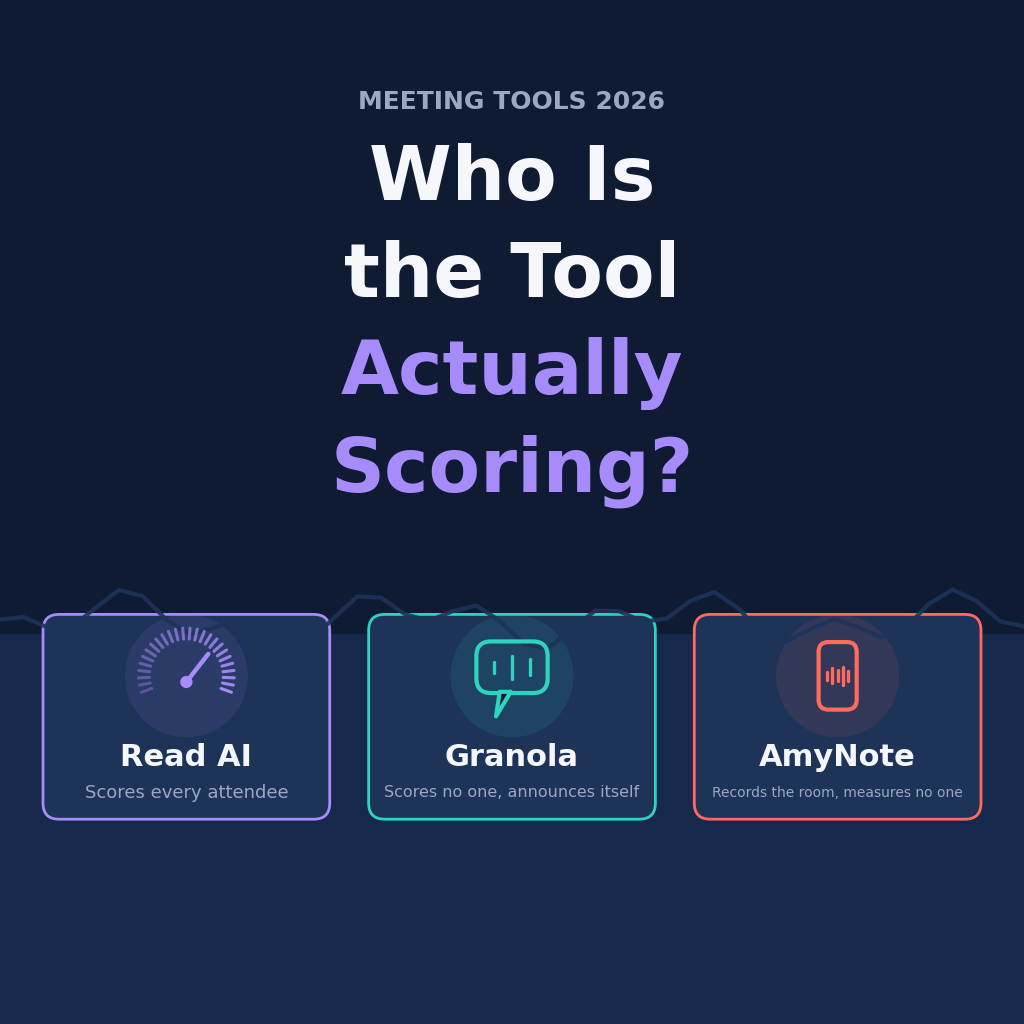
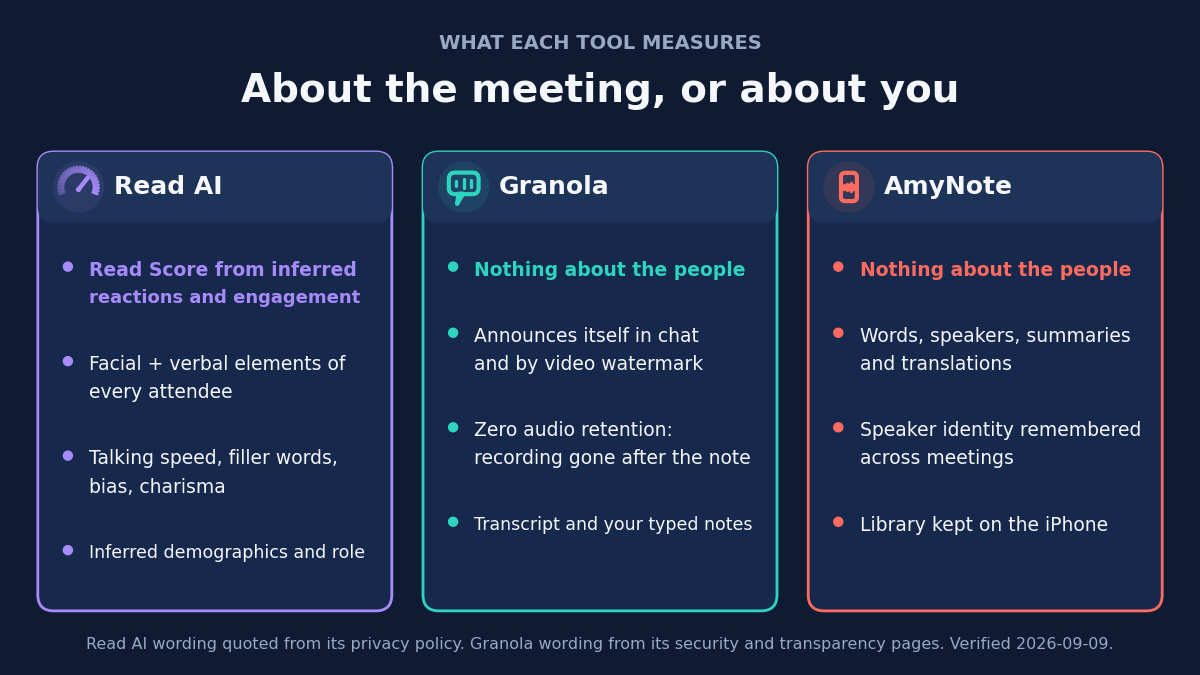
Two of them measure the meeting. One measures the people sitting in it, and says so in writing.
That difference is not a matter of emphasis or marketing tone. It is a difference in what gets derived about human beings who never installed the software and never agreed to anything — the other people on your call. Once you see the comparison that way, the usual feature grid stops being the interesting part.
Quick Verdict
Read AI is the only one of the three that grades attendees. Its privacy policy describes a Read Score built by “analyzing facial and verbal elements of all meeting attendees” to judge “how people are reacting” and “their level of involvement and interest.” If that sentence makes you uneasy on behalf of the other people on the call, pick something else.
Granola takes the opposite view. It measures nobody, keeps no audio at all, and spends its engineering effort on telling the room it is running.
AmyNote records the room and analyses the words. It scores no participants, trains on nothing, and keeps the library on your iPhone.
What We Compared
Pricing, capture method, what each vendor derives about people, model-training defaults, and published compliance, all read on the vendors’ own pages on 2026-09-09.
Where a vendor states something plainly, it is quoted rather than paraphrased. That matters more than usual in this comparison, because the claims that decide it are claims about inference and retention — exactly the claims that get softened when they pass through a review roundup. The sentences below are the vendors’ own.
Read AI: Strengths and Weaknesses
Strengths. Read AI is the broadest product here: Windows, macOS, iOS, Android and a Chrome extension, with the mobile apps explicitly built to capture in-person meetings and live events. It publishes SOC 2 Type 2, GDPR and HIPAA compliance, and offers a Business Associate Agreement on request.
Its analytics are genuinely unmatched. Meeting Coach reports talking speed, filler words, bias and charisma, and no rival here offers anything like it. Read AI also handles consent better than its reputation suggests: any participant can eject it mid-call by typing opt out into the meeting chat.
It is worth giving that credit properly. An in-meeting opt-out that any attendee can trigger, without an account and without asking the host, is a stronger consent mechanism than most of this category offers. The criticism that follows is about what the product measures by default, not about whether the vendor has thought about consent.
Weaknesses. The measurement is the product, and it reaches everyone. Beyond the Read Score, the policy states Read AI infers demographic characteristics from audio and visual information, and infers each person’s role, “such as the client or team manager.”
Read this line twice: “For users in the EU and UK, the Read Score does not include any use of meeting video or facial elements to calculate a score.” The feature ships in a reduced form where the law is strictest.
That carve-out is the most informative sentence on the page, because it is the vendor’s own assessment of which part of the feature is legally sensitive. Nobody builds a regional exception for a capability they consider uncontroversial. If you are outside the EU and UK, you are getting the version the vendor did not feel able to ship there — and so are the people in your meetings, who were never asked.
Read AI is also the most permissive vendor here on training, reserving the right to use information “to train and improve our models within our Services” on a legitimate-interest basis rather than consent.
The plans ration oddly. Free gives 5 transcripts a month and a 1-hour ceiling. Pro is $15 per user per month annually, or $19.75 monthly. Enterprise is $22.50 annual and $29.75 monthly. Enterprise+ is $29.75 annual and needs 5 or more licences. And the cap that never lifts: every card, including Enterprise+, reads “30 meetings measured per month.” Transcripts go unlimited on Pro. The analytics do not.
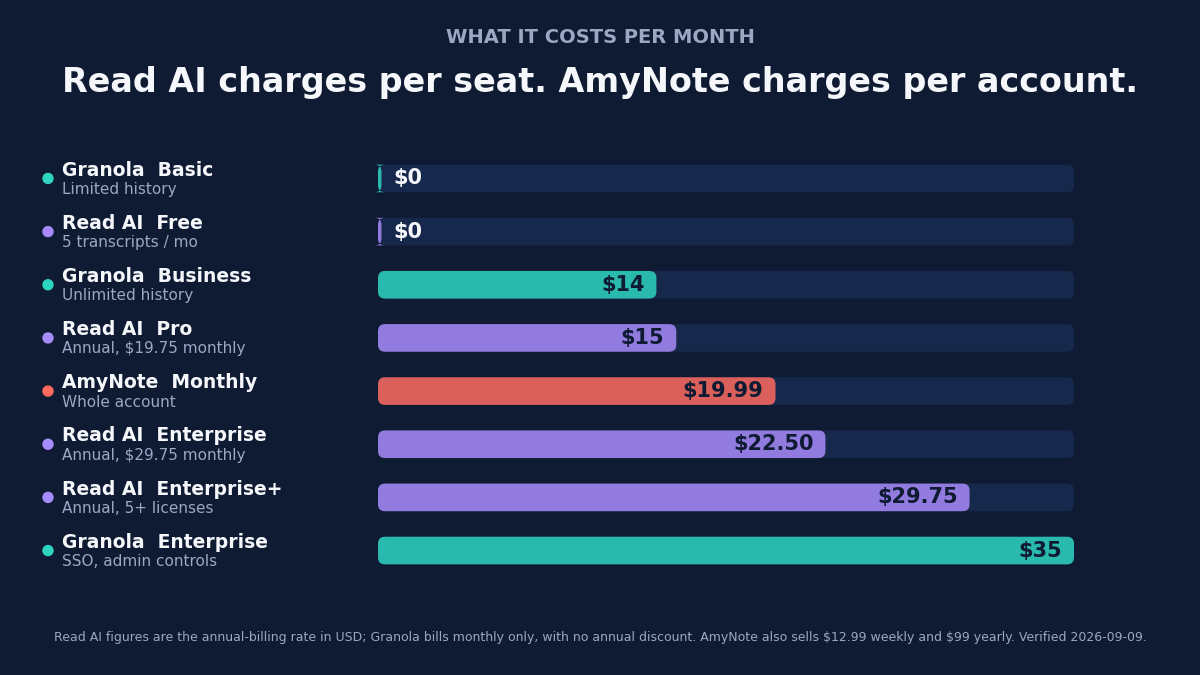
That 30-meetings ceiling is the detail most likely to be missed at purchase, because it contradicts the shape of every other line on the price ladder. Everything else about Read AI scales with the tier. The analytics — the reason to buy this product over the other two — do not. A team paying the top price is buying seats, storage and administration, not more measurement.
Granola: Strengths and Weaknesses
Strengths. Granola is bot-free, capturing device audio on macOS and Windows, with iOS, Android and Apple Watch apps.
Its data posture is the cleanest here. Zero audio retention: “Your meeting audio is never stored, on our servers or anyone else’s. Once the note is generated, the source recording is gone.” Granola publishes SOC 2 Type 2 and a DPA on request.
It is also the only vendor here that treats disclosure as a feature rather than your problem, announcing itself in the meeting chat and displaying a watermark on your video that stays visible for late joiners. Individuals get both on every plan.
Those two commitments work together in a way that is easy to undersell. Announcement handles the consent problem at the moment it arises, in the room, rather than deferring it to a policy nobody reads. Zero retention handles what happens afterwards. Between them, most of the questions a cautious participant would want to ask are answered before they have to ask.
Weaknesses. Granola trains on your data by default. Third parties like OpenAI and Anthropic are never permitted to train on it, but “Granola trains on your anonymized data,” any user can switch that off with one click, and Enterprise has it off from the start.
There is no HIPAA compliance and, verbatim, “no timeline” for it. That rules Granola out of clinical and regulated work outright. Billing is monthly only: Business $14 per user, Enterprise $35, with SSO gated to the top tier.
Most importantly, the product assumes you are typing, so a passive user gets noticeably less out of it. That is a real constraint rather than a quibble: Granola sharpens notes you are already taking. In a meeting where you need to be fully present — a difficult negotiation, an in-person conversation, anything where a laptop would be rude — the thing the product is best at is the thing you cannot do.
AmyNote: Strengths and Weaknesses
Strengths. AmyNote is bot-free and hardware-free, so in-person, hybrid and online meetings all work the same way. Transcription covers 140-plus languages with translation into 100-plus, tuned for East Asian and Arabic.
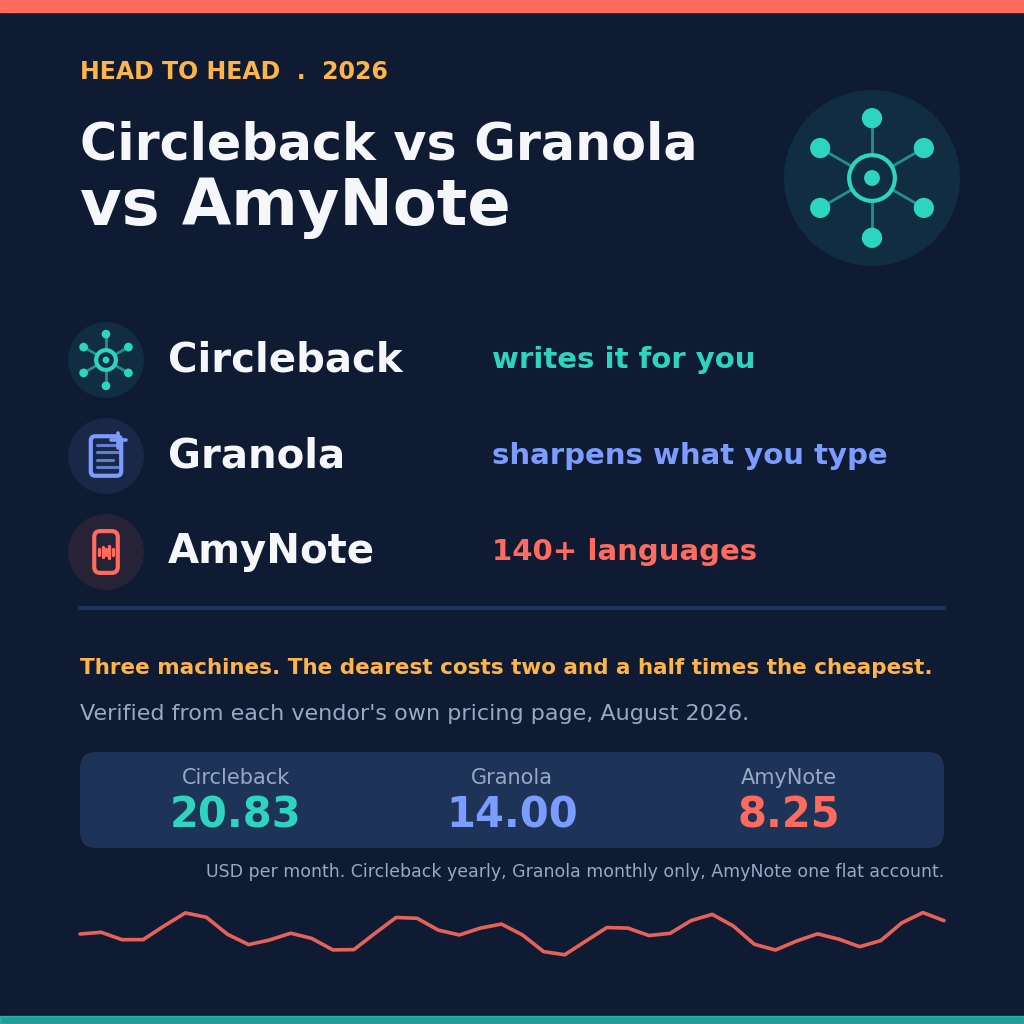
Transcription runs on OpenAI and analysis on Anthropic’s Claude, and AmyNote states plainly: “We don’t use your data to train AI models.” Pricing is a flat account price, not a per-seat one: $19.99 a month, $12.99 weekly, or $99 a year, after a 3-day trial with no credit card. And it derives nothing about the people in the room.
Weaknesses. AmyNote is iOS only in 2026, with no Android, Windows or web client. It publishes no certifications at all: SOC 2, ISO, HIPAA and GDPR each appear zero times on its security page, while both rivals publish SOC 2 Type 2.
Its own security page is careful where marketing usually is not, and the caveats belong in a fair review: “Local-first does not mean local-only.” Connected features upload audio or text, and “processing copies and results may be retained on our cloud infrastructure.” There are also no CRM integrations, no video recording and no team controls.
Set that against Granola’s zero-retention promise and the difference is exact rather than rhetorical. Granola commits that the audio is gone once the note exists. AmyNote commits that the transcript library lives on your device and that nothing trains on it — which is a different guarantee, not a stronger version of the same one. If the requirement is that no processing copy exists anywhere, that requirement points at Granola.
Side by Side
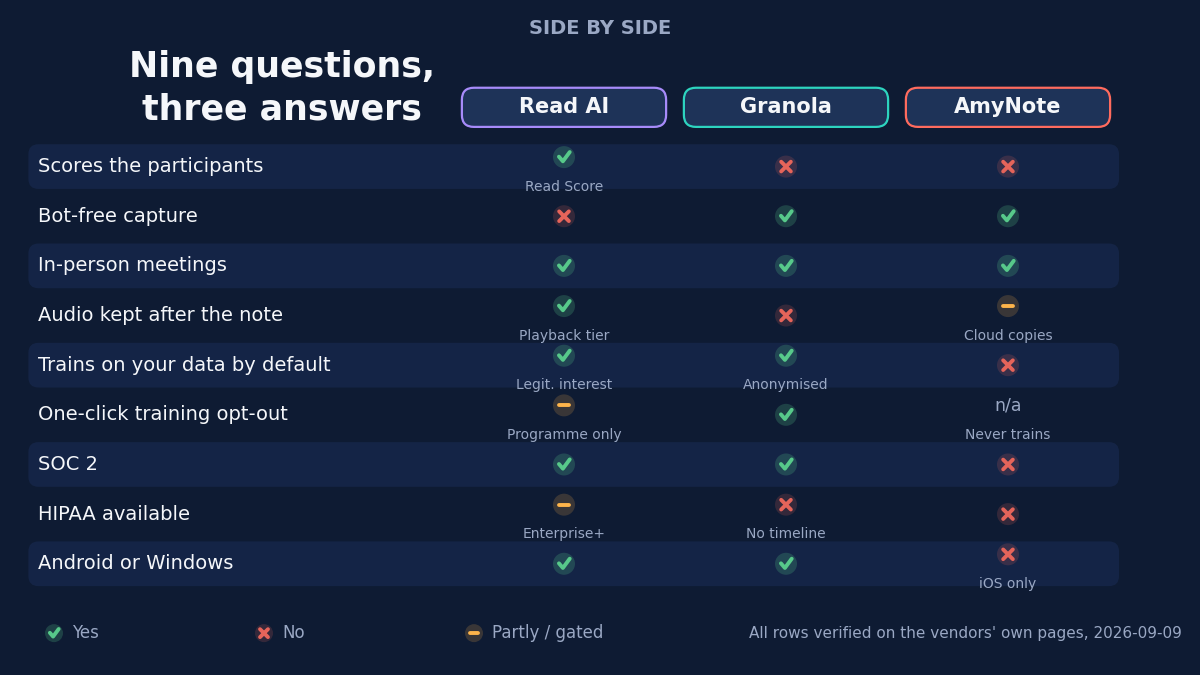
- Scores the participants: Read AI yes, via the Read Score. Granola no. AmyNote no.
- Trains on your data by default: Read AI yes, on legitimate interest. Granola yes, anonymised, one-click off. AmyNote no.
- HIPAA: Read AI on Enterprise+ with a BAA. Granola no, and no timeline. AmyNote no.
- Entry price per month: Granola $0, Read AI $0 for 5 transcripts, AmyNote $19.99 flat for the whole account.
- Announces itself to the room: Granola, in chat and by video watermark, on every plan.
- Analytics ceiling: Read AI measures 30 meetings a month on every tier, including Enterprise+.
Which One Fits You
You want coaching telemetry on how people behave in meetings. Read AI, and nothing else here comes close. Buy it deliberately, tell your participants, and understand that the measurement covers everyone in the room rather than just the person who bought the licence.
Your priority is that participants know what is running and that the audio does not survive the meeting. Granola. It is the only product here that solves disclosure inside the room, and the only one that commits to destroying the recording.
You need HIPAA. Read AI on Enterprise+ with a BAA is the only option on this page. Granola says no with no timeline, and AmyNote publishes no certifications at all.
Your meetings are in a room, in more than one language, and you want nothing derived about the humans present. AmyNote — accepting that it is iOS only and the least credentialed product here.
The Bottom Line
Decide what you want measured before you compare feature lists. If you want coaching telemetry on how people behave in meetings, Read AI is the only serious option, and it is a capable, well-certified product. Buy it with your eyes open: the scoring covers everyone in the room, and the EU and UK carve-out tells you which part the vendor itself treats as sensitive. Tell your participants.
If you want the opposite, Granola is the strongest privacy shape here, provided you are not in healthcare and you actually type during calls.
If your meetings happen in a room rather than on a call, run in more than one language, and you want a tool that derives nothing about the humans present, that is what AmyNote is built for. It is the narrowest of the three and the least credentialed, and that trade is the honest pitch. Try it free for three days at amynote.app and judge the transcript, not the score.
Originally published as an X Article by @AmyNoteApp.