Most AI note-takers were built for a 30-minute sales call. A semester is a different job. Lectures run 75 minutes or longer, seminars run past two hours, and the recording you need most is from week three, when finals arrive in week fourteen.
So the questions that matter for a student are not the ones on most comparison lists. Does a full lecture fit in one recording? Does a full course load fit in the monthly allowance? Will the notes still be there at exam time? And what does it cost once the student discount is applied? This guide answers those four questions for Otter, Notta, Circleback and AmyNote. Every figure below was read off the vendors’ own pages on 2 October 2026. Plans and prices change, so check them again before you pay.
Quick Verdict
- Circleback if you want the strongest free plan and can export or upgrade before the 30-day history runs out.
- Otter if you want a printed student price, apps on every device, and your lectures fit inside 90 minutes.
- Notta if you need long recordings at the lowest discounted price and do not mind monthly minute limits.
- AmyNote if you study on an iPhone, sit in long or multilingual lectures, and want no minute caps and a library kept on your own device, at a full $99 a year.
What We Compared
We scored each app on the four things that break a student workflow, all of which you can check on a pricing or help page:
- Per-lecture cap. The longest single recording a plan will transcribe.
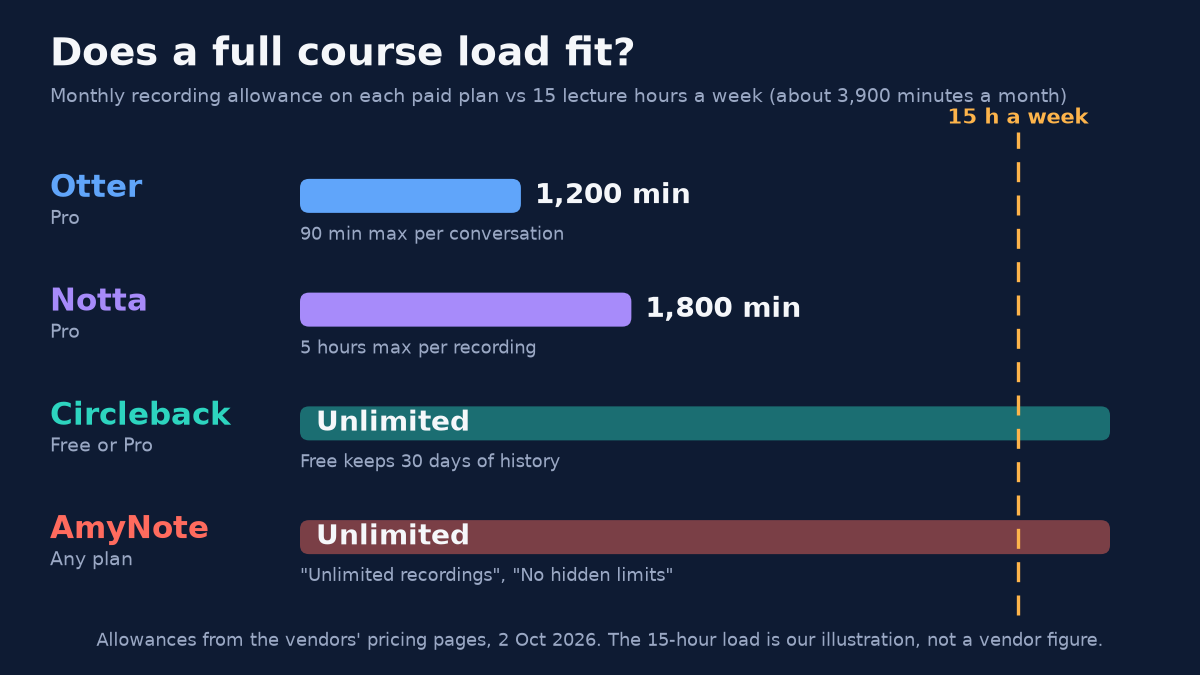
- Monthly allowance. Whether a full course load fits. Fifteen lecture hours a week is about 3,900 minutes a month. That is our illustration, not a vendor figure.
- History. How long recordings and notes stay available.
- Student price. Year one on annual billing, with the published education discount applied where one exists.
Otter: The Printed Student Price
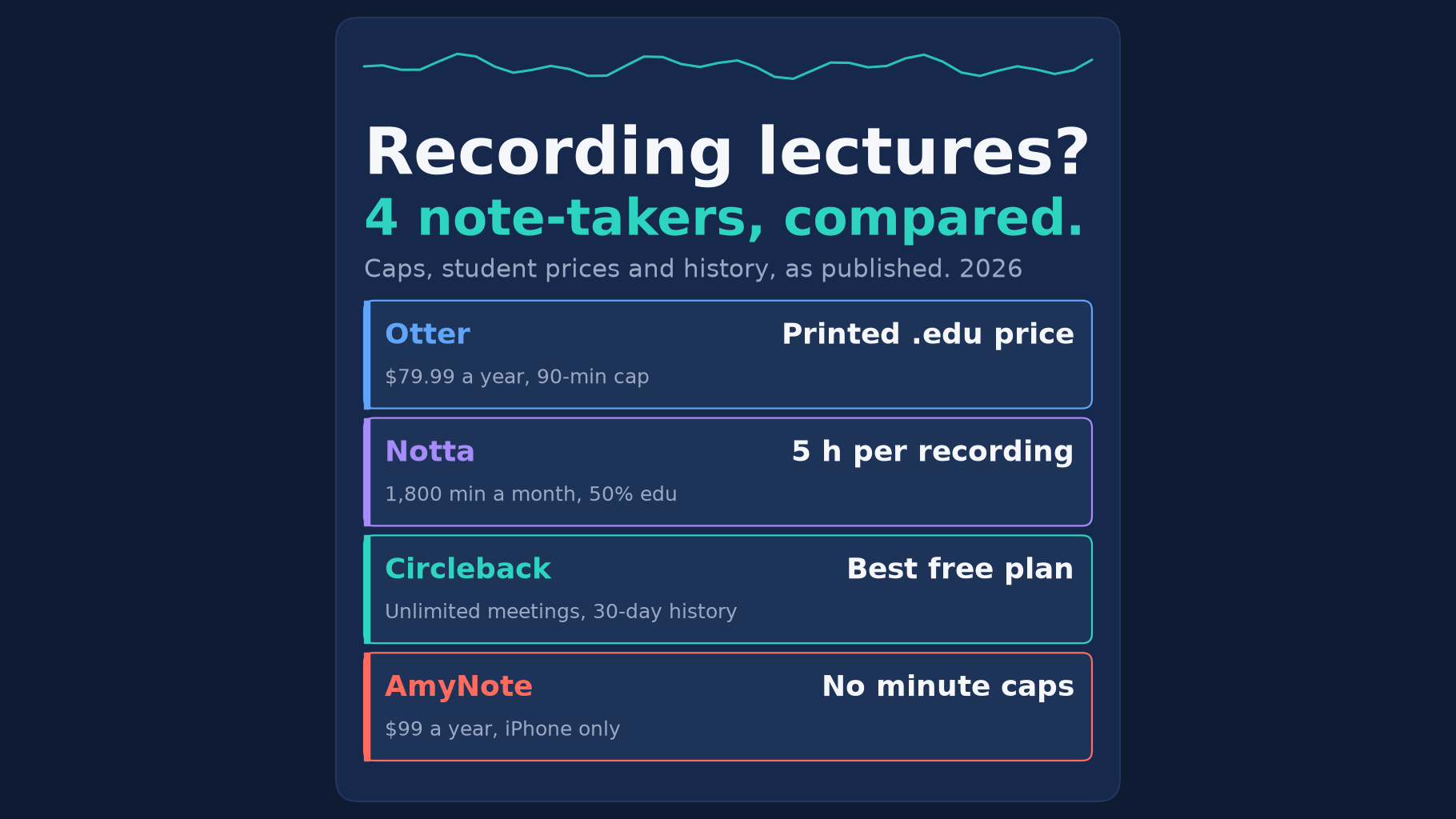
Strengths. Otter is the only vendor here that prints its student price outright: 20% off Pro for students and teachers with a .edu email, which comes to $79.99 billed annually, or $13.59 a month. The regular Pro price is $8.33 a month billed annually. It runs on iOS, Android, Mac and Windows, and Pro includes unlimited storage, so a recording from first semester is still there when you need it for a later course.
Weaknesses. The caps bite for lectures. The free Basic plan stops each conversation at 30 minutes, gives 300 minutes a month, and keeps only the 25 most recent conversations. Pro raises that to 90 minutes per conversation and 1,200 minutes a month, which is about 13 ninety-minute lectures. A three-hour lab or seminar does not fit in one recording. Otter transcribes six languages. Its privacy policy lists training its AI on de-identified audio recordings and transcriptions.
Best for: students with a .edu address, standard-length lectures in English or one of Otter’s other five languages, and a mix of phone and laptop.
Notta: Long Recordings, Metered Minutes
Strengths. Notta Pro allows 5 hours per recording, so a long seminar fits in one file. Pro lists at $97.99 a year with 1,800 transcription minutes a month, and Notta advertises a 50% education discount for students and educators who sign up with a school email. That would put Pro at roughly $49 a year, though Notta does not print the discounted total. It records on iOS and Android, and Pro includes transcript translation.
Weaknesses. The free plan caps each conversation at 3 minutes and 120 minutes a month, which is a demo rather than a lecture tool. Even Pro’s 1,800 minutes falls short of a 15-hour week. Fuller translation is sold as an add-on at $72 a year for monolingual translation. And if you stop paying, Notta’s FAQ says you can only view the first 3 minutes of each transcript as a free user, so export before you downgrade.
Best for: students on a tight budget who record a handful of long seminars rather than every class, and who will remember to export before the subscription ends.
Circleback: The Best Free Plan, With a 30-Day Clock
Strengths. Circleback’s free plan offers unlimited meetings, AI notes, speaker-labeled transcripts, and mobile and Apple Watch apps for in-person meetings, so you can record a lecture from your phone. It supports over 100 languages and says plainly that it does not train AI models on customer data. It also offers a 50% education discount for students, applied automatically with a school email, which would take Pro from $180 a year to roughly $90.
Weaknesses. Free keeps only a 30-day meeting and recording history. Week-one lectures are gone before finals unless you export or upgrade. Pro adds unlimited meeting history but only 1 year of recording storage, so the audio from first year will not survive to graduation without exporting it. Free prints no per-meeting length limit, so test a full lecture first.
Best for: students who want to pay nothing, record from a phone, and are disciplined enough to export notes every few weeks.
AmyNote: No Minute Caps, iPhone Only
Strengths. Every AmyNote plan lists unlimited recordings and no hidden limits, so a full course load and a three-hour seminar both fit. It transcribes 140+ languages and translates into 100+, with tuning for East Asian and Arabic speech, useful for international students. Translation is included in the price rather than sold as an add-on. The saved library of recordings, transcripts and notes lives on your iPhone or iPad, and playback works with no network, so last term’s lectures do not disappear when a history window closes. Its security page says “We don’t use your data to train AI models” and “We don’t require an account to use core features.”
Weaknesses, stated plainly. AmyNote is iOS only: no Android app and no desktop app, so you cannot record from a laptop. There is no free plan, only a 3-day trial, and no student discount is listed. At $99 a year, $19.99 a month or $12.99 a week, it is the most expensive option here once student discounts apply. Local-first is not local-only: when you transcribe, translate or summarise, the audio or text goes to its cloud partners (Microsoft Azure, OpenAI and Anthropic’s Claude), and processing copies may be retained. Transport is TLS, which AmyNote itself says is not end-to-end encryption. It publishes no retention period.
Best for: an iPhone user with a heavy timetable, long labs or lectures in more than one language, who wants every recording kept on their own device.
What Year One Costs a Student
For one student on the entry paid plan, billed annually, with the published education discount applied where one exists:
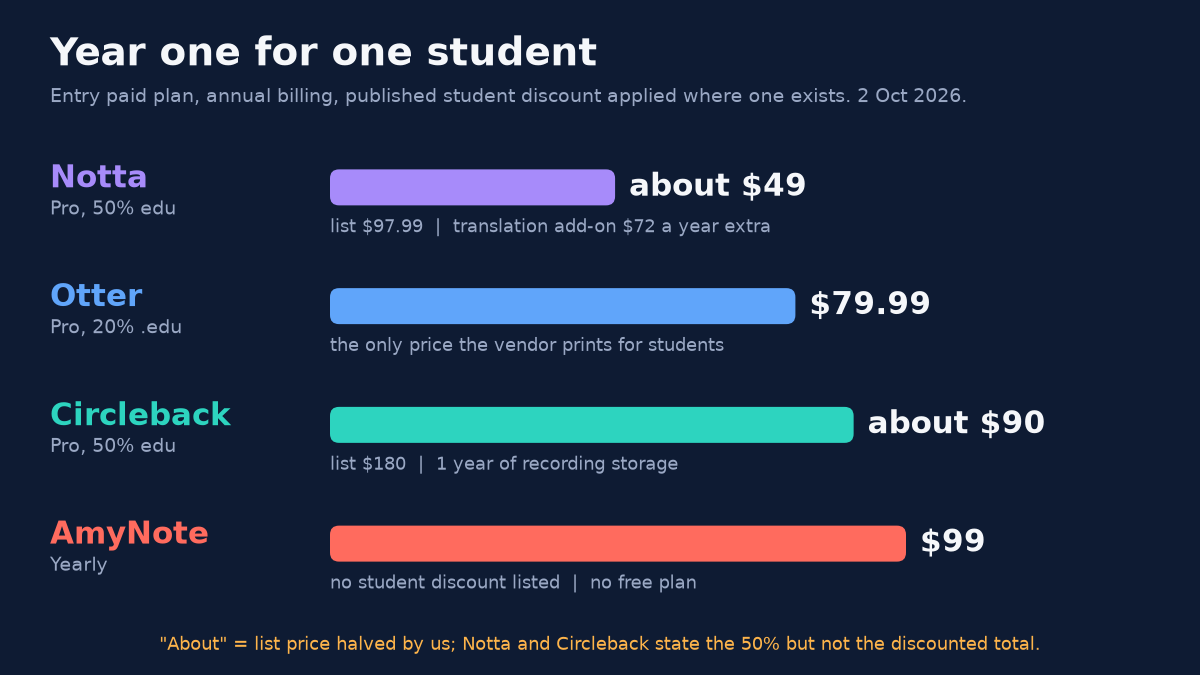
Two caveats. Notta’s $49 does not include the $72-a-year translation add-on, so a student who needs fuller translation pays more than the headline. And Circleback’s discounted Pro buys unlimited meeting history but still only one year of recording storage, so the price covers notes for your whole degree but not the audio.
Side by Side
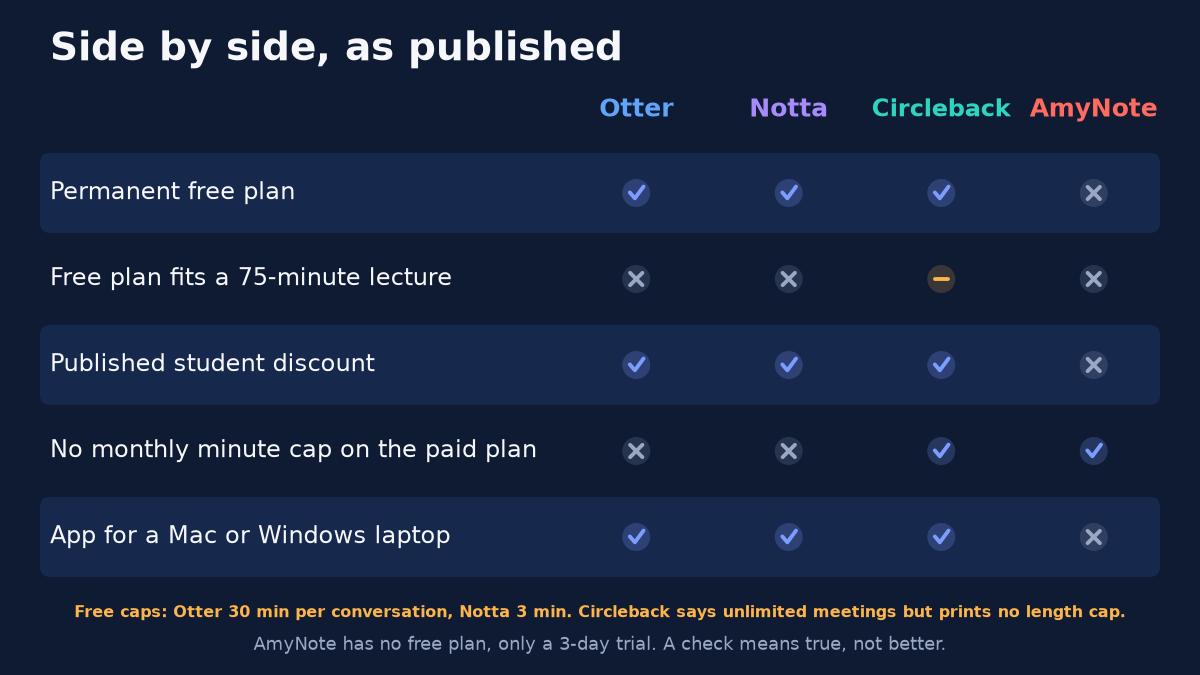
| Otter | Notta | Circleback | AmyNote | |
|---|---|---|---|---|
| Year one with student discount | $79.99 | About $49 | About $90 | $99, no discount |
| Free plan | 30 min per conversation, 300 min a month | 3 min per conversation, 120 min a month | Unlimited meetings, 30-day history | No, 3-day trial |
| Longest recording, entry paid plan | 90 minutes | 5 hours | No cap printed | No cap printed |
| Monthly allowance, entry paid plan | 1,200 minutes | 1,800 minutes | Unlimited | Unlimited |
| History | Unlimited storage on Pro | First 3 min viewable after you stop paying | Unlimited history, 1 year of recordings on Pro | Kept on your device |
| Laptop app | Yes | Yes | Yes | No, iPhone and iPad only |
How to Choose
Start from your timetable, not from the feature list:
- “I record a few lectures a week.” Circleback Free costs nothing and has no monthly minute cap. Set a reminder to export before each 30-day window closes.
- “My lectures are under 90 minutes and I switch between phone and laptop.” Otter Pro with a .edu email is the one printed student price, and it runs everywhere.
- “I have long seminars but not many of them.” Notta Pro fits five hours in one file and is the cheapest paid option with the education discount, as long as you stay inside 1,800 minutes.
- “I record every class, some of them long, some not in English.” AmyNote is the only option here with no minute cap on any plan and translation included, but only on an iPhone or iPad, and at full price.
Before Your First Lecture
- Check your school’s rules first. Many courses require the instructor’s permission to record. Ask before the first class, and tell classmates in seminars that you are recording.
- Test your longest class during the trial. A cap you never hit in a 20-minute test will cut off the last half hour of a lab. Record the longest session on your timetable before you commit.
- Plan your exports. If your plan has a history window or limits what you can see after you stop paying, export notes on a schedule rather than at the end of term.
The Bottom Line
It depends on how much you record. If it is a few lectures a week and you will export before 30 days pass, Circleback Free costs nothing. If your lectures are under 90 minutes and you want one app on your laptop and phone, Otter Pro with a .edu email is the safe, printed price. If you want the cheapest paid plan and can live inside 1,800 minutes, Notta Pro with the education discount wins on price.
If you take a full course load, sit in long or non-English lectures, and already carry an iPhone, AmyNote gives you uncapped recording, translation included and a library that stays on your own device. It costs more than the discounted rivals and will not run on your laptop. Search for AmyNote on the App Store and use the 3-day trial on your longest lecture of the week before you decide.
Originally published as an X Article by @AmyNoteApp.