The meeting that actually needed notes did not happen at your desk. It happened in a client's conference room, in a hallway after the real one ended, at a lunch where someone finally said the number out loud. You reached for your phone, because your phone was the only thing you had. For years the best AI note-takers treated that phone as an afterthought — a companion viewer for work that really happened on a laptop.
In 2026 that changed. Granola shipped an Android app in July, joining the mobile-first tools already there, and now runs across Mac, Windows, iPhone, and Android. But a phone app and a phone-first tool are not the same thing. Below are four options, checked against current vendor pages, with an honest look at what each can and cannot do once the laptop is closed.
Quick Verdict
- Otter if your meetings are still mostly scheduled Zoom, Meet, or Teams calls and you want a mature mobile app backed by a cloud bot that captures them.
- Granola if you love a quiet, local desktop notepad and want the same maker's new phone app for the occasional in-person meeting.
- Jamie if you work on a Mac or Windows laptop, need bot-free capture, and want everything hosted in the EU under strict compliance.
- AmyNote if the meetings you keep losing are the ones away from any computer: rooms, site visits, interviews, and multilingual conversations captured from the phone in your pocket.
What "Works on Your Phone" Actually Means
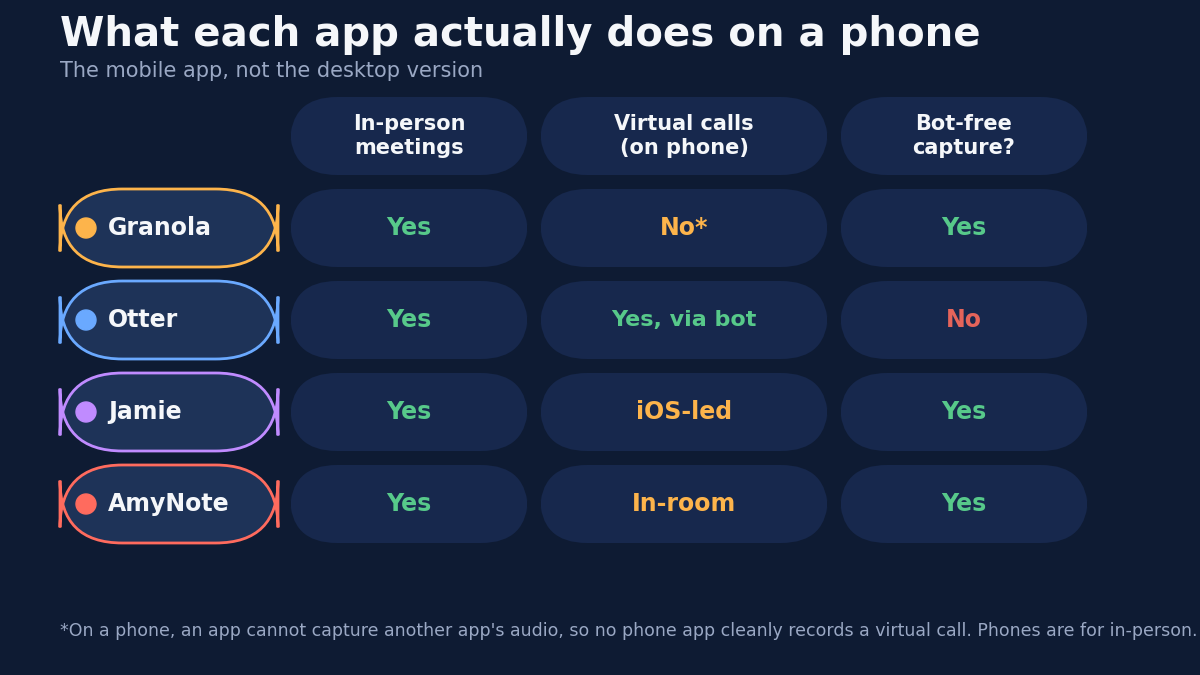
Before comparing apps, one technical fact reshapes the whole question. On a phone, an app cannot record the audio of another app. iOS and Android both sandbox audio for privacy, so a note-taker on your phone cannot quietly tap the sound of a Zoom or Meet call running next to it. This is not a bug any vendor can patch. It is the operating system doing its job.
That single rule splits the field. A tool that relies on capturing your call's audio locally works beautifully on a laptop and hits a wall on a phone. The only clean way to transcribe a virtual call from a phone is to route it through a cloud bot that joins the meeting on its own, the way Otter does. Everything else on a phone is really about one job: capturing the room you are physically in.
So the useful question is not "does it have a mobile app." It is "is this tool built for what a phone is genuinely good at." Every page below promises mobile; only some mean it.
Otter: The Mature Mobile App With a Cloud Bot
Otter has shipped polished iOS and Android apps for years, and it solves the phone problem by not depending on the phone. Its bot joins your scheduled video call in the cloud and streams the transcript back to any device, including your handset.
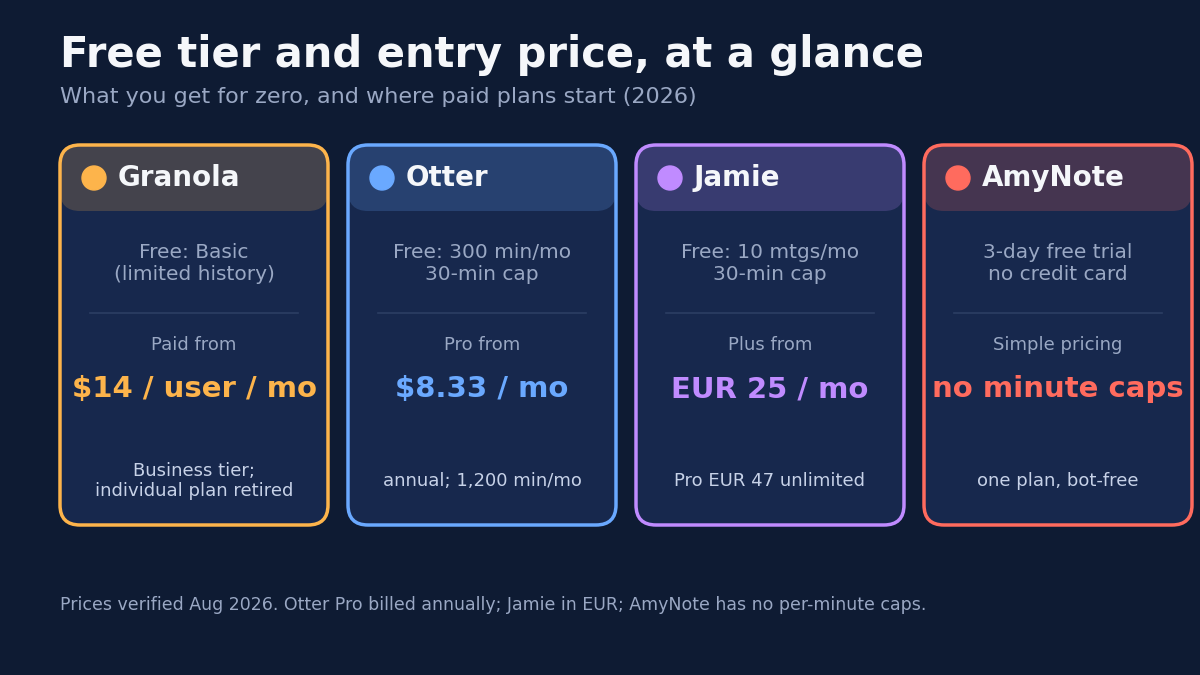
- Strengths. The most refined mobile experience of the four, real-time transcription you can read as the call happens, speaker labels, and AI chat across your history. The free Basic plan includes 300 minutes per month and the mobile apps; Pro at $8.33 per user per month billed annually raises that to 1,200.
- Weaknesses. The free plan caps conversations at 30 minutes each and gives you only three lifetime file imports. The bot is visible to every participant, which changes a sensitive room. Transcripts live in Otter's cloud, and its language support is far narrower than the multilingual tools here.
Granola: The Desktop Notepad That Just Reached Android
Granola built its reputation as a quiet Mac and Windows notepad that records system audio locally, blends your typed fragments with the transcript, and never puts a bot in the call. In July 2026 it added Android to its iPhone app, so it now runs across all four platforms.
- Strengths. Genuinely excellent AI notes, customizable templates, and AI chat across meetings. No bot, nothing visible to participants. On mobile it captures in-person conversations well, and on iPhone it can also record outbound calls placed through its own dialer.
- Weaknesses. The mobile app inherits the OS limit: it cannot transcribe a virtual meeting playing in another app on your phone, so its handset role is in-person only. The free Basic plan lets you open only recent meeting history, and the individual plan was retired in the February 2026 rebrand, pushing solo users toward Business at $14 per user per month. It remains, at heart, a desktop product with a phone companion.
Jamie: Bot-Free and EU-Hosted, but Laptop-First
Jamie is a bot-free assistant that captures online and in-person meetings, transcribes in 100+ languages, and hosts everything in the EU under GDPR with ISO 27001 certification. Its center of gravity is the desktop app on macOS and Windows.
- Strengths. No bot in the participant list, strong speaker identification, and the most serious European compliance posture of the four. The free plan trials it on 10 meetings a month across a wide language range.
- Weaknesses. Its mobile story is iOS-led and thinner than its desktop apps, so Android users lean on the laptop. And it is expensive: free meetings cap at 30 minutes, Plus at EUR 25 per month covers only 20 meetings, and unlimited use costs EUR 47 per month on Pro. If you reach for a phone because you left the laptop behind, Jamie is not aimed at that moment.
AmyNote: Built Phone-First, Bot-Free
AmyNote starts from the phone instead of adapting to it. Open the app, press record, and it captures the conversation in the room around you, with no bot, no browser extension, no hardware, and no desktop to depend on. It is designed for exactly the job a phone does well.
- Strengths. It covers the meetings the desktop tools structurally miss: client sessions, site visits, interviews, and calls on the move, including a virtual call put on speaker in the room. Transcription runs through OpenAI's Speech API and analysis through Anthropic's Claude Opus, with 120+ languages and real-time translation, plus speaker identification that remembers voices across sessions. A 3-day full trial needs no credit card.
- Weaknesses. There is no desktop app, so a back-to-back day of scheduled video calls is more comfortable in Otter. It does not run a cloud bot, so it will not silently join a Zoom call for you the way Otter can. No video recording, no CRM integrations, no team workspace yet, and a smaller brand than the others here.
Side-by-Side
- Phone virtual calls: Otter wins, because its bot runs in the cloud, not on your handset.
- Phone in-person meetings: AmyNote is purpose-built for the room; Granola is a capable second now that Android has landed.
- Bot-free capture: Granola, Jamie, and AmyNote never put a bot in the room. Otter's bot is visible to everyone.
- Paid entry: Otter $8.33, Granola $14, Jamie about $29 at current rates, all per user per month. AmyNote keeps a simple plan with no per-minute caps.
- Privacy standard: Both OpenAI and Anthropic contractually guarantee zero training on user data. Audio is encrypted in transit and not retained after processing. AmyNote stores transcripts locally with end-to-end encryption; Otter and Jamie keep them in the cloud.
The Bottom Line
The phrase "has a mobile app" hides the real divide. For scheduled video calls on your phone, Otter's cloud bot is the honest answer, because it never asks the phone to do something the operating system forbids. Granola's new Android app is a fine companion if a desktop notepad is already your home base, and Jamie fits when EU hosting is a hard line and budget is not.
But if the meetings you keep losing are the ones that happen in rooms, in the field, and in other languages, with transcripts that never sit in a vendor's cloud, that is the exact shape AmyNote at amynote.app was built for. It offers a 3-day full trial with no credit card.
Originally published as an X Article by @AmyNoteApp.