A reporter meets a source in a coffee shop. The source will talk only if their name stays out of it. The reporter hits record on a phone, and an hour later has a transcript. What the reporter cannot answer is a simpler question: where did that audio just go?
For a journalist, that question is the whole job. A recording of a confidential source is something a newsroom may one day have to protect, and the reporter is the one who decided where it lives. This roundup compares four note-takers, Otter, Plaud, Notta and AmyNote, on the questions a reporter should ask before pressing record, using only what each vendor publishes about itself.
Quick Verdict
- Best for interviews that must never leave the laptop: Notta. Its desktop Privacy Mode transcribes locally on Mac and Windows and works offline once set up. It is still in Beta, it covers a handful of languages, and phone recordings still go to the cloud.
- Best for long field days with a dedicated recorder: Plaud. It has the cleanest no-training clause and the longest compliance list here. You must buy a device first, starting at $159.
- Best free plan for short phone interviews: Otter. Basic is free, with iOS and Android apps. It caps each conversation at 30 minutes and trains its own AI on de-identified audio.
- Best for multilingual reporting on an iPhone: AmyNote. It costs $99 a year, transcribes 140+ languages and keeps the saved library on the phone. It has no free plan, no certifications, and transcription needs a network.
What We Compared
We read each vendor’s pricing, privacy and security pages on October 16, 2026 and scored five questions:
- Where the audio goes. Can transcription run on the device, or does every interview go to a cloud?
- Training. Does the vendor say it trains AI on your recordings?
- Retention. Does the vendor publish how long it keeps them?
- Field capture. Does it work on a phone or recorder, for interviews longer than an hour?
- The tape. Can you replay the original audio to check a quote?
We also priced one reporter for one year, billed annually. We did not test transcript accuracy. For a reporter, the harder questions are about what happens to the recording afterwards, and those are answered on the vendors’ own policy pages.
Otter: The Familiar Free Start, With a Training Clause
Strengths. Basic is free, with 300 transcription minutes a month and apps for iOS and Android. Pro costs $8.33 a month billed annually, or $16.99 monthly, and raises the cap to 1,200 minutes and 90 minutes per conversation. Business allows 4 hours per conversation. For a reporter who already has Otter on a phone, the barrier to a quick recorded call is close to zero.
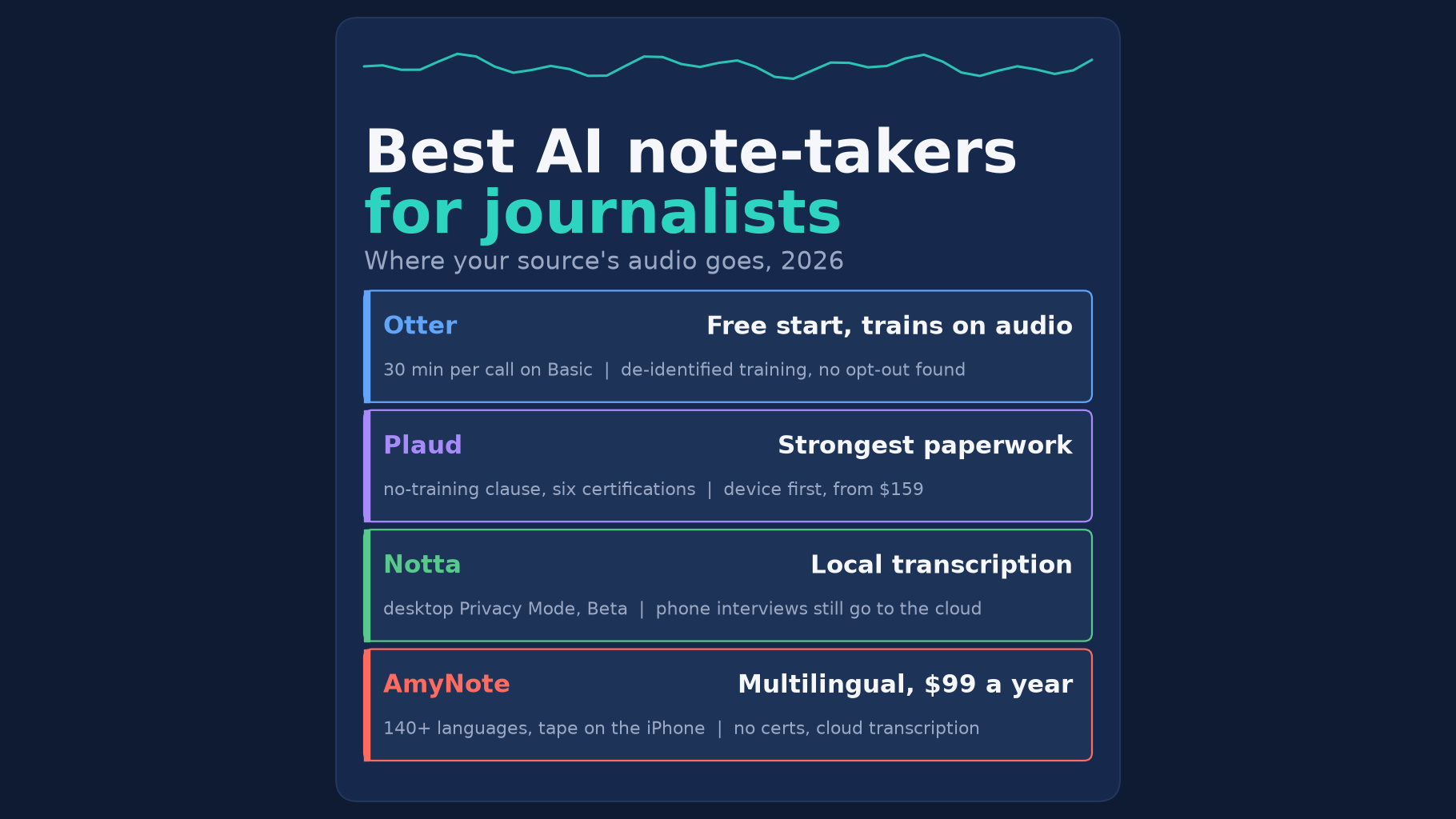
Weaknesses. Otter’s privacy policy lists “training our proprietary AI technology on de-identified audio recordings and on transcriptions”. We found no training opt-out in the policy. It keeps data “for as long as necessary” and names no period. Basic stops each conversation at 30 minutes, keeps only the 25 most recent, and replays at 1x speed only. Transcription covers six languages. HIPAA compliance is an add-on on Enterprise, not something an individual reporter gets.
Who it suits. Short on-the-record calls where the source has no reason to worry about the audio, and a reporter who wants a free start.
Plaud: A Dedicated Recorder With the Strongest Paperwork
Strengths. Plaud’s privacy policy says it will “never” use your audio to train its own or any third-party AI model without explicit consent. Its plan page lists ISO 27001, ISO 27701, SOC 2 Type II, GDPR, HIPAA and EN 18031 on every plan. It transcribes 112 languages, and its own FAQ names journalists among the people it is built for. A separate recorder also means a reporter’s phone stays free for calls and notes during a long day.
Weaknesses. There is no software-only path in. “Every Plaud device includes the Starter Plan”, and the desktop app is marked “Requires Device”. Plaud Note costs $159, and the Note plus a year of Pro (1,200 minutes a month) is $248.99. Unlimited costs $239.99 a year. Plaud publishes no general retention period, and AI runs in the cloud.
Who it suits. Field reporters and long-form writers who record for hours at a time and want the most documentation behind the vendor.
Notta: The Only Local Transcription Here
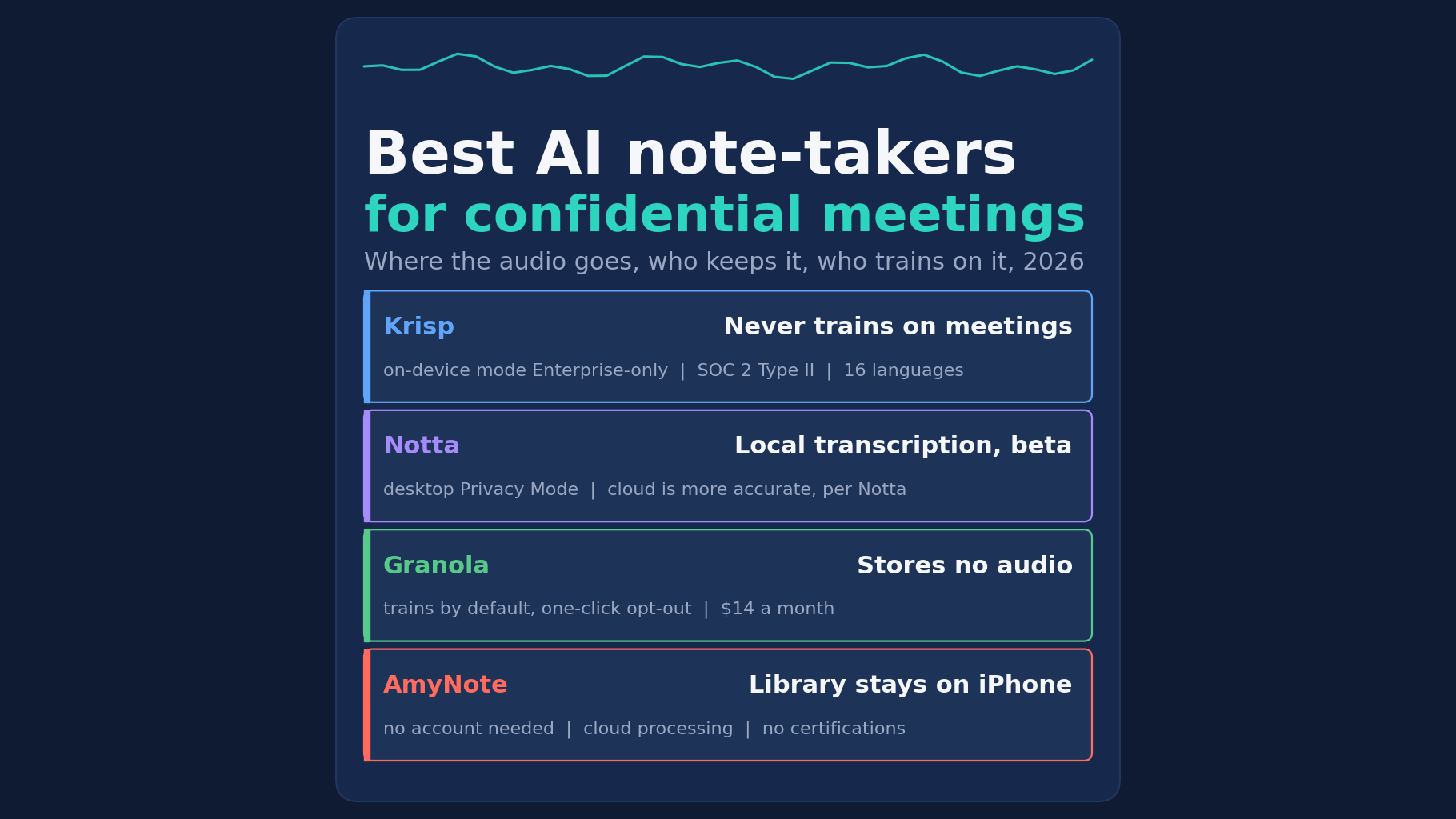
Strengths. Notta’s desktop Privacy Mode transcribes on your computer, so interview audio does not need to be uploaded. It works offline once set up, and on Pro it does not use cloud minutes. Pro costs $97.99 a year with 1,800 cloud minutes and up to 5 hours per recording. Its security page says it has obtained SOC 2 Type II.
Weaknesses. Privacy Mode is Beta on Mac and Windows only. Its default local model covers English, Chinese, Japanese, Korean and Cantonese, or 11 languages with Apple’s engine on macOS 26, and Notta says cloud transcription gives “higher accuracy”. A phone interview goes to the cloud. Free stops at 3 minutes per conversation. The only no-training line in Notta’s privacy policy covers Google Workspace data, not your audio. Its security page says it “follows” ISO 27001 and HIPAA guidelines rather than listing those certifications.
Who it suits. A reporter who can conduct the sensitive interview at a laptop, in one of the supported languages, and is comfortable relying on a Beta feature.
AmyNote: The Phone in Your Pocket, Not a Vault
Weaknesses first. AmyNote cannot transcribe offline, so Notta’s local mode beats it on source protection. AmyNote runs on iPhone and iPad only, with no desktop or Android app and no free plan beyond a 3-day trial. It publishes no SOC 2, ISO 27001 or HIPAA certification and no retention period. It does not advertise file import, so do not count on it to transcribe a recording made on another device.
Strengths. AmyNote records in the room with no bot and no device to buy, and needs no account for core features. It transcribes 140+ languages and translates into 100+, which matters for a reporter interviewing in one language and filing in another. Recording, playback, reading and export to PDF, TXT or Word all work offline, so the original tape is always there to check a quote. Pricing is flat: $99 a year, $19.99 a month or $12.99 a week, with unlimited recordings.
Privacy. AmyNote says it does not use your data to train AI models and does not sell meeting content. Transcription and AI run through Microsoft Azure, OpenAI and Anthropic’s Claude, behind Cloudflare, with TLS in transit, and AmyNote says that is not end-to-end encryption. The saved library lives on the reporter’s iPhone. Local-first is not local-only: when a transcript or summary runs, the audio or text is uploaded and a processing copy may be retained in AmyNote’s cloud.
Who it suits. A reporter who works from an iPhone, often across languages, and wants the tape and transcript in one place on the phone.
Side-by-Side Comparison
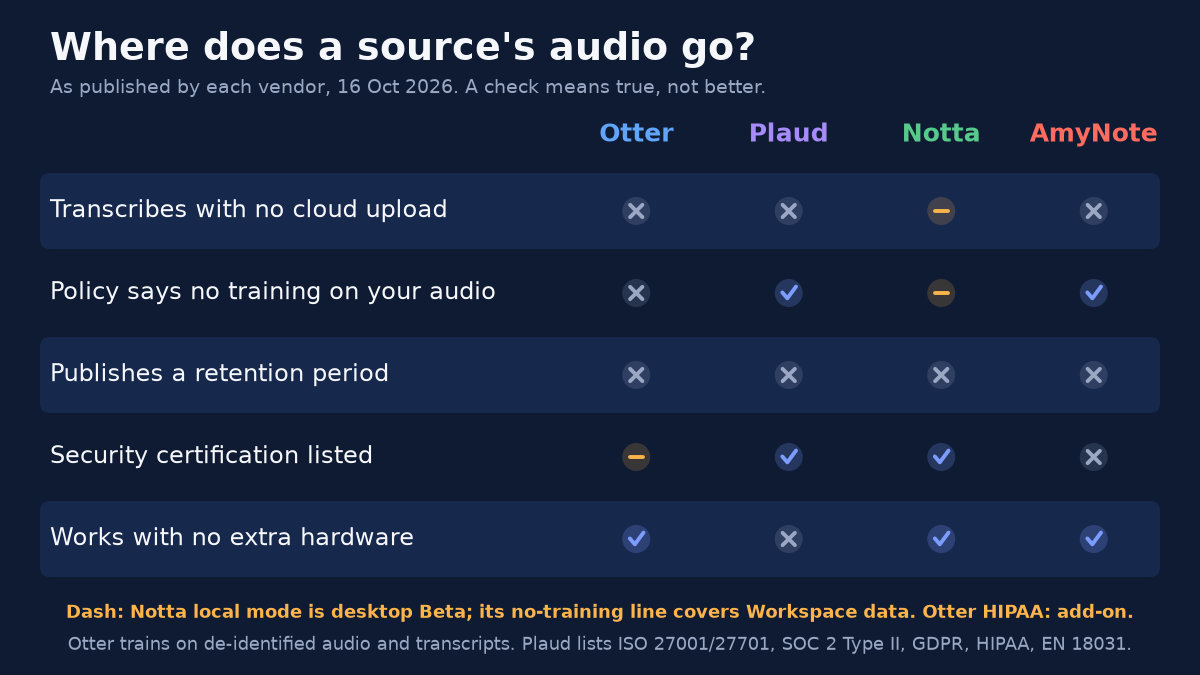
- Transcription without the cloud: Notta Privacy Mode, desktop Beta. Otter, Plaud and AmyNote no.
- Trains on your recordings: Otter yes, on de-identified data. Plaud and AmyNote say no. Notta publishes no general statement.
- Published retention period: none of the four.
- Certifications: Plaud lists six. Notta has SOC 2 Type II. Otter sells HIPAA as an Enterprise add-on. AmyNote none.
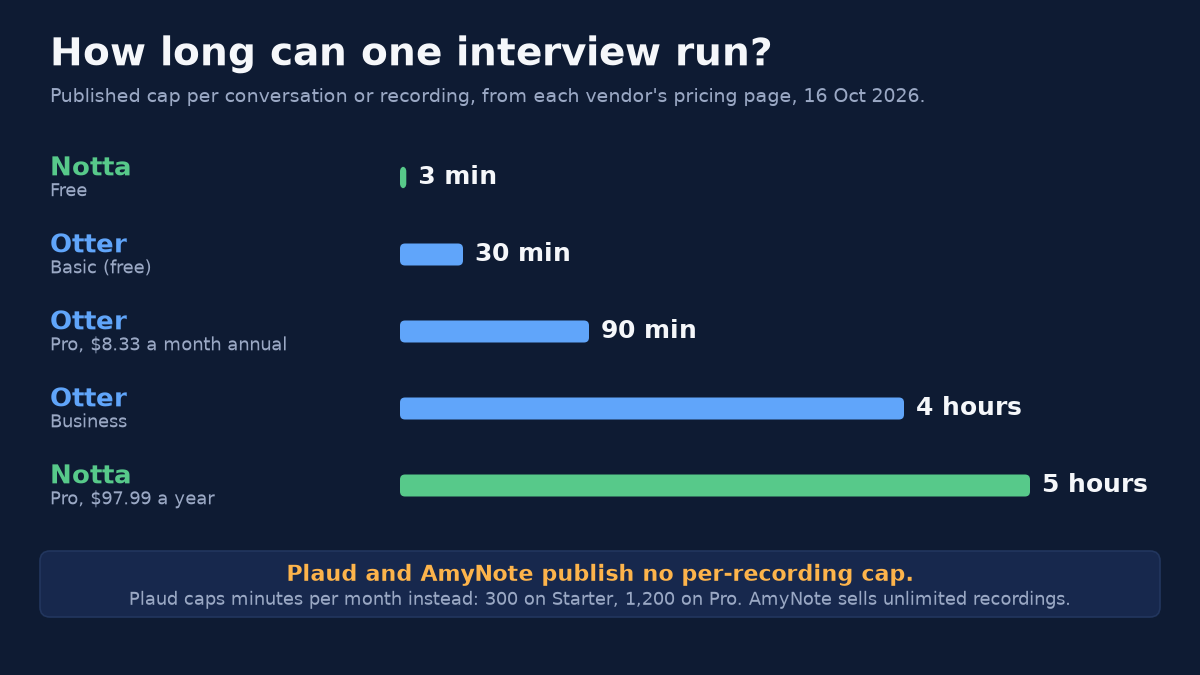
- Longest interview on the entry paid plan: Notta Pro 5 hours. Otter Pro 90 minutes. AmyNote and Plaud Pro publish no per-recording cap.
- Free plan: Otter, 30 minutes per conversation. Notta, 3 minutes. Plaud, with a device. AmyNote, a 3-day trial.
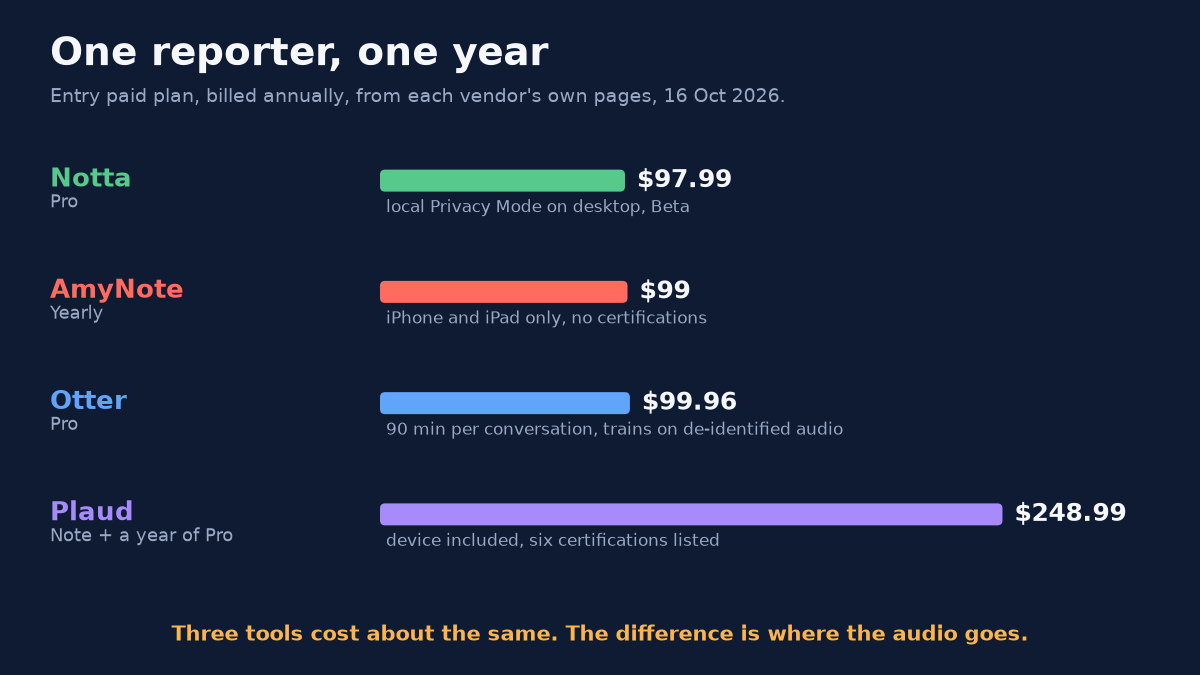
- One reporter, one year: Notta Pro $97.99. AmyNote $99. Otter Pro $99.96. Plaud Note plus Pro $248.99.
Questions to Ask Before You Record a Source
Whichever tool you pick, the vendor pages above answer only part of the question. Before recording an interview that could matter later, a reporter can settle a few things in advance:
- Does this interview need to touch a server at all? If the answer is no, the only option in this roundup is a laptop running Notta’s Privacy Mode, in a supported language.
- What does the policy say about training? Read the exact sentence, not the marketing page. Otter’s policy names de-identified audio; Plaud and AmyNote say they do not train on it.
- How long does the vendor keep it? None of the four publishes a period, so plan on deleting recordings yourself when a story no longer needs them.
- Will the plan cut you off? Check the per-conversation cap before a long sit-down, not halfway through it.
- Can you get back to the original audio? A transcript is a draft. The tape is what you check a quote against.
The Bottom Line
If the interview must never touch a server, use Notta’s Privacy Mode on a laptop, and accept the Beta label and the narrower language list. For a full day of field recording, Plaud has the strongest paperwork, once you pay for the device. For quick free phone calls, Otter works, but read its training clause before recording anyone off the record.
AmyNote is for the reporter who works from an iPhone and across languages. It costs about the same as Notta or Otter, keeps the tape on the phone, and does not train on your audio. It is not a vault: transcription uses the cloud, and it carries no certifications. It is on the App Store with a 3-day trial.
Originally published as an X Article by @AmyNoteApp.