A finance lead walks into a pricing review with two board members and an outside advisor. Someone asks to take AI notes. Everyone nods, and nobody asks the follow-up: where does the audio go, who keeps it, and is anyone training a model on it?
For a confidential meeting, the data path matters more than the summary. A beautiful action-item list is worth little if the recording sits on a vendor server indefinitely, or if the conversation quietly becomes training data. This roundup follows that path for four tools, Krisp, Notta, Granola and AmyNote, using only what each vendor says on its own pages.
Quick Verdict
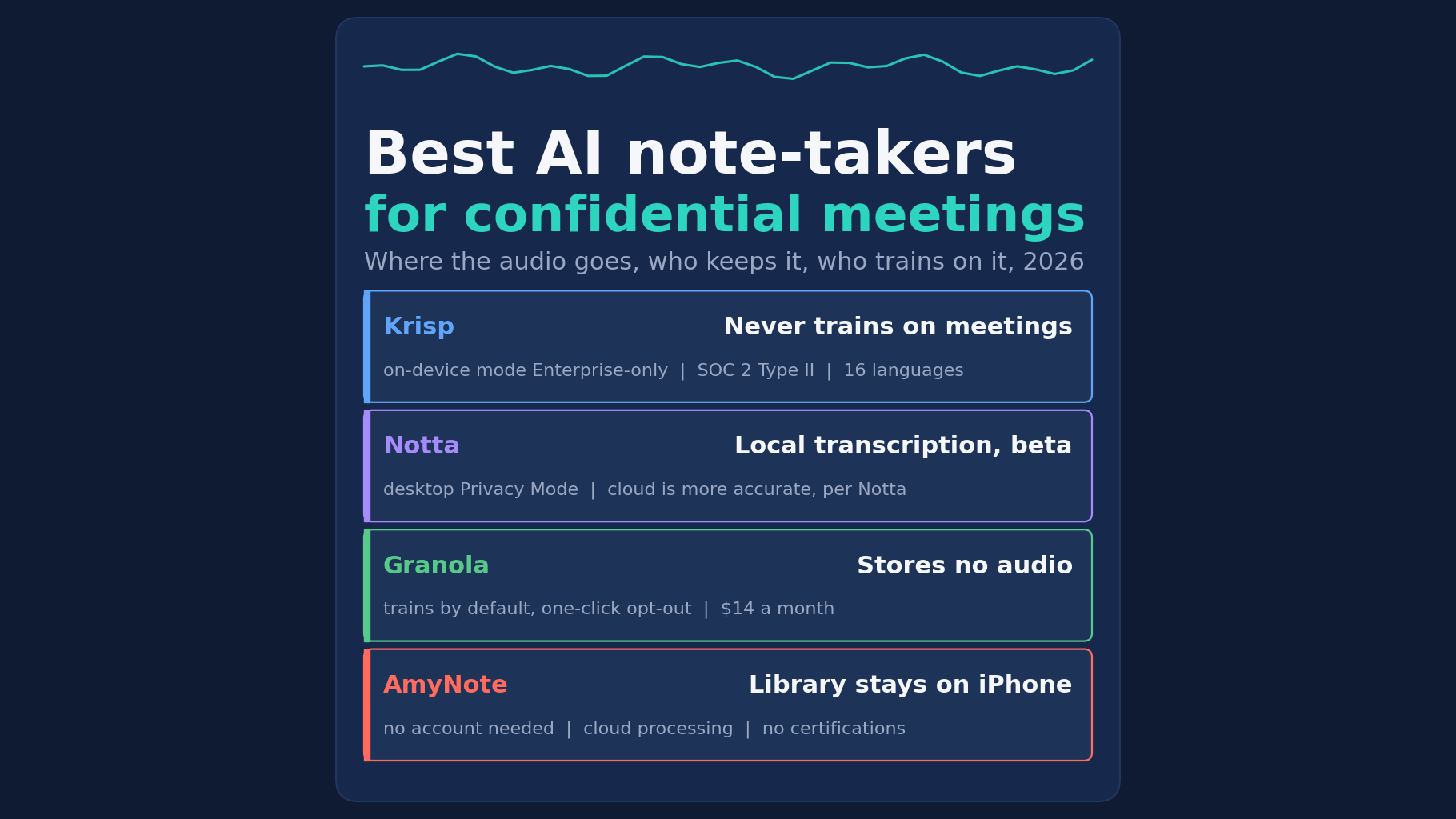
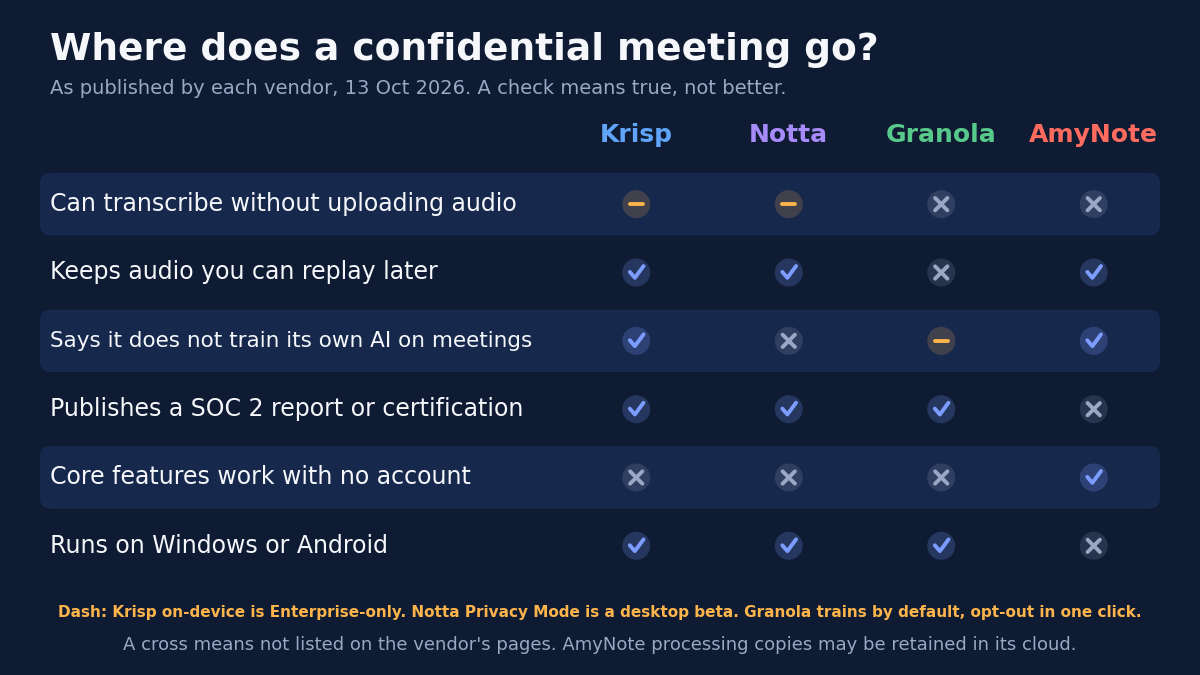
- Best for keeping audio on your own computer: Notta. Its new desktop Privacy Mode transcribes locally on Mac and Windows, with no upload. It is still in beta, and Notta says its cloud transcription is more accurate.
- Best written no-training promise on a cross-platform tool: Krisp. “Your meeting data is never used to train Krisp’s AI models,” plus SOC 2 Type II. On-device transcription is Enterprise-only, and the cloud keeps recordings until you ask for deletion.
- Best if you never want a recording to exist: Granola. It stores no meeting audio, only transcripts and notes. It does train on anonymized data by default, with a one-click opt-out.
- Best phone-first option with no account: AmyNote. It costs $99 a year, says it does not train AI on your data and keeps the saved library on your iPhone. It is iOS only, holds no certifications and processes audio in the cloud.
What We Compared
We read each vendor’s pricing page, security page and privacy policy on October 13, 2026, and scored four questions:
- Where transcription runs. On your device, or on a vendor server.
- What is kept afterward. Audio, transcript, both, or neither, and for how long.
- Training. Does the vendor train its own models on your meetings, and is it on by default?
- Paperwork. Which certifications are published, and which plan you need to get them.
Every price below is a list price as printed on that date. Plans and policies change, so treat the figures as a snapshot and re-read the vendor’s page before a tool goes into a board pack or a client engagement.
None of these tools replaces your legal team’s judgment. If an NDA or a client contract says something specific, such as that recordings may not leave a given device or may not be used to train software, find the vendor line that answers it before the first meeting, not after.
Krisp: Clear No-Training Line, Cloud by Default
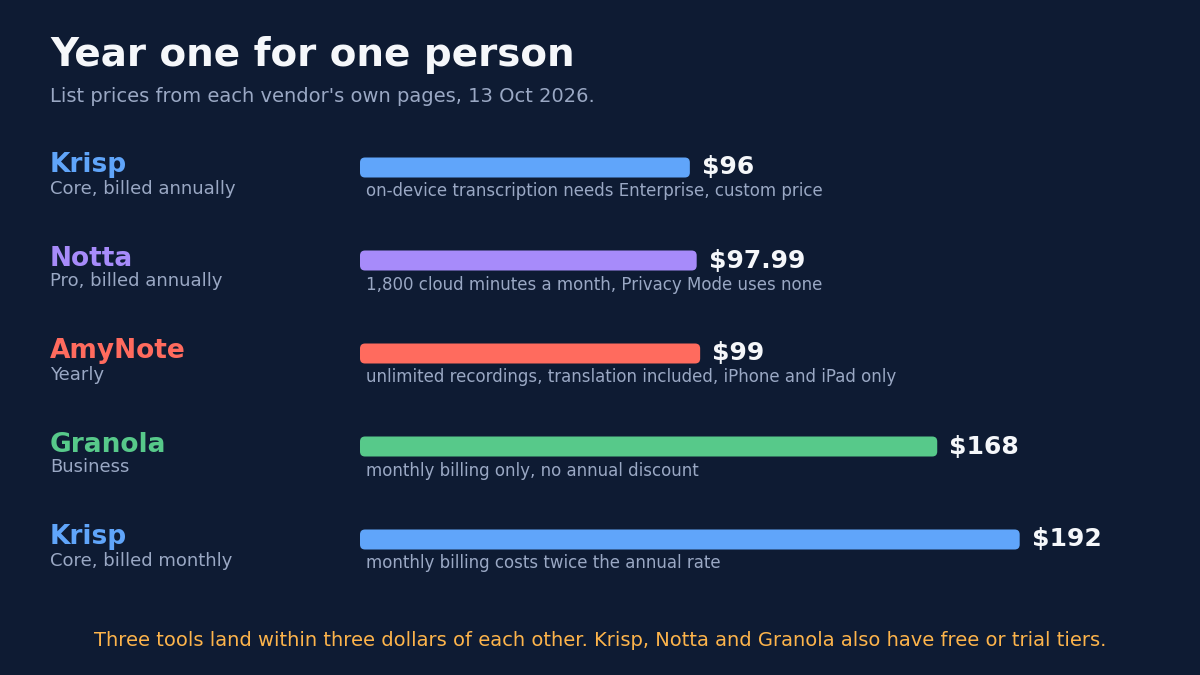
Strengths. Krisp records without a bot on Windows, Mac, iOS and Android. Its pricing FAQ says “No model training: Your meeting data is never used to train Krisp’s AI models.” It lists SOC 2 Type II and GDPR on every tier. Core costs $8 per user per month billed annually, or $16 monthly, after a 7-day free trial. Advanced is $15 billed annually or $30 monthly.
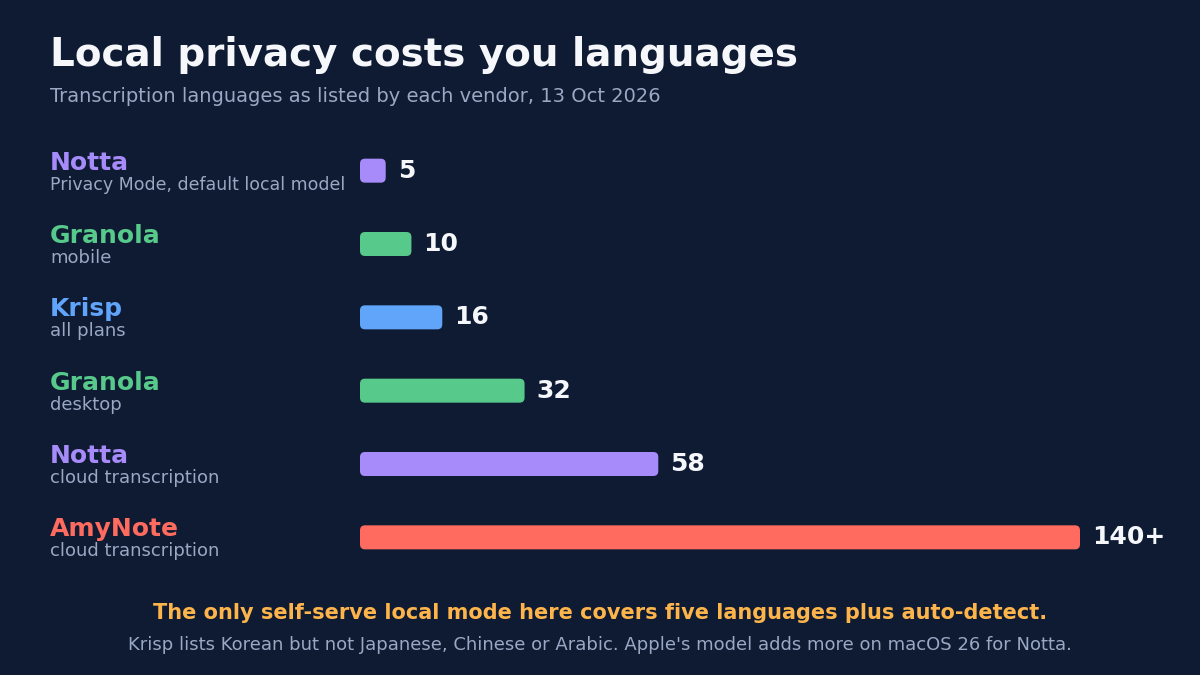
Weaknesses. On-device “Private Transcription & Recordings” is listed only on Enterprise, with custom pricing. HIPAA is also Enterprise-only, and a BAA is “Available for teams with 100+ seats.” Its privacy policy, last updated September 28, 2026, says recordings and notes are stored “until you instruct us to delete” them. Signup requires a Google or Outlook calendar connection by default. It transcribes 16 languages, including Korean but not Japanese, Chinese or Arabic.
Who it fits. Teams on mixed desktop and mobile platforms who want a written no-training promise and SOC 2 Type II on every plan, and who are comfortable with cloud storage until they delete, or can negotiate an Enterprise contract for on-device processing.
Notta: The Only Local Transcription Here, in Beta
Strengths. Notta Desktop Privacy Mode transcribes on your computer, so meeting audio does not need to be uploaded. The Mac and Windows downloads are both marked Beta. With Pro, Privacy Mode does not use cloud minutes. Pro costs $97.99 a year for 1,800 cloud minutes a month and recordings up to 5 hours. Notta’s security page says it obtained SOC 2 Type II and encrypts data with TLS 1.2 in transit and AES-256 at rest.
Weaknesses. Notta’s own FAQ says to use cloud transcription when “you need higher accuracy.” The default local model covers only English, Simplified Chinese, Japanese, Korean and Cantonese, against 58 languages in the cloud. Apple’s speech model adds a few more on macOS 26. The free plan stops each conversation at 3 minutes. On HIPAA, the security page says only that Notta follows HIPAA guidelines, and ISO 27001 is described the same way. We found no general no-training promise on its security page.
Who it fits. Anyone whose confidential meetings happen at a laptop, in one of the five local languages, and who is willing to run beta software to keep the audio off a vendor server.
Granola: No Stored Audio, Training On by Default
Strengths. Granola’s security page says it “doesn’t store the audio from meetings.” It keeps only the transcript and your notes. It is bot-free on desktop, iOS, Android and Apple Watch. It covers 32 languages on desktop and 10 on mobile. It is SOC 2 compliant, and HIPAA is available on Enterprise.
Weaknesses. “Granola trains on your anonymized data” by default on Basic and Business. Any user can opt out in one click, and Enterprise starts with training off. Transcription is not local either: the security page says Granola uses transcription providers such as Deepgram and Assembly and AI providers such as OpenAI and Anthropic. Free keeps 30 days of history. Business is $14 per user per month with no annual discount, so $168 in year one. With no audio stored, there is nothing to replay if someone disputes a line.
Who it fits. People who would rather no recording of a sensitive meeting exist at all, who are happy with a transcript and their own notes, and who will switch off the training default on day one.
AmyNote: Local Library, Cloud Processing
Strengths. AmyNote is an iPhone and iPad app with no bot. Saved recordings, transcripts and notes live on the device, and recording, playback, reading and export to PDF, TXT or Word work with no network. Its security page lists “We don’t use your data to train AI models” and “We don’t require an account to use core features.” It transcribes 140+ languages and translates into 100+. Pricing is flat: $99 a year, $19.99 a month or $12.99 a week.
Weaknesses. Local-first is not local-only. When AmyNote transcribes, translates or summarizes, audio or text goes to its cloud partners, which it names as Cloudflare, Microsoft Azure, OpenAI and Anthropic’s Claude. “Processing copies and results may be retained,” and it publishes no retention period. Transport uses TLS, and AmyNote says that is not end-to-end encryption. It publishes no SOC 2, HIPAA or ISO 27001 certification. It is iOS only, has no free plan beyond a 3-day trial, offers no on-device transcription mode, and lists no file import.
Who it fits. People whose confidential conversations happen face to face, with an iPhone on the table, who want the library on their own device and no account, and whose contracts do not require a certification.
Side-by-Side Comparison
| Krisp | Notta | Granola | AmyNote | |
|---|---|---|---|---|
| Transcription stays on the device | Enterprise only | Desktop Privacy Mode, beta | No | No |
| Audio kept afterward | Until you delete it | On your computer in Privacy Mode | None | On your iPhone |
| Vendor trains on your meetings | Says never | No general statement | Yes by default, opt-out | Says no |
| Certifications | SOC 2 Type II | SOC 2 Type II | SOC 2 | None published |
| HIPAA | Enterprise | “Follows guidelines” | Enterprise | None |
| Account needed | Yes, calendar by default | Yes | Yes | Not for core features |
| Year one, one person | $96 (Core) | $97.99 (Pro) | $168 (Business) | $99 |
| Platforms | Desktop and mobile | Desktop and mobile | Desktop, mobile, Watch | iPhone and iPad |
Questions to Ask Before the Meeting
Start from the meeting, not the feature list. Four questions settle most cases:
- Where does the conversation happen? On a laptop call, Notta’s Privacy Mode and Krisp are candidates. Around a table with a phone in the middle, AmyNote fits the setting.
- Must the audio stay off vendor servers? Today that means Notta Privacy Mode in beta, or Krisp on an Enterprise contract. Granola and AmyNote both process in the cloud.
- Will anyone need to replay a line? If a disputed sentence must be checked against the recording, Granola does not fit, because it keeps no audio.
- What does the contract demand? If it requires SOC 2 or a BAA, AmyNote is out, and HIPAA on Krisp or Granola means Enterprise.
Whatever you pick, say at the start of the meeting that it is being recorded, and follow the consent law where each participant sits.
The Bottom Line
If the audio must not leave the room’s laptop, Notta’s Privacy Mode is the only option here that does that today, and it is still in beta. If you want a written no-training promise and SOC 2 Type II on every tier, Krisp has both, but local processing needs an Enterprise contract. If you would rather no recording exist at all, Granola keeps none. Switch off its training default first.
If your confidential meetings happen face to face and you carry an iPhone, AmyNote keeps the library on the device, needs no account and says it does not train on your data, at $99 a year. It still processes audio in the cloud and has no certifications, so check your contract first. It is on the App Store with a 3-day trial.
Originally published as an X Article by @AmyNoteApp.