Nobody comparison-shops a zero. A free plan is the one row on a pricing page that nobody reads carefully, because there is apparently nothing to weigh: the number is the smallest one printed, and the smallest number wins.
But free is a real price, paid in three currencies. What the plan caps. What quietly falls off the shelf while you are not looking. And what the policy lets the vendor do with the things you said out loud. None of those three appear on the card with the $0 on it. All three appear somewhere on the same website, usually two clicks away, in a table or a policy section written to be technically complete rather than actually read.
So this comparison does the unglamorous version of the work. It takes the free tier at two of the biggest names in AI note-taking, follows each cap to the vendor’s own footnotes, reads the retention and training clauses in the matching privacy policy, and reports what the $0 actually returns. Then it does something slightly unfair and includes a third product that has no free tier at all — because “costs money on day one” is also a price, and it deserves to be compared honestly against the other two rather than quietly excluded.
Quick Verdict
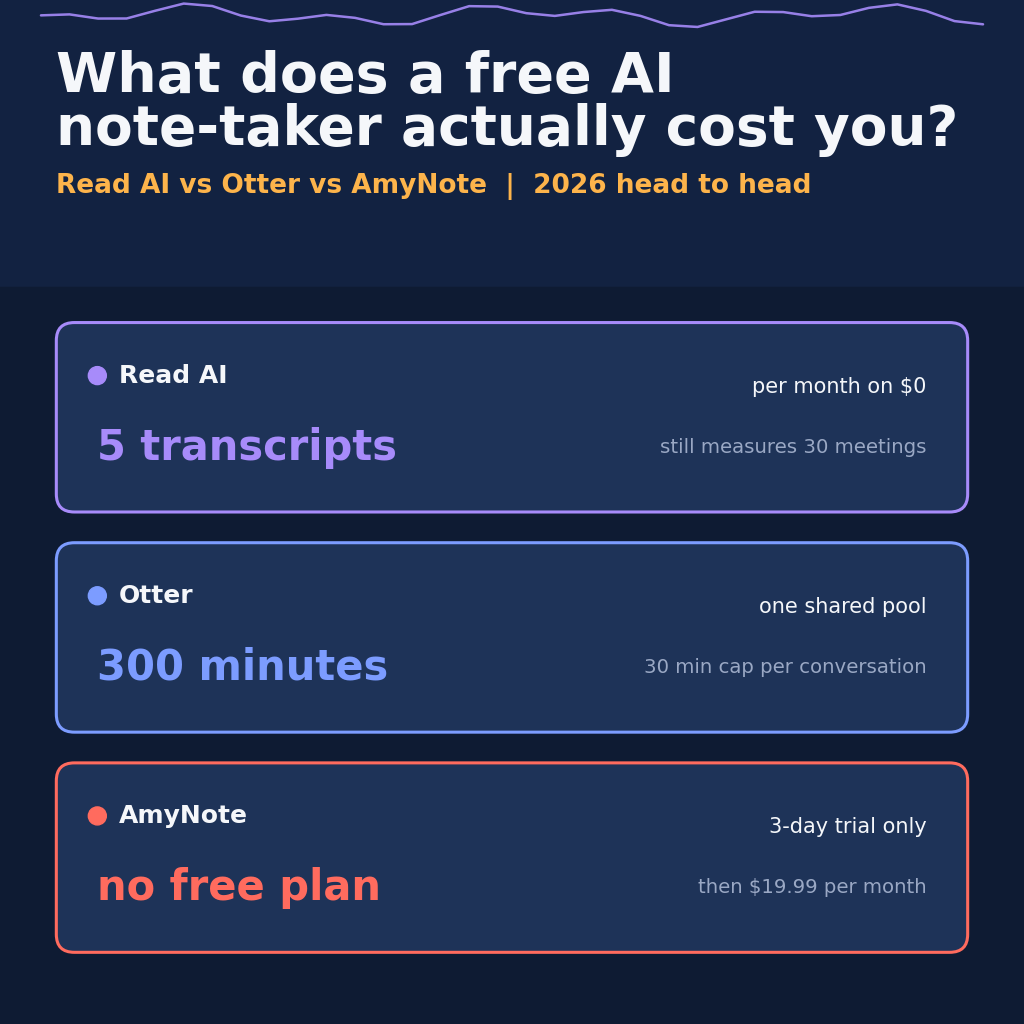
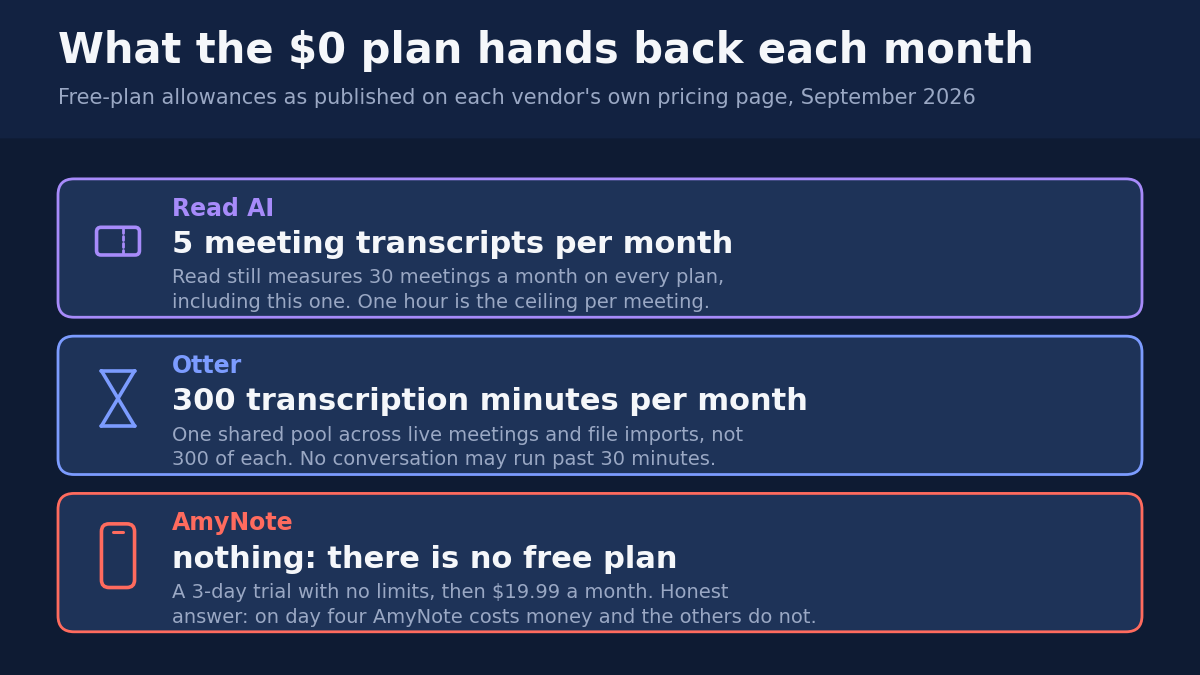
Read AI has the broadest platform spread and the only published retention ceiling here. Its free plan returns five transcripts a month while the account still measures thirty meetings.
Otter has the free plan that does the most real work: 300 transcription minutes a month. They are one shared pool, no conversation may run past thirty minutes, and only your 25 most recent are kept.
AmyNote has no free plan at all, which is the honest headline. It is a 3-day trial and then $19.99 a month. In exchange there are no caps, and it does not train on your content.
What We Compared
Each vendor’s own pricing cards and plan comparison table, the free-tier row of every cap, and the training and retention clauses in each privacy policy. Every figure below was read from the vendors’ own pages on 2026-09-12.
One note on method, because it explains an omission. The three allowances are not plotted on a shared axis anywhere in this article, and that is deliberate. Five transcripts, 300 minutes and no plan at all are measured in three incompatible units, and forcing them onto one scale would invent a precision the underlying facts do not support. Where the comparison is genuinely like-for-like — retention ceilings, training rights, session caps — it is stated directly. Where it is not, the units are left alone.
Read AI: Strengths and Weaknesses
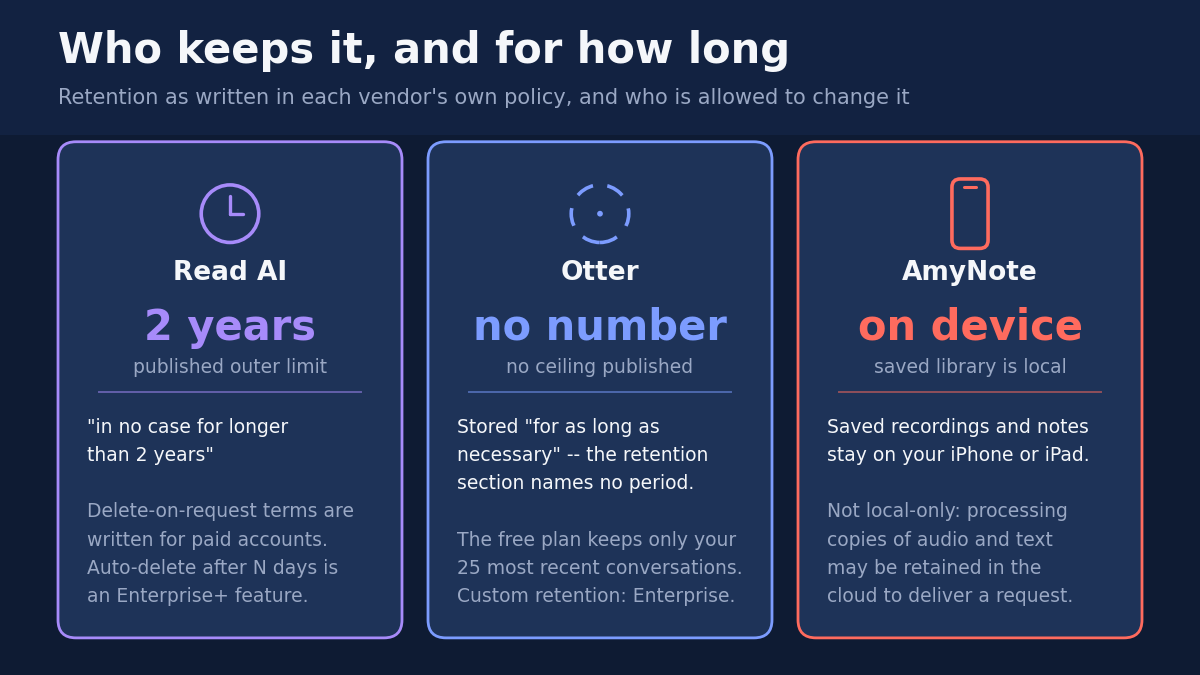
Strengths. Read AI runs on Windows, macOS, iOS, Android and Chrome, joins Zoom, Teams and Meet, and captures in-person meetings from the mobile apps. The free plan asks for no credit card. It is also the only vendor here publishing a hard limit on how long it keeps recordings: audio and video stored “in no case for longer than 2 years.” Most vendors publish no number at all.
That last point deserves more credit than it usually gets. A published ceiling is a commitment that can be quoted back at a vendor; an unpublished one is a posture. Read AI is the only product on this page that gives a reader something specific enough to hold it to.
Weaknesses. The free plan is thinner than the card suggests: five meeting transcripts a month, a one hour ceiling per meeting, no audio or video uploads, basic integrations only, and no access to the Claude and GPT models in Read’s search copilot. Free users also cannot be part of a Workspace, so it does not work for a team.
Then the line that reframes the rest: “30 meetings measured per month” sits under every card, the free one included. Read AI measures up to thirty of your meetings while handing back transcripts for five.
Sit with the shape of that for a moment. The metering and the deliverable are two different numbers, and only one of them is on the part of the page you were reading. Whatever “measured” entails on the vendor’s side, the arithmetic facing the user is that twenty-five meetings a month can pass through the account’s counter without producing anything the user gets to keep.
Retention has the same shape. The 2-year ceiling is genuine, but the sentence promising deletion on request is written for paid accounts, and the control that auto-deletes reports after a set number of days is Enterprise+, five licences minimum. Training runs under legitimate interest, not consent.
That last phrase is worth translating out of compliance language. Legitimate interest is the legal basis a controller reaches for precisely when it does not intend to ask permission. It is lawful, it is common, and it is not the same thing as consent — which matters most to the free user, who is also the user with the fewest deletion rights on the page.
Otter: Strengths and Weaknesses
Strengths. Otter’s free tier is the most genuinely usable one here. Basic includes 300 transcription minutes a month, unlimited real-time recordings, automated summaries with action items, iOS and Android apps, folders and sharing, TLS with AES-256 on real-time content, and two-factor authentication.
If the question is strictly “which zero-cost plan does the most work,” this is the answer, and it is not close. Summaries with action items and two-factor authentication on a free tier are both features other vendors treat as upgrade bait.
Weaknesses. The caps compound. The 300 minutes are footnoted as a shared pool across all transcription types: 300 total for live meetings and file imports together, not 300 of each. No conversation may run past 30 minutes, which rules out most real meetings. Imports are capped at three for the lifetime of the account. History is your 25 most recent, so the twenty-sixth meeting pushes the first off the shelf.
Read those four limits as one mechanism rather than four line items, because that is how they are experienced. The 30-minute ceiling decides what you can record; the shared pool decides how often; the three-import lifetime cap closes the obvious workaround of recording elsewhere and uploading; and the 25-conversation history decides how long any of it survives. A plan can be generous on its headline number and still be narrow at every point where you would actually use it.
That history cap is the one that tends to surprise people, because it is the only limit here that operates retroactively. Every other cap tells you what you cannot do next. This one quietly removes something you already did, and it does so without asking, at the moment you record something new.
Smaller edges cut too: five custom vocabulary terms, twenty AI Chat queries a month capped at three per conversation, playback locked at 1x, and exports limited to mp3 and txt while paid tiers add pdf, docx and srt. Transcription covers six languages.
On rights, Otter’s policy lists training its AI on “de-identified audio recordings and on transcriptions (which may contain Personal Information)” with a legal basis of “Consent or Legitimate interests.” No training opt-out appears anywhere in the policy. And the retention section, quoted in full, stores information “for as long as necessary” and names no period. Custom data retention is an Enterprise feature.
Note the parenthesis in the vendor’s own sentence: de-identified recordings, and transcriptions which may contain Personal Information. The policy is doing the honest thing by writing that down. It is also describing a training corpus that the vendor itself declines to promise is free of personal information — with no opt-out published anywhere in the document.
AmyNote: Strengths and Weaknesses
Strengths. Once you pay, the caps stop. AmyNote is $12.99 a week, $19.99 a month or $99 a year as a flat account price, not per seat, with unlimited recordings and every feature on all three. It transcribes 140+ languages and translates into 100+, tuned for East Asian and Arabic. Its security page states that it does not train AI models on your data, does not sell meeting content, and does not require an account to use core features.
The flat-price detail is the one that changes the arithmetic rather than the feature list. Both competitors price per seat, so their cost scales with the number of people; AmyNote’s does not. That is irrelevant to a solo user and decisive to nobody in between — which is a polite way of saying it matters exactly when the alternative would have been multiplying a monthly figure by a headcount.
Weaknesses. There is no free tier. A 3-day trial with no limits, and then it costs money on day four while Read AI and Otter do not. If you want an AI note-taker at zero, AmyNote is not on the list. It is also iOS only: no Android, no desktop, no web. It claims no compliance certifications, and the words SOC 2, ISO 27001, HIPAA and GDPR appear zero times on its site, which rules it out wherever procurement needs a badge. Its own page is careful that local-first is not local-only: processing copies may be retained in the cloud to complete a request, and it declines to call its TLS transport encryption end-to-end. There are no team or CRM features.
That is a long list of disqualifications, and it is worth noticing who wrote it. The no-certifications line, the local-first caveat and the refusal to call TLS end-to-end are all on the vendor’s own security page. It is a different failure mode from the other two: not a claim that narrows when you check it, but an absence stated plainly where a badge would normally go.
Side by Side
| Read AI | Otter | AmyNote | |
|---|---|---|---|
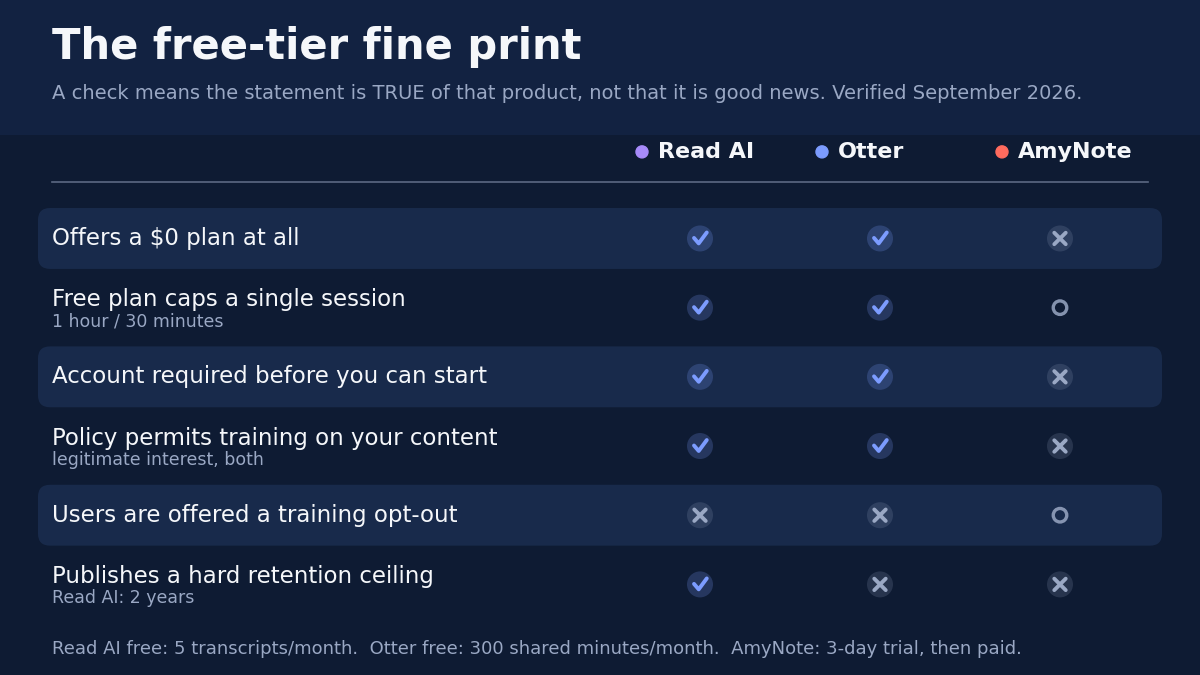
| Free plan exists | Yes | Yes | No |
| What $0 returns per month | 5 transcripts | 300 shared minutes | Nothing |
| Ceiling on one session | 1 hour | 30 minutes | Not applicable |
| What the free plan forgets | — | Keeps your 25 most recent | Library stays on your device |
| Retention ceiling published | 2 years | None | None |
| Policy permits training on your content | Yes | Yes | No |
| Training opt-out offered | No | No | Not applicable |
| Entry price when free runs out | $15 a seat annually | $8.33 a seat annually | $99 a year for the account |
Which One Is For You
You want the most capable zero-cost plan and your meetings are short. Otter. The 300 minutes are real work, the summaries and action items are included, and the 30-minute ceiling is survivable if your calls genuinely are. Go in knowing the twenty-sixth conversation deletes the first.
You need one assistant across every device, including in-person rooms. Read AI. Nothing else here spans Windows, macOS, iOS, Android and Chrome at once. Budget for a paid tier if five transcripts a month is not enough, which for most people it will not be.
Retention is the thing you actually care about. Read AI, on the narrow ground that it is the only one publishing a number. Two years is not a short ceiling, but “for as long as necessary” is not a ceiling at all.
You will not accept a policy that permits training on your content. AmyNote is the only one of the three, and it costs money on day four. Neither competitor offers a training opt-out, so on this specific question there is no free option to weigh.
Procurement needs a badge. Not AmyNote — it claims no certifications and says so. That is a genuine disqualification and no amount of privacy posture substitutes for it.
The Bottom Line
Pick Otter if you want the most capable zero-cost plan and your meetings fit inside thirty minutes. Pick Read AI for the widest platform coverage and a vendor that prints a retention number instead of hiding behind “as long as necessary.” Pick AmyNote, at amynote.app, if what you want is no caps, no bot, no per-seat math and no training on your content, and you have an iPhone and will pay for it on day four.
Free is never free. It is billed in minutes, in history and in rights instead of dollars. The bill is itemised on the same website as the price — in a footnote under the plan table, in a retention section that names no period, in a legal-basis column that says legitimate interest where you assumed it said consent. None of it is hidden, exactly. It is just kept one click further away than the number you came to read.
Read the row before you read the price.
Originally published as an X Article by @AmyNoteApp.