The board meets in a church hall on Tuesday night for two hours. On Wednesday a program officer visits a donor at home, and on Thursday a volunteer runs an intake session in Spanish. By Friday the director needs minutes, a donor note and an intake summary, and nobody on a staff of three had time to write them.
That week is normal for a small nonprofit. The important conversations happen in rooms, not just on Zoom, they run long, and the people in them include donors, clients and volunteer board members who never signed up to be recorded by a bot. Nonprofits need a tool that fits a small budget, works in a room as well as on a video call, and does not cut off at minute 90. This roundup compares four tools on that job: Fathom, Otter, Circleback and AmyNote, using only what each vendor publishes about itself.
Quick Verdict
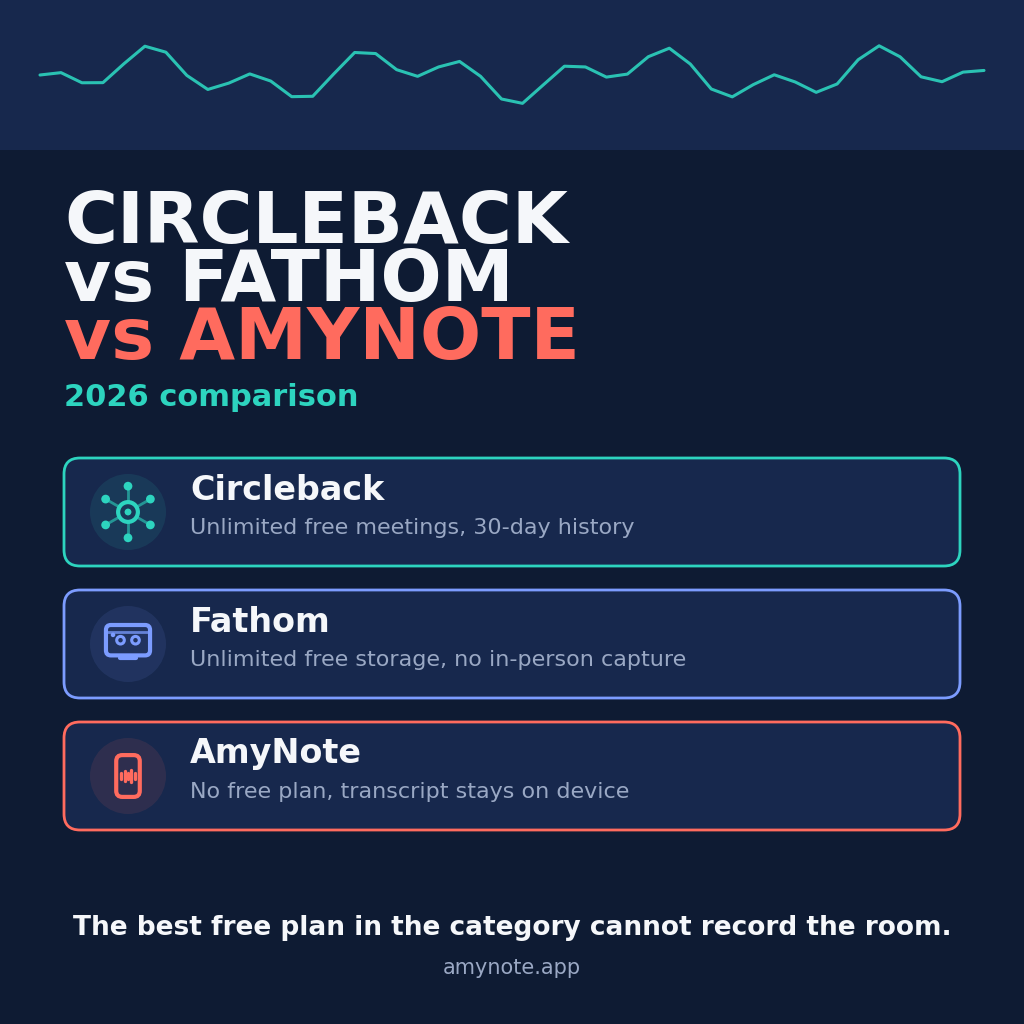
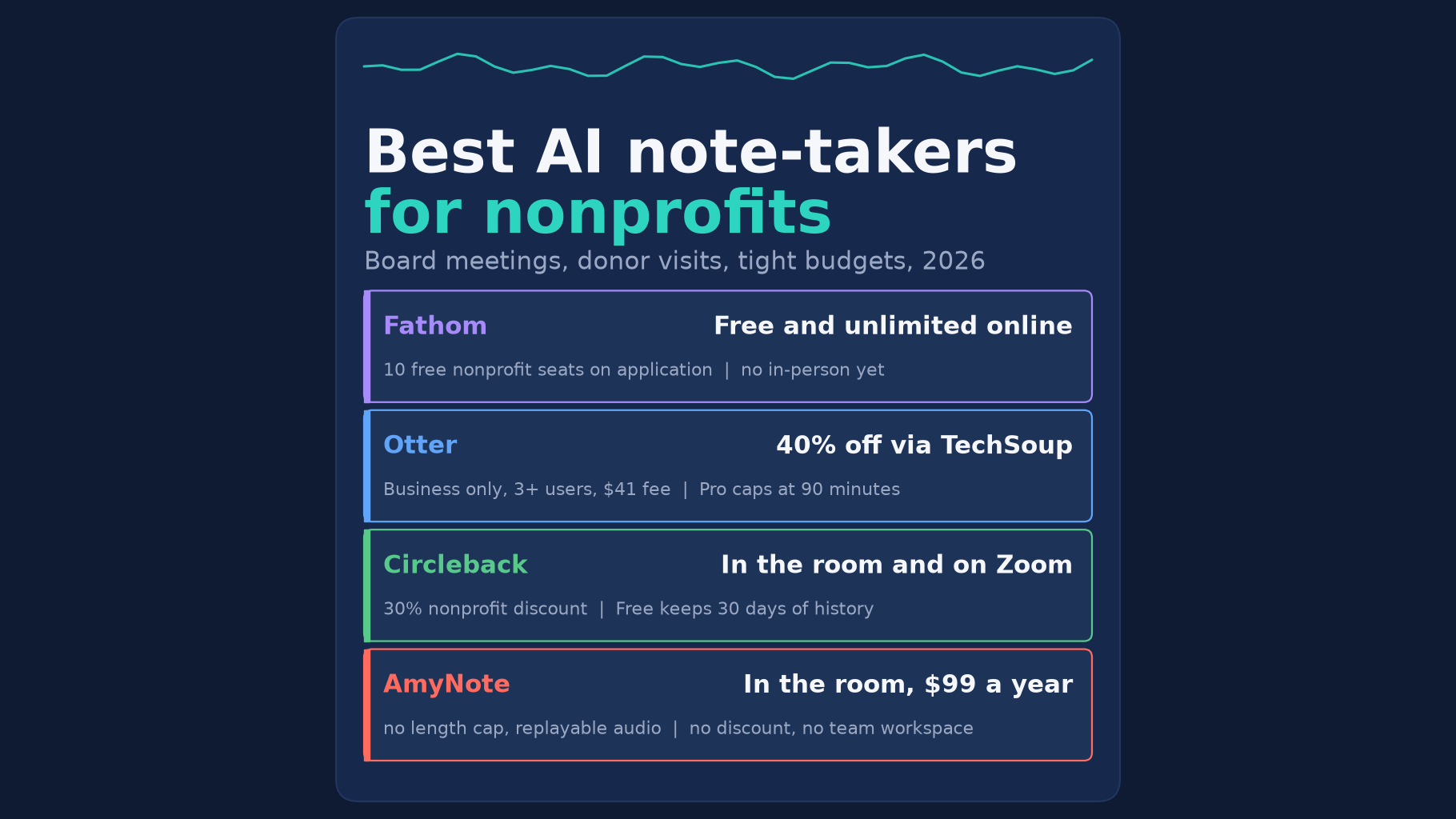
- Best free option for online meetings: Fathom. The Free plan has unlimited recordings and transcripts, and Fathom offers nonprofits 10 free seats through a short application. It records video calls, not the board room.
- Best for a nonprofit team that already uses Otter: Otter Business through TechSoup. It is 40 percent off a one-year plan for three or more users, plus a $41 admin fee, with a 4-hour limit per conversation.
- Best for in-person and online on one plan: Circleback. The Free plan records in-person meetings from a phone or Apple Watch, and Circleback lists a 30% nonprofit discount.
- Best for in-person meetings on an iPhone: AmyNote. It costs $99 a year, lists no length cap and keeps replayable audio on the phone. It has no nonprofit discount, no team workspace and no free plan.
What We Compared
We read each vendor’s pricing, help and privacy pages, plus TechSoup’s Otter listing, on October 20, 2026, and asked five questions:
- Nonprofit price. Is there a discount, and what does it take to get it?
- In-person meetings. Can it record a board meeting or a donor visit, not just a video call?
- Length. Will it cut off a two-hour board meeting?
- Sharing. Can staff and board members see the same notes?
- Privacy. Does the vendor train AI on what donors, clients and board members say?
We also priced three staff for one year. We did not test transcript accuracy, and we did not use any vendor’s own time-saved claims. A nonprofit discount is only worth something if it applies to the plan you need. So we read the conditions attached to each one, not just the headline percentage.
Fathom: Free and Generous, but Online Only
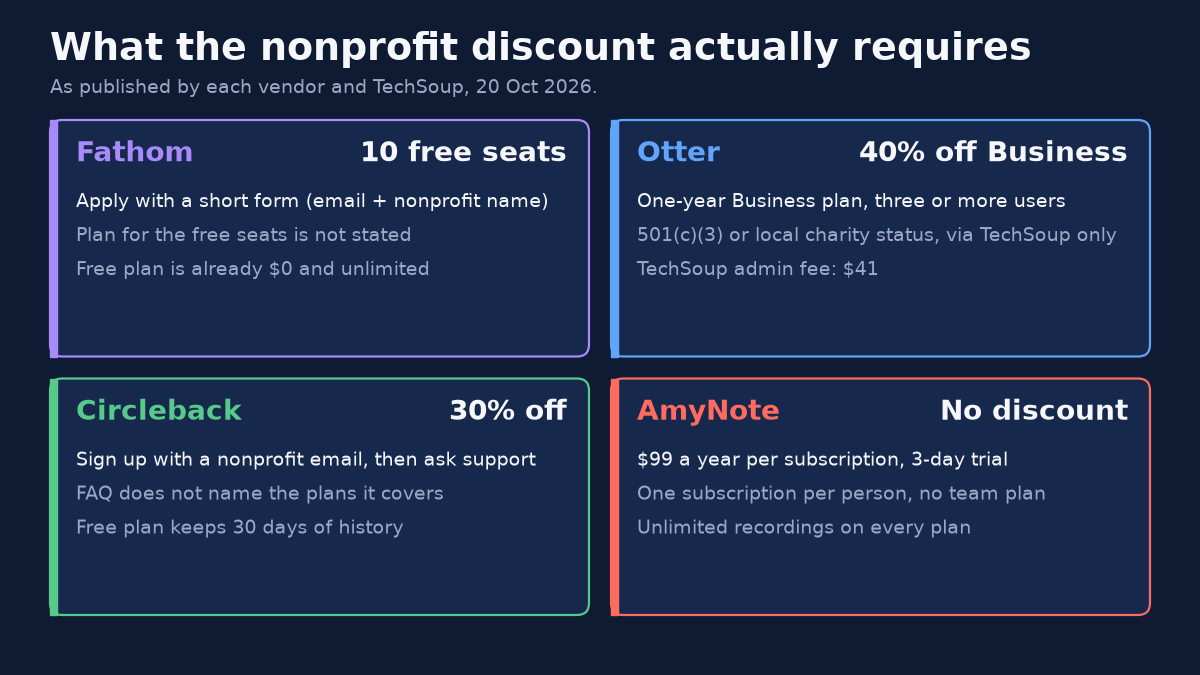
Strengths. Fathom’s Free plan includes unlimited recordings and transcriptions, with no history limit. Its pricing page also says “Get 10 free seats for nonprofits.” The application is a short form asking for an email and the nonprofit’s name. Transcripts cover 38 languages. For an organization whose staff meetings, partner check-ins and funder calls already happen on Zoom, Google Meet or Teams, that is hard to beat at $0.
Weaknesses. Fathom records Zoom, Google Meet and Microsoft Teams calls, and only when you are on the call. In-person meetings are still a waitlist for its iOS app, so the church-hall board meeting is out of reach, and so is the donor’s kitchen table. The pricing page does not say which plan the 10 free seats are on. By default, Fathom may train its own AI models on de-identified meeting data unless you opt out, so whoever sets up the account should find that setting on day one.
Otter: The TechSoup Discount, with Strings
Strengths. Otter has the most formal nonprofit program here. TechSoup lists “a 40 percent discount on a one-year subscription for Otter Business for three or more users.” Organizations with 501(c)(3) status or a local charity registration qualify. Its iOS and Android apps let staff record a donor visit on a phone, and Business allows 4 hours per conversation, which covers a long board meeting with room to spare.
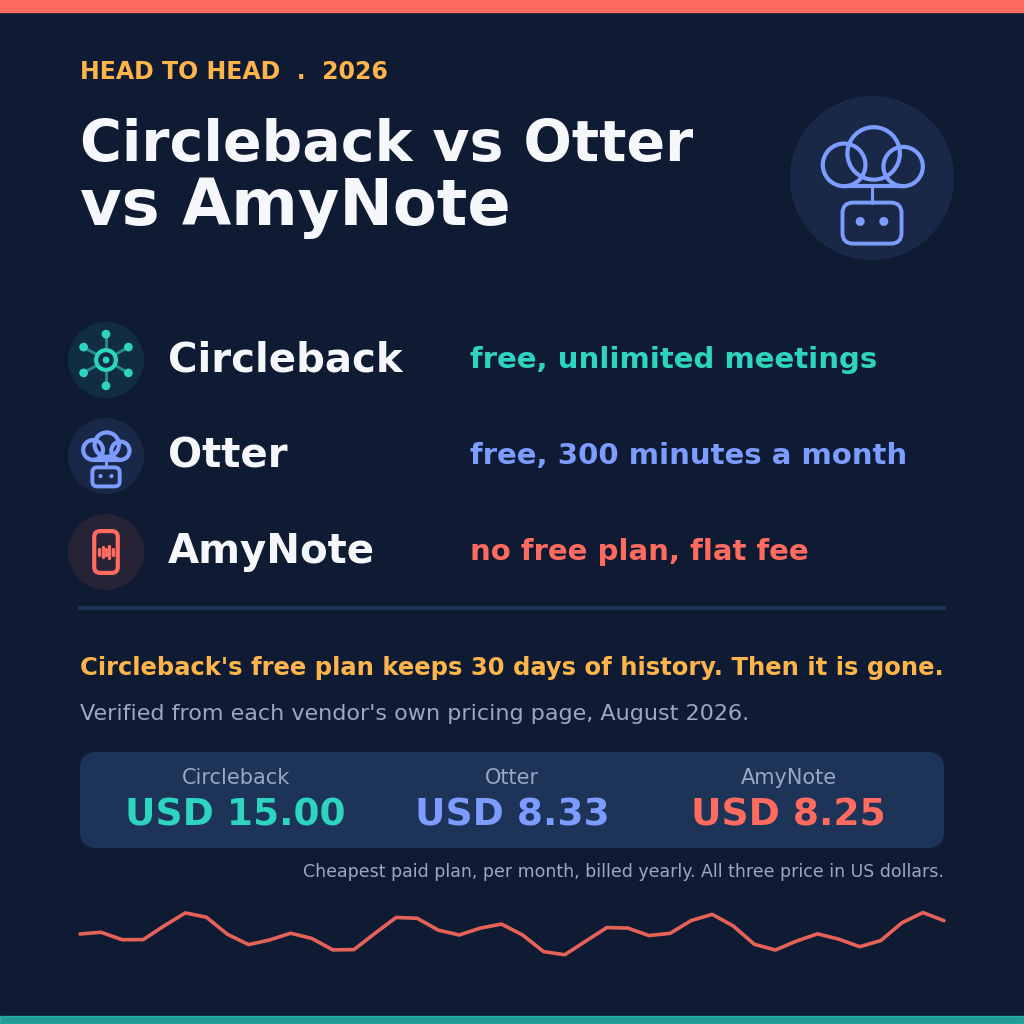
Weaknesses. The discount covers only Business, only annual billing and only three or more users. It also carries a $41 admin fee, and TechSoup is “currently the only way” in. A one-person shop on Pro at $8.33 a month billed annually gets no discount and a 90-minute cap, so a two-hour board meeting stops early. The free Basic plan stops at 30 minutes. Otter’s privacy policy says it trains its AI on de-identified audio and transcripts.
Circleback: In the Room and on Zoom
Strengths. Circleback’s Free plan records online and in-person meetings, with mobile and Apple Watch apps. Its FAQ answers the training question plainly: “No. Circleback does not use customer data to train models.” It supports over 100 languages. Its pricing FAQ lists “a 30% non-profit discount” through support, after you sign up with a nonprofit email.
Weaknesses. The Free plan keeps only 30 days of meeting and recording history. Last quarter’s board minutes are gone unless you pay. Pro costs $15 a seat a month billed yearly and keeps 1 year of recordings. The FAQ does not say which plans the discount applies to, so ask support before you budget for it. HIPAA compliance is on Enterprise only, at $35 a seat, which matters to health and human-services nonprofits.
AmyNote: For the Room, Not the Team
Weaknesses first. AmyNote has no nonprofit discount, no team workspace and no shared library. It runs on iPhone and iPad only, with no web or desktop app, and it does not join Zoom calls. To share board minutes, you export a PDF, TXT or Word file and send it. There is no free plan beyond a 3-day trial, and AmyNote lists no SOC 2, ISO 27001 or HIPAA certification.
Strengths. AmyNote records an in-person meeting on a phone placed on the table, and lists no length cap. A two-hour board meeting is captured whole. The audio stays replayable, so the board secretary can check the exact wording of a motion before the minutes go out. It transcribes 140+ languages and translates into 100+, which helps when intake happens in Spanish, Vietnamese or Arabic. Pricing is $99 a year, $19.99 a month or $12.99 a week, with unlimited recordings.
Privacy. AmyNote says it does not use your data to train AI models and does not sell meeting content. Transcription and AI run through Microsoft Azure, OpenAI and Anthropic’s Claude, with TLS in transit, which AmyNote says is not end-to-end encryption. The saved library lives on the staff member’s iPhone. Local-first does not mean local-only: when a transcript or summary runs, the audio or text is uploaded, and a processing copy may be kept in AmyNote’s cloud.
Side-by-Side Comparison
- Nonprofit price: Fathom, 10 free seats on application. Otter, 40 percent off Business for three or more users through TechSoup, plus $41. Circleback, 30% off through support. AmyNote, none.
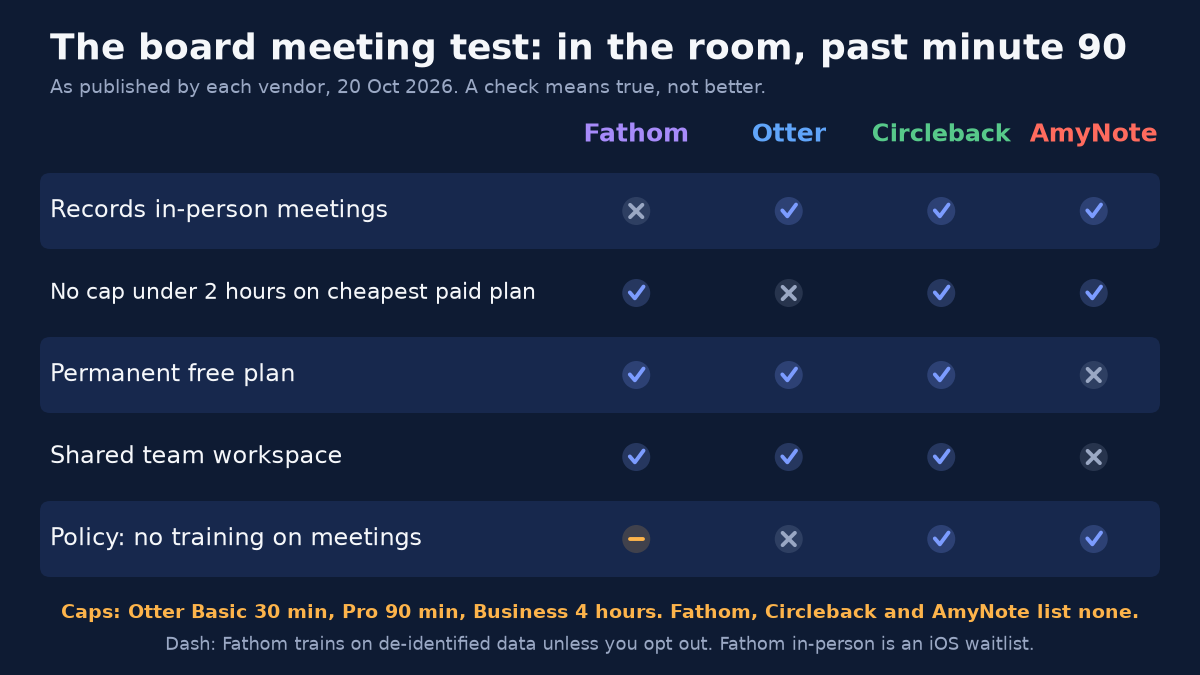
- In-person meetings: Circleback and AmyNote, yes, from a phone. Otter, yes, from its mobile apps. Fathom, not yet.
- Length cap: Otter Pro 90 minutes, Business 4 hours. Fathom, Circleback and AmyNote list none.
- Sharing: Fathom, Otter and Circleback have team workspaces. AmyNote shares by file export only.
- Trains on your meetings: Circleback and AmyNote say no. Fathom trains on de-identified data unless you opt out. Otter trains on de-identified data.
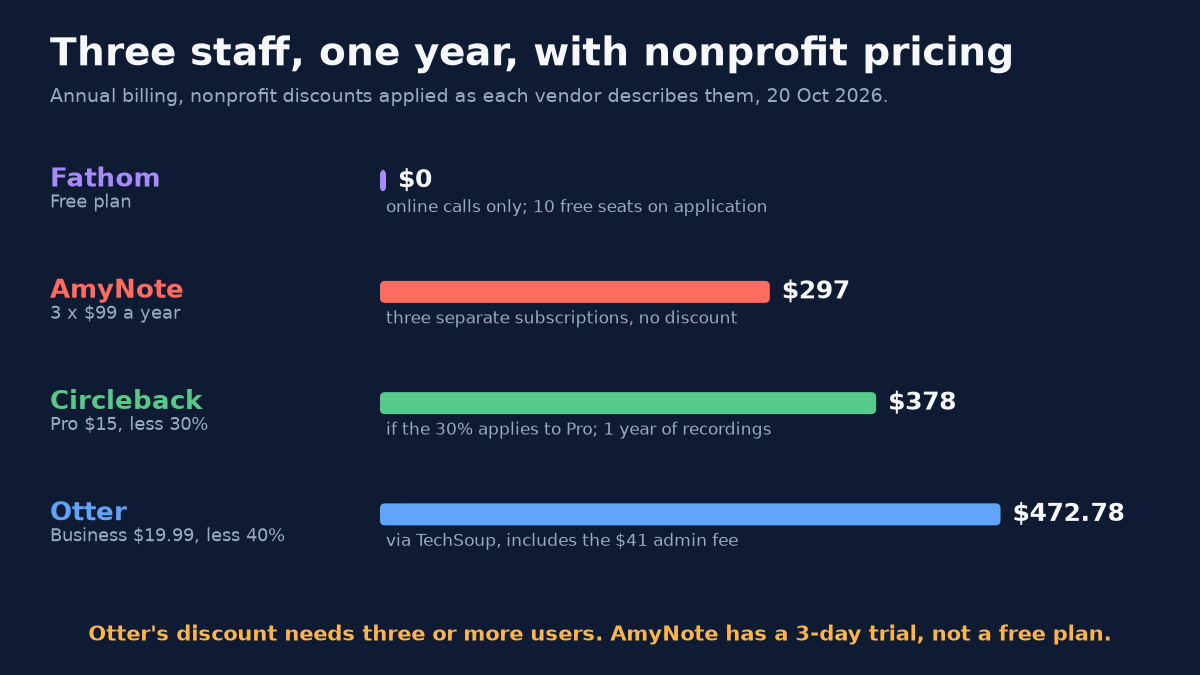
- Three staff, one year: Fathom $0 on Free. AmyNote $297, as three separate subscriptions. Circleback Pro $378 if the 30% applies to Pro. Otter Business $472.78 through TechSoup, including the fee.
Which Tool Fits Which Nonprofit
The comparison above is about features. The decision usually comes down to where your important conversations happen and who needs to read the notes afterwards.
- A remote team that meets on Zoom. Fathom’s Free plan already covers it, and the nonprofit seats cost nothing to request. Turn off training in the settings.
- Three or more staff who share notes every week. Otter Business through TechSoup, or Circleback Pro if support confirms the 30% applies. Both give the team one shared library.
- Board meetings and donor visits, with Zoom on the side. Circleback records both, but budget for a paid plan if you need minutes older than 30 days.
- One person who does the in-person work. The board secretary, the major-gifts officer or the intake coordinator. AmyNote records the whole meeting on the phone they already carry, in the language it happens in.
Before You Record a Board Meeting
Whichever tool you pick, a recording is not minutes. Tell everyone in the room, including guests and members of the public, that the meeting is being recorded and why. Decide in advance whether the audio is kept after the minutes are approved or deleted. Executive sessions and personnel discussions may need to stay off the recording entirely. A transcript helps the secretary write accurate minutes, but the board still approves the minutes, not the transcript. Your bylaws, your state’s recording-consent rules and your records-retention policy decide what happens next, so check them before the first recorded meeting.
The same applies to donors and clients. A donor who is told a visit is being recorded can say no, and a client in an intake session should know where the audio goes and who can hear it. The privacy rows in the comparison above are where that conversation starts.
The Bottom Line
If your meetings are mostly on Zoom, start with Fathom: the Free plan is unlimited, and the nonprofit seats cost nothing to ask for. If your team already uses Otter, the TechSoup deal makes Business worth it for three or more users. Circleback fits a team that meets both in the room and online, if you pay to keep more than 30 days of history.
AmyNote is for the staff member who does the work in person: the board secretary, the program officer at a donor’s kitchen table, the case worker running intake in Spanish. It costs $99 a year, keeps replayable audio on the phone and does not train on what people say. It will not share a workspace or join your Zoom calls. It has a 3-day trial on the App Store.
Originally published as an X Article by @AmyNoteApp.