A supplier call starts in English and drifts into Japanese. Half the room follows, and the notes afterwards cover whichever half the tool understood. Nobody notices until someone asks what was agreed in the second half of the call, and the summary is silent about it.
Every meeting assistant claims dozens of languages. Far fewer translate what was said, and those that do price it very differently. We compared Read AI, Notta and AmyNote on that one question: what does it cost to translate the meeting? Every figure below was read off the vendors’ own pages on 3 October 2026.
Quick Verdict
- Notta if you want the cheapest base plan and translate finished transcripts, and you only need live or side-by-side translation a few times a month.
- Read AI if your meetings run in one language at a time and you want analytics, a permanent free plan and apps on every platform.
- AmyNote if you hold mixed-language conversations in person on an iPhone and want live translation inside one flat price, and can do without a free plan, desktop apps or a compliance certificate.
What We Compared
“Supports 58 languages” can mean a tool transcribes, summarises or translates them. Those are different products. A tool can transcribe Japanese perfectly and still hand an English speaker a page they cannot read. We looked at four questions:
- Transcription languages. What the vendor’s own page counts.
- Translation. Whether it exists, and which kinds: after the meeting, live, or both languages side by side.
- Metering. Whether translation is unlimited or counted per use.
- Year-one cost for one person who translates every week.
The order matters. A large language count is the first number on most pricing pages, but it answers the easiest question. The cost of a mixed-language meeting is decided further down the table, in the rows about translation and how often you may use it.
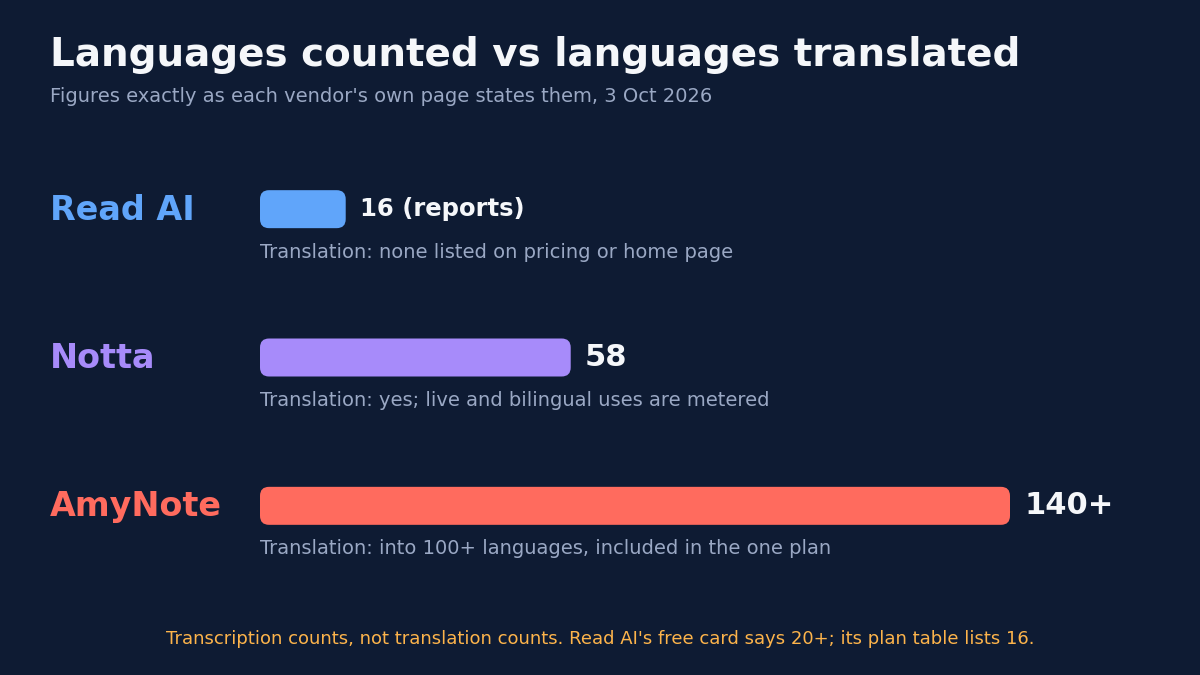
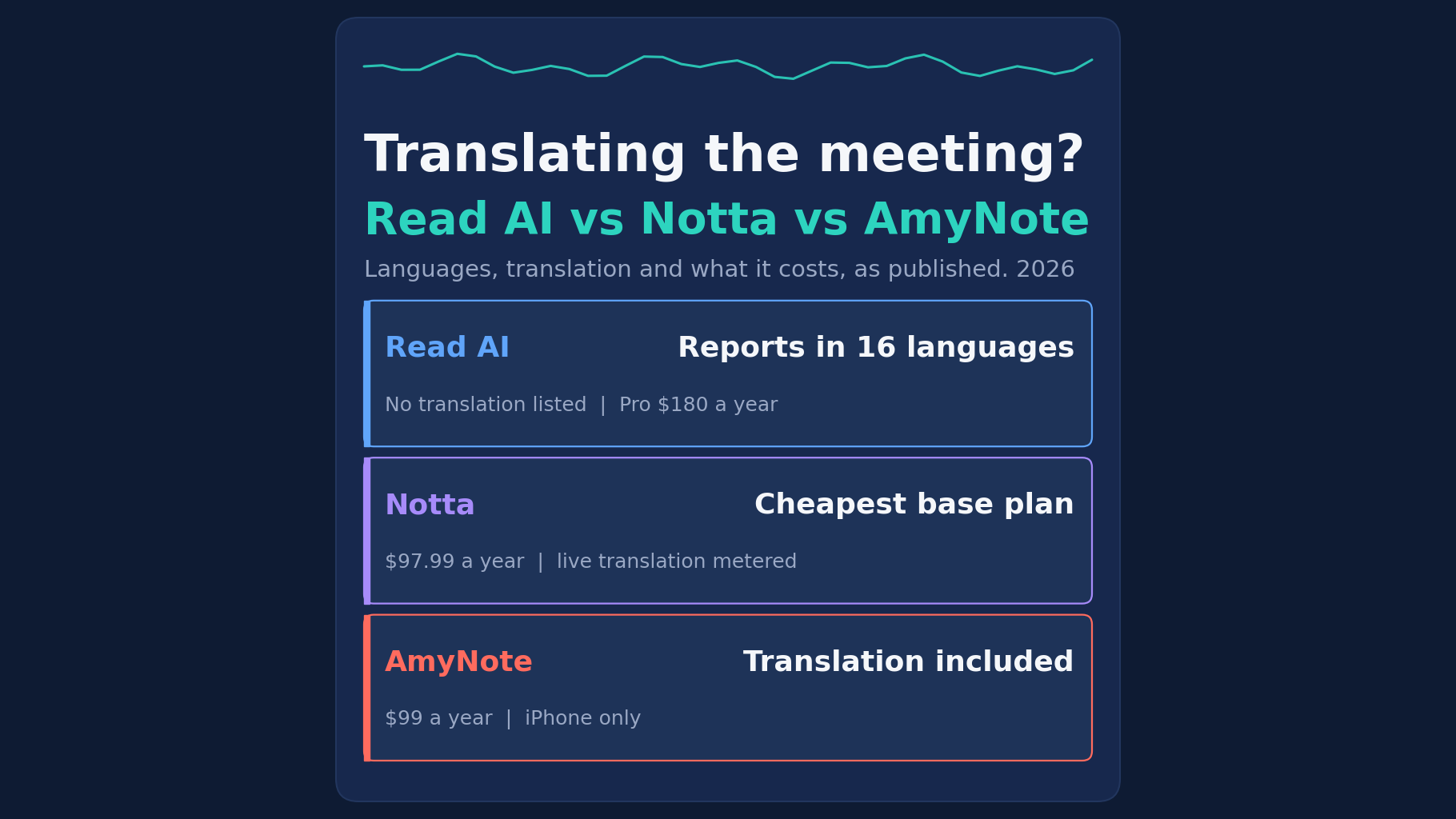
Read AI: Reports in 16 Languages, No Translation Listed
Strengths. Read AI runs on Windows, macOS, iOS, Android and a browser extension, joining Zoom, Teams and Meet. Its free plan never expires. Pro is $15 per user per month billed annually, or $19.75 monthly, with unlimited transcripts and meetings up to four hours. Enterprise is $22.50 and Enterprise+ $29.75, the latter from five licences. It publishes a hard retention ceiling: audio and video are kept “in no case for longer than 2 years.”
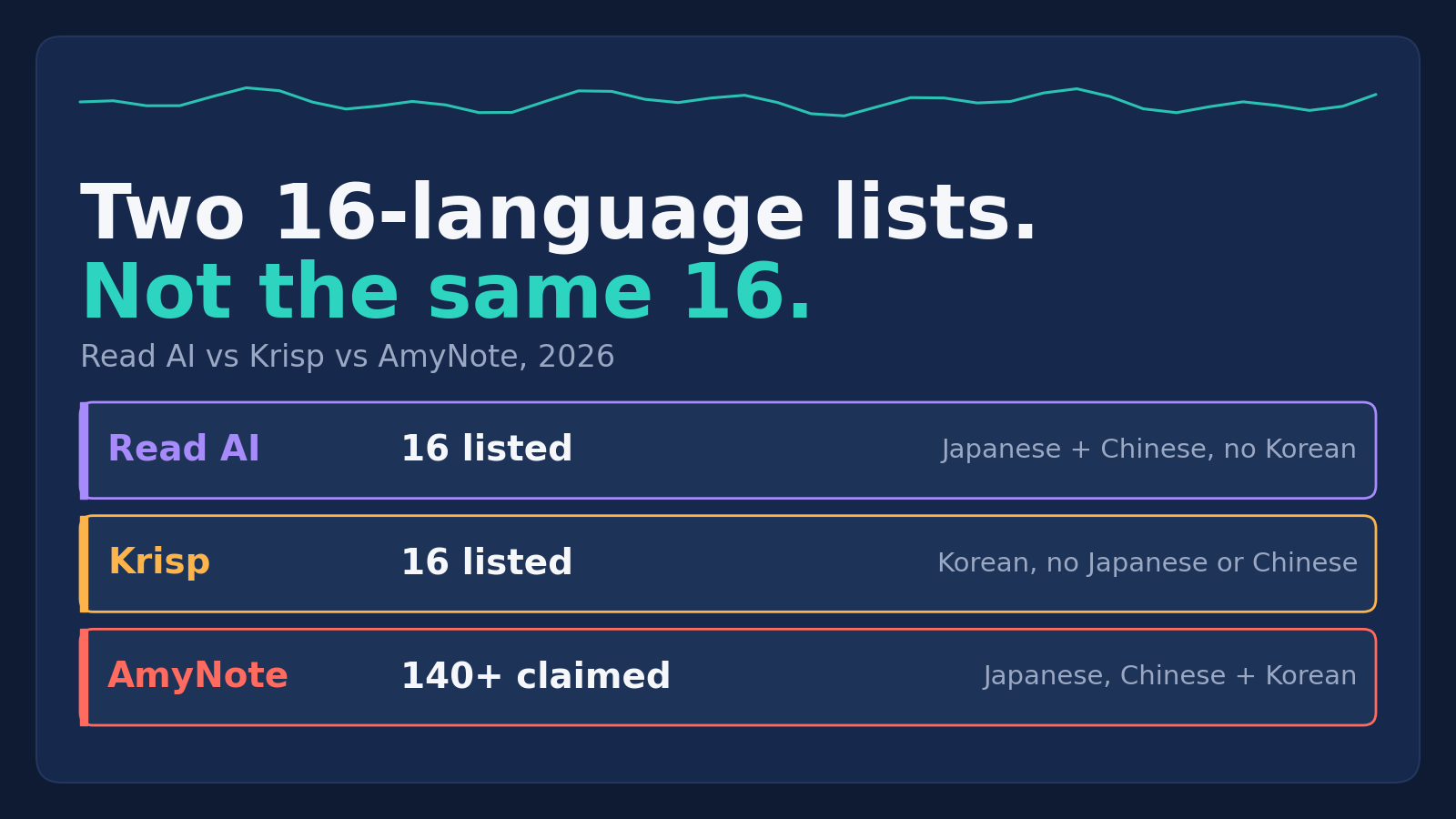
Weaknesses. Its plan table says “Read meeting reports are available in 16+ languages” and lists exactly sixteen, from Arabic to Swedish. The free card and home page say “20+”. Neither its pricing page nor its home page lists a translation feature. Read AI’s own blog explains that it “automatically determines what language was being spoken primarily during the meeting and then generates notes in that language.” A mostly English meeting gets English notes, and the Japanese half of the supplier call is summarised in whatever form the primary-language pass makes of it.
Language is also an input to scoring. Read AI’s privacy policy says it uses “other information like language, to infer certain demographic characteristics about users”, and its Read Score involves “analyzing facial and verbal elements of all meeting attendees.” The same policy lists “using information to train and improve our models” on a legitimate-interest basis, while the home page promises “no training on your data by default.”
Notta: Cheapest Base Plan, Metered Live Translation
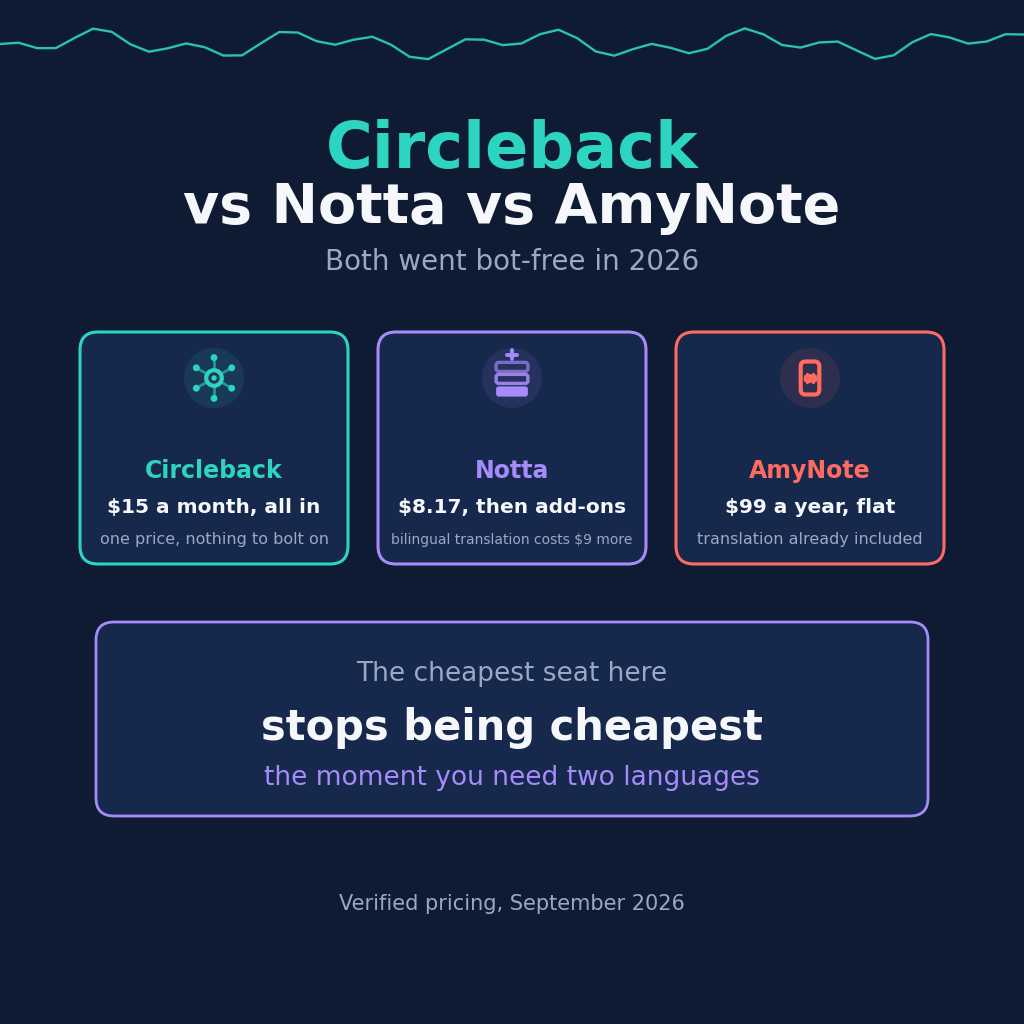
Strengths. Notta’s home page says “58 Languages Supported”. Pro costs $97.99 a year, billed annually, and includes 1,800 minutes a month, recordings up to five hours, custom vocabulary and “Transcript translation” for finished transcripts. It records through a bot or bot-free on Mac and Windows, and has iOS and Android apps. Students get a 50% education discount on Pro.
Its paperwork is the strongest here. The security page says Notta “has successfully obtained SOC 2 Type II certification”, and describes TLS 1.2 in transit with AES-256 at rest.
Weaknesses. Live translation is counted. The plan table gives every tier “Up to 2 free uses / month” of monolingual real-time translation and “Up to 4 free uses / month” of bilingual transcription and translation. Beyond that you buy add-ons, which Notta says are available only to Pro, Business and Enterprise:
- Monolingual Translation: $72 a year, or $10 billed monthly, up to 100 uses per account per month.
- Bilingual Transcription & Translation: $108 a year, or $15 billed monthly, up to 200 uses.
The free plan caps each conversation at three minutes. After cancelling a paid plan, the FAQ says you “can only view the first 3 minutes of the transcript.” On compliance, ISO 27001 and HIPAA are described as guidelines Notta “follows”, not certificates. Its privacy policy’s only no-training statement is scoped to Google Workspace API data.
AmyNote: Translation Included, iPhone Only
Strengths. AmyNote is an iPhone app that records in-person conversations and calls with no bot and no hardware. Its home page says it can “Transcribe 140+ languages, translate into 100+”, is “Optimized for East Asian & Arabic”, and lists real-time translation. There is one plan with every feature: $12.99 weekly, $19.99 monthly or $99 yearly, advertised as “Unlimited recordings” with “No hidden limits.” Translation is not sold as an add-on, and no per-use translation limit is published.
Its security page names Microsoft Azure for speech-to-text and translation, OpenAI for speech recognition and Anthropic’s Claude for analysis. It states “We don’t use your data to train AI models” and “We don’t require an account to use core features.” Recording and playback work “100% offline.”
Weaknesses, stated plainly. Notta Pro’s base price is lower: $97.99 a year against $99. AmyNote has no free plan, only a three-day trial, while both rivals offer permanent free tiers. No student discount is listed. It is iOS only, with no Android, Windows or Mac app. It records audio only, has no CRM integration, and sells no SSO.
It holds no SOC 2, ISO 27001, HIPAA or GDPR certification, and publishes no retention period, while Read AI publishes a two-year ceiling. Local-first is not local-only: live transcription and translation send audio or text to the cloud, where a processing copy may be retained. Transit uses TLS, which AmyNote specifically says it does not call end-to-end encryption.
The Year-One Math
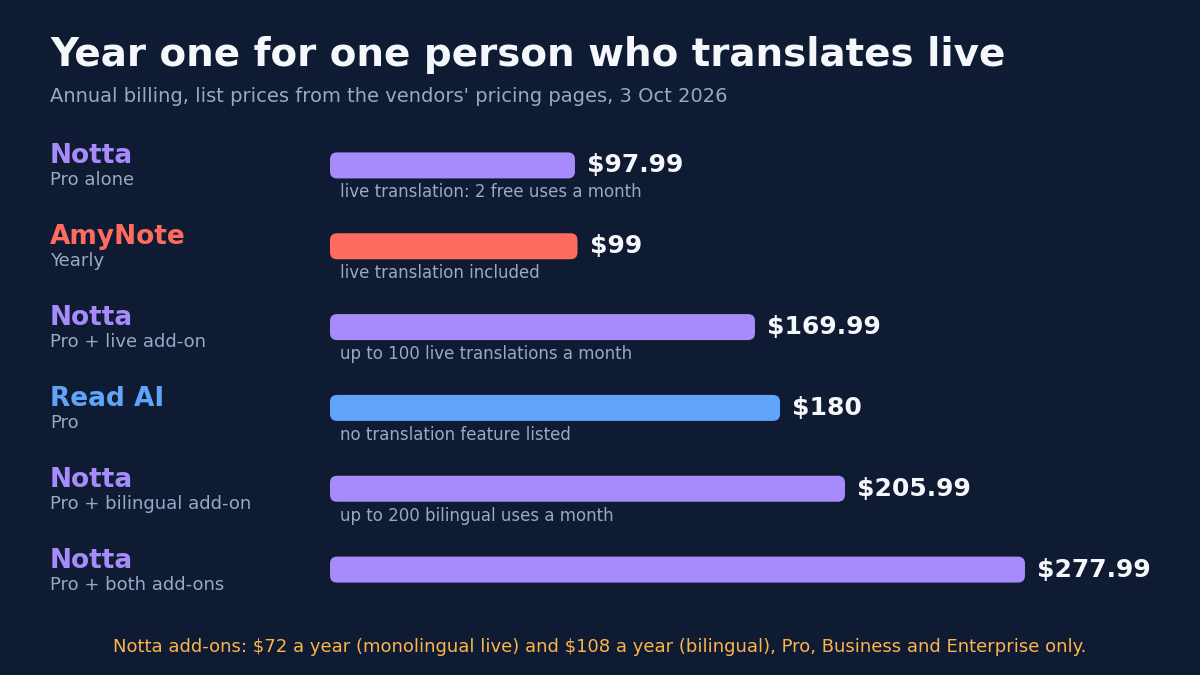
For one person on annual billing who translates every week:
- Read AI Pro: $180. No translation feature listed.
- Notta Pro alone: $97.99. Finished-transcript translation included, live translation 2 free uses a month.
- Notta Pro plus live translation add-on: $169.99.
- Notta Pro plus bilingual add-on: $205.99.
- Notta Pro plus both add-ons: $277.99.
- AmyNote: $99. Live translation included.
If you only translate after the meeting, Notta is the cheapest of the three. Once translation has to happen while people are still talking, the add-on line decides the bill. Someone who translates live every week uses more than two sessions a month, so the realistic Notta figure is the $169.99 line, or $205.99 if they want both languages side by side.
Which Kind of Translation Do You Actually Need?
The three products line up differently depending on when the translation has to exist:
- After the meeting, for the record. You review a transcript the next day and need it in your language. Notta Pro covers this in its base plan, and it is the cheapest route here. Read AI lists no translation for this case.
- During the meeting, a few times a month. An occasional call with an overseas partner. Notta’s two free monolingual uses and four bilingual uses a month may be enough, with no add-on needed.
- During the meeting, every week. A bilingual team, a regular supplier call, a client who switches languages mid-sentence. This is where Notta’s metering adds $72 to $180 a year, and where AmyNote’s flat plan is designed to sit, provided the conversation happens on an iPhone.
Side by Side
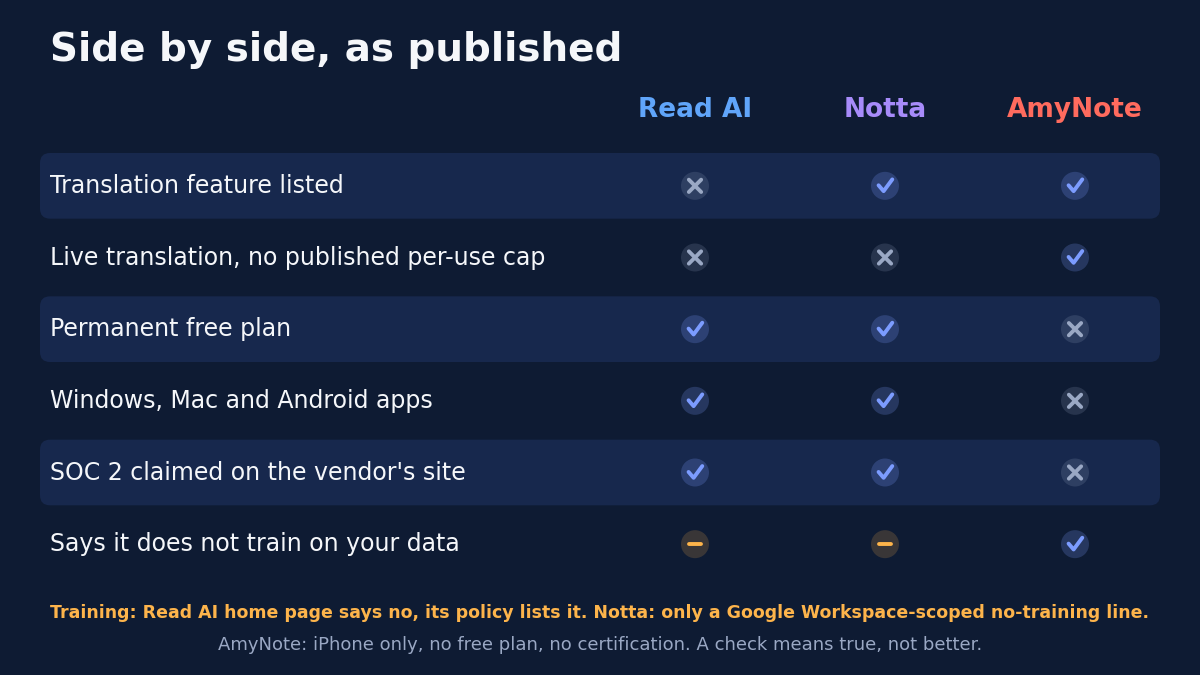
| Read AI | Notta | AmyNote | |
|---|---|---|---|
| Transcription languages | Reports in 16 | 58 | 140+ |
| Translation | None listed | Yes | Yes, into 100+ |
| Live translation metering | None listed | 2 free uses a month, then add-on | Included |
| Year one, weekly live translation | $180, no translation | $169.99 to $277.99 | $99 |
| Certification | Badges SOC 2 | SOC 2 Type II | None |
| Model training | Policy lists it, legitimate interest | No general statement | Says no |
| Platforms | Windows, Mac, iOS, Android | Windows, Mac, iOS, Android | iPhone only |
How to Test Translation Before You Buy
A pricing page can tell you a feature exists. Only a trial tells you whether it holds up in your meetings.
- Find the translation row, not the language count. Check whether translation is listed at all, and on which plan.
- Read the metering line. “Uses per month” is a budget. Count your mixed-language meetings in a typical month and compare.
- Test a real mixed-language conversation. Switch languages mid-meeting, then check whether both halves appear in the notes and the translation.
- Check what survives cancellation. If your transcripts become partly unreadable after you stop paying, export what you need first.
The Bottom Line
Language counts measure transcription, not understanding. Read AI writes notes in the language most people spoke, which suits single-language teams and leaves bilingual meetings half documented. Notta translates, cheaply after the fact, and charges by the use when you need it live.
AmyNote is narrower: an iPhone, an in-person or phone conversation in two languages, and live translation inside one price. It is the wrong choice if you need a desktop app, a free plan or a certificate for procurement. Before choosing, ask one question: how many times a month can I translate a meeting live, and what happens on the next one?
Originally published as an X Article by @AmyNoteApp.