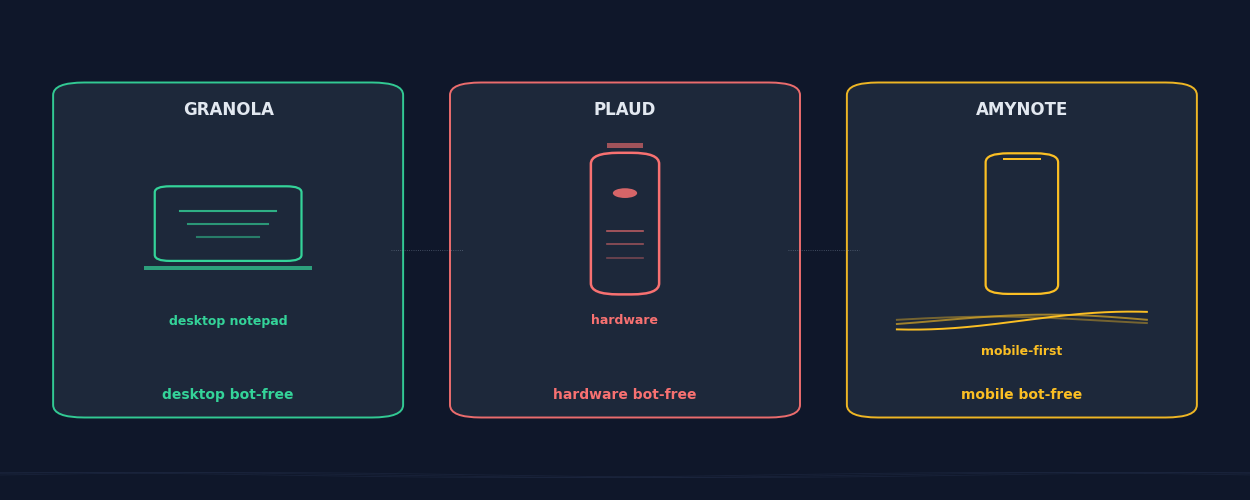
Three of the most-searched bot-free meeting tools in 2026 sit in three completely different form factors. Granola is a Mac and Windows desktop notepad that listens to your system audio and writes the notes for you. Plaud Note Pro is a 1-ounce hardware recorder that clips to your phone and ships audio to a cloud AI. AmyNote is a pure mobile app that captures the conversation in front of you with no bot and no hardware.
All three skip the meeting bot, but they bet on three different surfaces for capture. That sounds like a small distinction. In practice it determines which meetings actually get recorded, which ones get lost, and which ones never had a chance.
Quick Verdict
Granola wins if your day is back-to-back video calls on a laptop and you want polished notes generated as the meeting happens. $14 per seat per month for unlimited, with a tiny free tier and a default opt-in to AI training to plan around.
Plaud Note Pro wins if you record real-world conversations away from a laptop and you do not mind carrying a device. $189 device, dual-mode capture for phone calls and in-person meetings, 30-hour battery, free 300 minutes of AI per month.
AmyNote wins if your meetings happen anywhere a phone can record, you want zero hardware to charge, and no bot in any call. Pure iOS app, 120-plus languages, OpenAI and Anthropic privacy contracts, 3-day free trial without a credit card.
What We Compared
Five axes per product: capture surface, pricing, AI quality, privacy posture, and where each tool actually breaks. All pricing was verified against vendor sites in June 2026. We left out feature-list bingo because the feature list is rarely what determines whether the tool actually captures the meeting you needed captured.
Granola: The Desktop Notepad For Back-To-Back Meetings
Strengths. Granola is purpose-built for the laptop-bound meeting worker. The app sits in the background on Mac or Windows, listens to system audio and microphone, and produces a clean structured note as the meeting runs. The note layout is the cleanest in the category, integrations push directly into Notion, HubSpot, Attio, Affinity, Slack, and Zapier, and the company raised $125 million at a $1.5 billion valuation in March 2026. It feels less like a transcription tool and more like a notepad that pays attention.
For a sales lead, a customer success manager, or a venture investor whose calendar is a wall of thirty-minute Zooms, that bet pays off. Templates feel calm. The notes update live during the call so you can correct the AI as it goes. The Notion and HubSpot push covers most CRM workflows without configuration.
Pricing. Free covers 25 meetings total for the lifetime of the account. Business unlocks unlimited meetings and integrations at $14 per seat per month. Enterprise is $35 per seat per month for SSO, API access, and org-wide opt-out of model training.
Weaknesses. Granola is desktop only. Mac, Windows, and a recent iOS app, with no Android and no web. The recording method requires the desktop app running on the same device where the meeting audio plays, so phone calls on the train, hallway conversations, or in-person meetings without a laptop on the table are all out of scope. The free plan caps at 25 lifetime meetings, not 25 per month, which most active users hit inside a few weeks. And meeting data is used to train Granola's AI models by default, with org-wide opt-out gated behind the $35 Enterprise tier. For a regulated team, that default is the thing to flip on day one.
Plaud Note Pro: Hardware Recorder For Real-World Conversations
Strengths. Plaud Note Pro is a 0.12-inch thin, 1.06-ounce recorder that clips magnetically to the back of a phone. The 4 MEMS plus 1 VPU microphone array captures voices up to 16.4 feet away, the device runs 30 hours on a charge, and a dual-mode switch toggles between phone-call pickup and ambient mode for in-person meetings. Forbes named it a 2026 Best AI Wearable and it took an iF DESIGN AWARD in 2026.
The hardware story is what differentiates Plaud. A laptop on a cafe table is awkward. A phone face-down on the table with a small device clipped to it is unremarkable. For field reps, journalists, executives in town-hall settings, and anyone whose recordable conversations happen away from a keyboard, Plaud captures meetings that software-only tools simply cannot reach.
Pricing. Hardware is $189. Each device ships with a free Starter plan of 300 AI transcription minutes per month. Pro is $99.99 per year (or $17.99 monthly) for 1,200 minutes per month plus advanced features. The math works out cheaper than a SaaS subscription if you are a moderate user.
Weaknesses. Reviewers note three recurring pain points in 2026. The magnetic charging cable is proprietary, which gets frustrating on a trip. The Plaud companion app is buggy enough that sync delays and failed uploads appear in user reports through Q1 and Q2 2026. Summary quality depends on the cloud AI pipeline, with December 2025 reviews flagging disconnected notes and weak summaries that required prompting. And every minute over the free tier needs a subscription, so heavy users stack a $189 device cost with a $99 yearly plan. The other practical friction is that hardware adds a step before every meeting: charge the device, clip it on, remember the mode switch. Software tools start automatically.
AmyNote: Mobile-First Capture For Conversations Outside The Call
Strengths. AmyNote is a pure iOS app. It records the conversation in front of you with the phone in your pocket, with no bot in any video call and no separate hardware to charge or pair. Transcription runs through OpenAI's Speech API. AI analysis, summaries, and semantic search are powered by Anthropic's Claude Opus. Language coverage is 120-plus with real-time translation. Cross-session speaker memory identifies recurring participants without re-tagging them every meeting.
The mobile-first shape matters more than the spec list suggests. The meetings that most need capture are often the ones nobody planned to record. A hallway decision after a board meeting. A vendor pitch in a cafe. A founder pitch to an angel investor at dinner. A clinician's between-patient debrief. None of those have a laptop on the table. All of them have a phone.
Privacy architecture is the headline. Both OpenAI and Anthropic contractually guarantee zero training on user data. Audio is encrypted in transit; processing copies may be retained to deliver and recover requested features. All transcripts and recordings are stored locally on the device with encrypted transport. 3-day free trial, no credit card. For attorneys, clinicians, journalists, and anyone whose recordings should not sit on a third-party drive after the call ends, that architecture is the decision point.
Weaknesses. No desktop app, so a Granola-style "notepad on the laptop while I take a Zoom call" workflow is not the right fit. No CRM integrations today. No video recording. Smaller brand than Plaud or Granola. No team or enterprise tier yet. If your day is 90 percent of Zoom calls on a laptop with HubSpot sync, this is the wrong tool. Pick the one that matches where your meetings actually happen.
Side-by-Side Comparison
| Granola | Plaud Note Pro | AmyNote | |
|---|---|---|---|
| Capture surface | Mac or Windows desktop | Hardware device, clips to phone | Pure iOS app |
| Best for | Back-to-back Zoom/Meet calls | In-person, phone, ambient | Mobile, multilingual, in-person |
| Free tier | 25 lifetime meetings | 300 min/month with device | 3-day full trial, no card |
| Paid entry | $14 / seat / month | $189 device + $99/year | Flat subscription |
| Languages | Not the priority | Cloud LLM coverage | 120+ with translation |
| Training opt-out | $35 Enterprise tier | Cloud retention | Contractual zero-training |
Privacy posture. Granola: audio processing copies may be retained to deliver and recover requested features, but meeting data defaults to AI training, with org-wide opt-out only on the $35 Enterprise plan. Plaud: audio uploaded to Plaud cloud, SOC2 and ISO 27701 certified, cloud processing on third-party LLMs. AmyNote: transcripts and recordings stored locally on the device with encrypted transport, and both AI providers contractually guarantee zero training on user data.
Where each one breaks. Granola breaks the moment the meeting leaves the laptop, and the 25-meeting lifetime cap on the free tier is a hard wall most users hit inside a month. Plaud breaks on the proprietary charging cable and the companion-app sync issues that show up in reviews through Q1 and Q2 2026, plus a subscription bill stacked on top of $189 of hardware. AmyNote breaks on desktop-first workflows, CRM sync, and team admin features.
How To Pick
Start with where the meeting you keep losing actually happens. Not the average meeting on the calendar, but the one that gets away. The decision-makers' hallway conversation after the formal call. The vendor lunch where the buying signal showed up. The patient debrief between rooms. The interview in a language other than English. Whichever tool catches that meeting is the one worth paying for.
The second filter is sensitivity. Sales discovery is fine in the cloud. A board conversation, an HR situation, an attorney call, a deal under NDA, or any clinical conversation that should not sit on a third-party drive after the call ends — the local-storage architecture stops being a nice-to-have and becomes the only acceptable answer.
The Bottom Line
Pick Granola if your job is back-to-back Zoom or Meet calls on the same laptop you live in all day, and you want a polished notepad that does most of the writing for you. Plan around the lifetime free cap and flip the training opt-out on day one.
Pick Plaud if a real fraction of your meetings happen in person or over the phone, you do not mind carrying a small device, and you prefer one-time hardware over a SaaS bill. The 30-hour battery and dual-mode capture earn the $189 if you actually use them.
Pick AmyNote if your meetings happen anywhere a phone can record, you want zero hardware to charge and no bot in any call, and you care about who can read your transcripts later. The 120-plus language support and the OpenAI-plus-Anthropic privacy contracts matter most when you are recording conversations a desktop app and a CRM were never going to see. Find it at amynote.app.
Originally published as an X Article.