A customer on a Zoom call says the export button is the reason the team is evaluating a competitor. On Thursday, five users sit in a conference room for a usability test and two of them get stuck on the same screen. On Friday, the engineering lead asks for proof before reprioritizing the sprint.
A product manager needs evidence that someone else will act on: a clip, a quote, a ticket. A summary that says “users found the flow confusing” rarely moves a sprint. The customer saying it, in their own words, often does. This roundup compares four tools, Granola, tl;dv, Fathom and AmyNote, on what actually reaches the engineer, using only what each vendor publishes about itself.
Quick Verdict
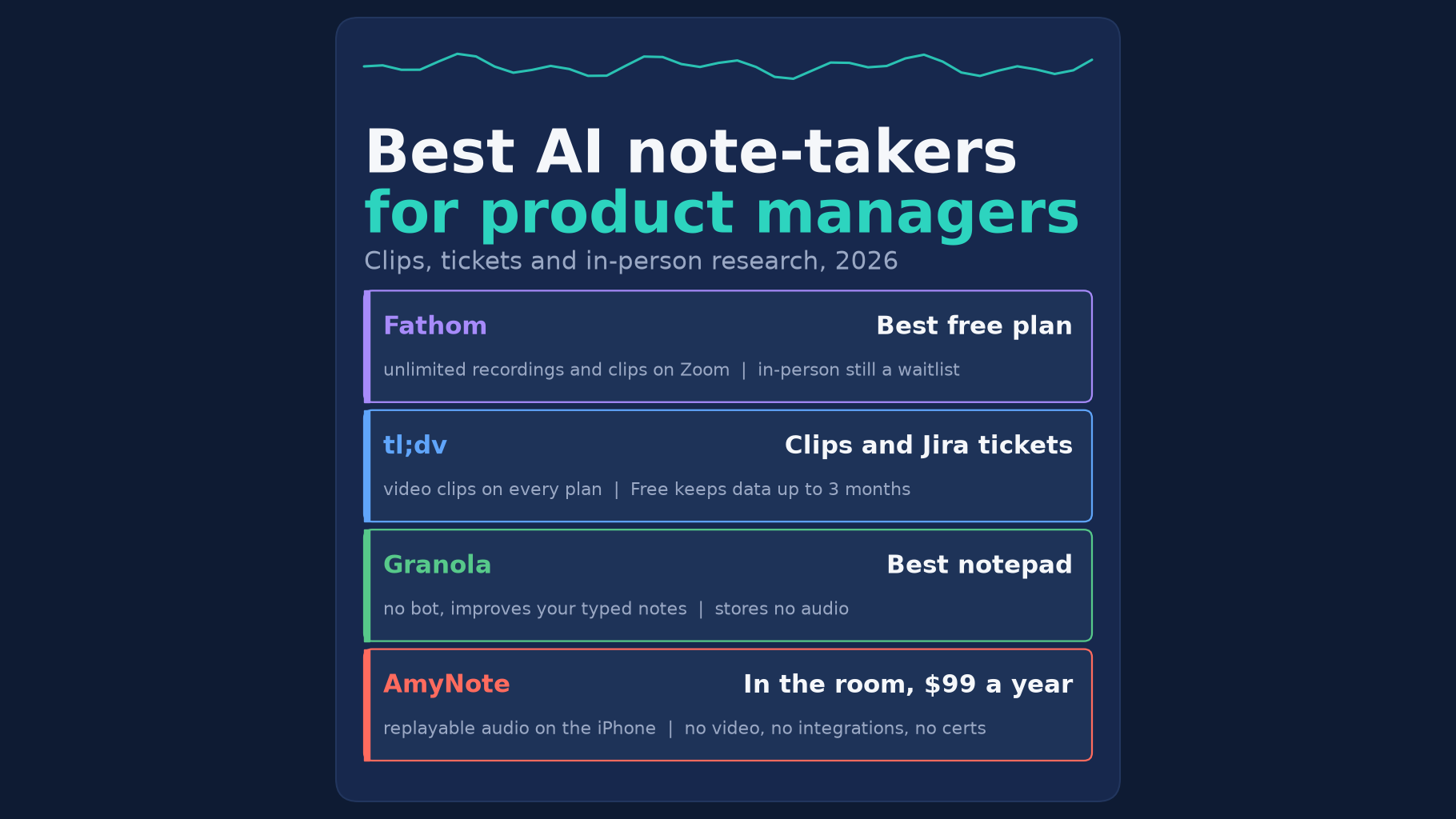
- Best free plan for customer calls: Fathom. Free includes unlimited recordings, transcripts and clips, with no expiry. In-person capture on iOS is still a waitlist.
- Best for turning calls into tickets: tl;dv. It records video, makes shareable clips on every plan and lists a Jira integration that creates tickets from bugs raised in meetings. Free keeps data for up to 3 months.
- Best for PMs who type their own notes: Granola. It joins no call and improves the notes you write. It stores no audio, so there is no clip to send.
- Best for in-person sessions on an iPhone: AmyNote. It costs $99 a year, keeps replayable audio and transcribes 140+ languages. It has no video, no integrations, no free plan and no certifications.
What We Compared
We read each vendor’s pricing, privacy and product pages on October 18, 2026 and asked five questions:
- Evidence. Can you send an engineer a recording or clip, not just a summary?
- Handoff. Does it push notes into Jira, Notion, Slack or a task tool?
- In the room. Can it record a usability test or design review with no laptop on the table?
- History. How long does the free plan keep your research?
- Privacy. Does the vendor train AI on your customers’ words?
We also priced one PM for one year on the cheapest paid plan. We did not test transcript accuracy. For a PM, the deciding questions are whether the tool can hear the conversation at all, and whether what it produces is something an engineer will open.
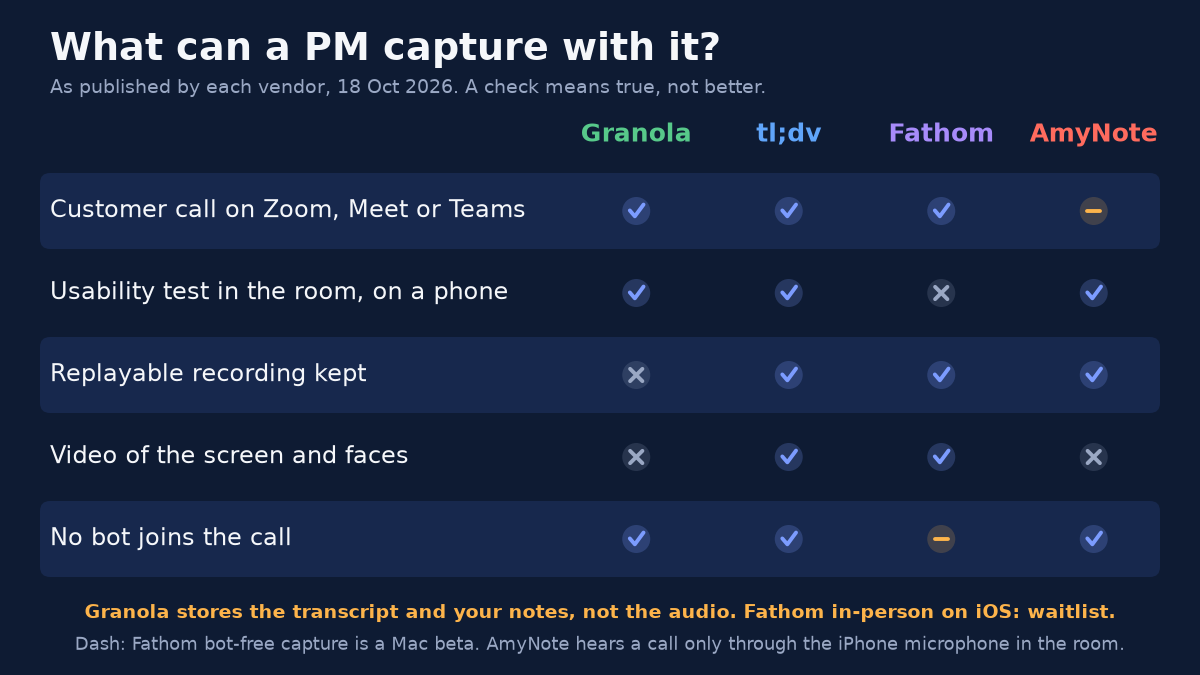
Granola: The Best Notepad, but No Recording
Strengths. Granola captures your computer’s audio, so no bot joins the call, and it runs on macOS, Windows, iOS and Android. It is built around the notes you type and fills in what you missed. Business costs $14 a user a month and adds unlimited history plus integrations with Notion, Slack, HubSpot, Attio, Affinity and Zapier, with MCP and API access.
Weaknesses. Granola’s security page says it does not store meeting audio, only the transcript and your notes. So there is no clip of the customer saying it. Basic, the free plan, keeps 30 days of history. Granola is billed monthly with no annual discount, supports 32 languages on desktop and 10 on mobile, and trains on anonymized data by default, with a one-click opt-out.
Who it suits. A PM who already takes good notes during calls and wants them sharpened and pushed into Notion or Slack, and who does not need to replay the customer’s voice later.
tl;dv: Clips and Tickets
Strengths. tl;dv records video and makes shareable clips on every plan, Free included. Its integrations page lists Jira, where it can create tickets from bugs or to-dos raised in a meeting, and Pro adds 5,000+ apps through Zapier. The home page says no bot is required, and the mobile apps for iOS and Android have unlimited recording capacity. Its privacy policy says it does not use customer content to train AI models.
Weaknesses. Free keeps data for up to 3 months, writes AI notes for only 10 meetings and does not let you download a recording. Pro costs $18 a seat a month billed annually or $29 monthly, and Business costs $29 or $39. Every plan caps a recording at 3 hours, and transcription covers 30+ languages, the fewest here.
Who it suits. A PM whose team lives in Jira and who wants a bug raised on a customer call to land in the backlog with a clip attached, without retyping it.
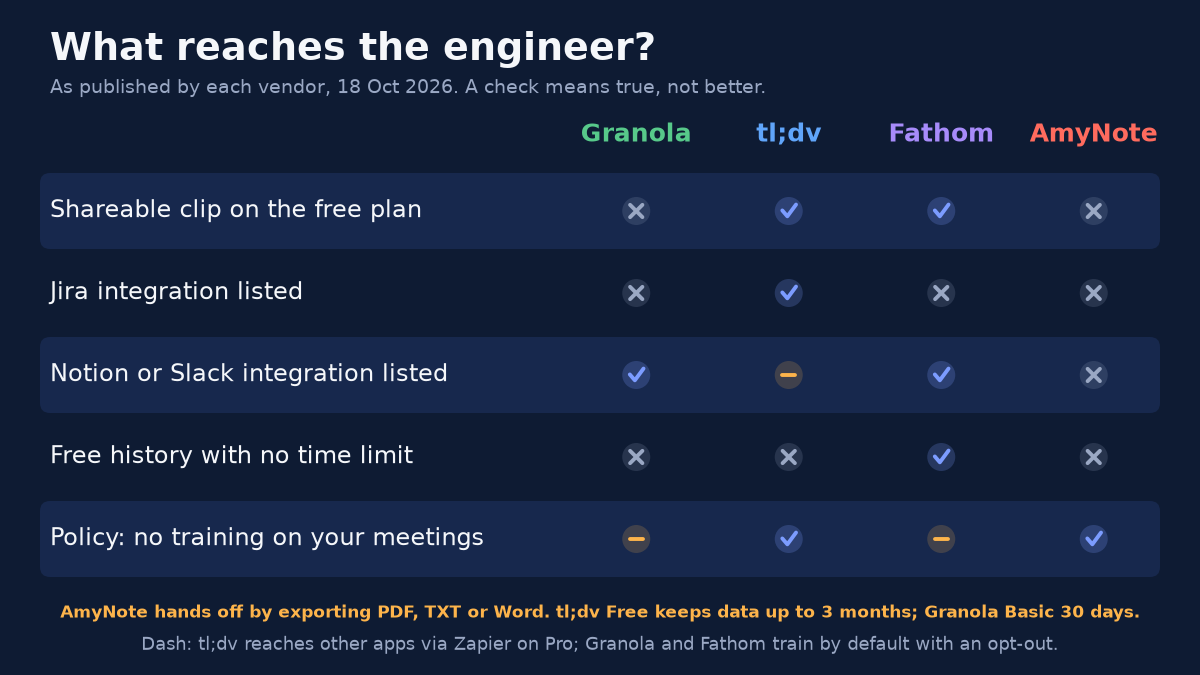
Fathom: Unlimited and Free, if It Happens on Zoom
Strengths. Fathom’s Free plan includes unlimited recordings and transcriptions, with clips, playlists and search across calls. Integrations include Asana, Notion, Slack, HubSpot and Salesforce, and it can send meetings to Claude and ChatGPT. Premium costs $16 a month billed annually or $20 monthly, and its help center lists 38 transcript languages.
Weaknesses. Fathom works on Zoom, Google Meet and Teams. Its iOS page still asks you to join a waitlist for the official app that captures in-person meetings, so a usability test in a conference room is out of reach today. Bot-free capture is a Mac beta. We found no Jira or Linear integration on its list. Its privacy policy allows training on de-identified meeting data unless you opt out in settings.
Who it suits. A PM whose customer research happens almost entirely on video calls and who wants a searchable, clip-ready archive without paying for it.
AmyNote: In the Room, Not in the Ticket
Weaknesses first. AmyNote records audio, not video, and has no integration with Jira, Notion, Slack or anything else. Handoff means exporting a PDF, TXT or Word file yourself. It runs on iPhone and iPad only, with no desktop app and no meeting bot. There is no free plan beyond a 3-day trial, and it publishes no SOC 2, ISO 27001 or HIPAA certification.
Strengths. AmyNote records a usability test or design review on a phone, with no laptop, and needs no account for core features. The audio stays replayable, so you can find the exact moment a user got stuck. It names speakers once and remembers them in later sessions, which suits a recurring customer panel. It transcribes 140+ languages and translates into 100+. Pricing is flat: $99 a year, $19.99 a month or $12.99 a week.
Privacy. AmyNote says it does not use your data to train AI models and does not sell meeting content. Transcription and AI run through Microsoft Azure, OpenAI and Anthropic’s Claude, behind Cloudflare, with TLS in transit, and AmyNote says that is not end-to-end encryption. The saved library lives on the PM’s iPhone. Local-first is not local-only: when a transcript or summary runs, the audio or text is uploaded and a processing copy may be retained in AmyNote’s cloud.
Who it suits. A PM who runs usability tests, design reviews and customer visits in person, sometimes with participants who speak more than one language, and who is happy to hand off with an exported file.
Side-by-Side Comparison
- Video clips to share: tl;dv and Fathom, both on Free. Granola and AmyNote no.
- Replayable audio: tl;dv, Fathom and AmyNote. Granola stores none.
- Ticket and task handoff: tl;dv lists Jira. Fathom lists Asana. Granola lists Notion and Slack. AmyNote exports files only.
- In-person on a phone: Granola, tl;dv and AmyNote. Fathom is on a waitlist.
- Free history: Fathom unlimited. tl;dv up to 3 months. Granola 30 days. AmyNote has a 3-day trial.
- Trains on your meetings: tl;dv and AmyNote say no. Granola and Fathom do by default, with an opt-out.
- Languages: AmyNote 140+. Fathom 38. Granola 32 on desktop. tl;dv 30+.
- One PM, one year, cheapest paid plan: AmyNote $99. Granola $168. Fathom Premium $192. tl;dv Pro $216.
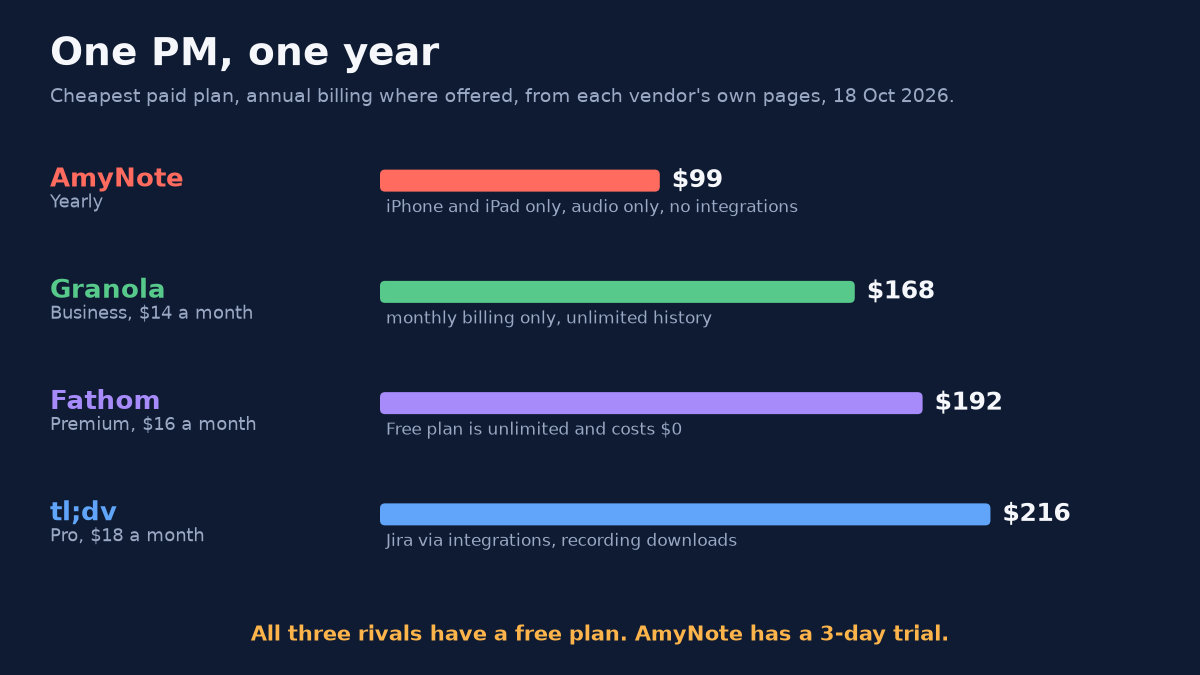
Choosing the Right Tool for Your Product Work
The vendor pages answer what each tool can do. Which one fits depends on where your research actually happens and what your engineers will open. A few questions settle it quickly:
- Where does the evidence come from? If nearly every customer conversation is a Zoom, Meet or Teams call, Fathom and tl;dv both cover it, with video. If usability tests and design reviews happen in a room, Fathom’s in-person app is still a waitlist; tl;dv, Granola and AmyNote all run on a phone.
- Does the engineer need to see it, or just read it? A clip of a user hesitating on a screen is stronger than a sentence describing it. Only tl;dv and Fathom keep video. Granola keeps no recording at all.
- Where should the note land? If the backlog is in Jira, tl;dv is the only tool here that lists it. If the team plans in Notion or Slack, Granola and Fathom list those. AmyNote leaves you to export and paste.
- How far back does your research go? Discovery themes build over quarters. Granola’s free 30 days and tl;dv’s free 3 months are enough for this sprint, not for spotting a pattern across a year of interviews. Fathom’s free history has no time limit.
- Are your customers comfortable with training? tl;dv and AmyNote say they do not train on meeting content. Granola and Fathom do by default, with an opt-out you have to remember to switch on.
The Bottom Line
If your customer calls happen on Zoom, start with Fathom: the free plan is unlimited and the clips are free. If you want calls turned into Jira tickets, pick tl;dv. If you take your own notes and want them sharper, Granola is the best notepad here, with no recording to share.
AmyNote is for the PM who runs usability tests, design reviews and customer visits in person, on an iPhone, sometimes in more than one language. It costs $99 a year, keeps replayable audio on the phone and does not train on your customers’ words. It will not clip a video or file a ticket for you. It is on the App Store with a 3-day trial.
Originally published as an X Article by @AmyNoteApp.