A product team runs its weekly sync in English. The engineering standup after it runs in Japanese. Twice a month the same people sit in a room in Taipei with a partner who switches between Mandarin and English mid-sentence.
Most AI note-takers are built for the first meeting and quietly fail at the third. Vendors advertise language counts because they fit on a pricing page, but a count tells you almost nothing about whether a tool survives a meeting where two languages are actually in play.
Here are four tools measured against what matters for cross-language work: how many languages each really transcribes, what translation costs, whether mixed-language meetings work at all, and what happens when the conversation is in a room instead of on a call. All figures verified August 2026.
Quick Verdict
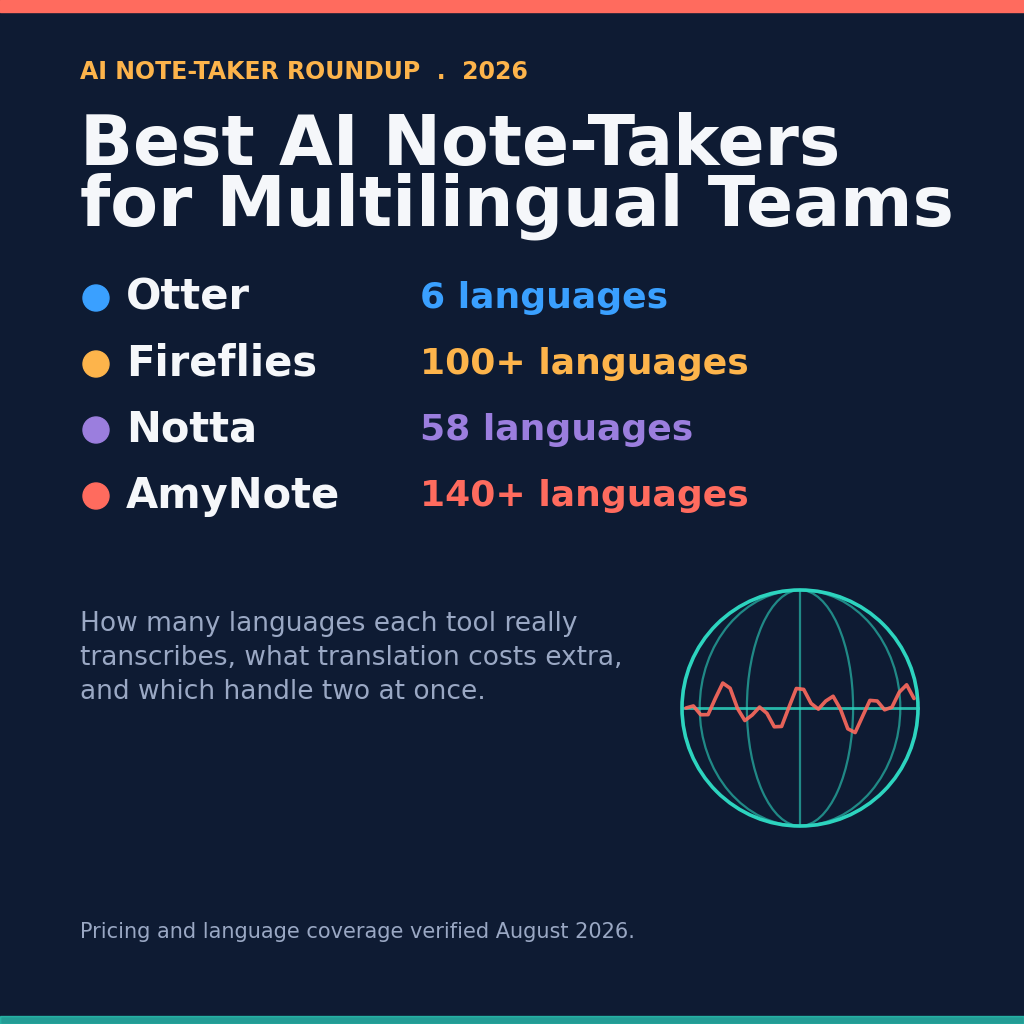
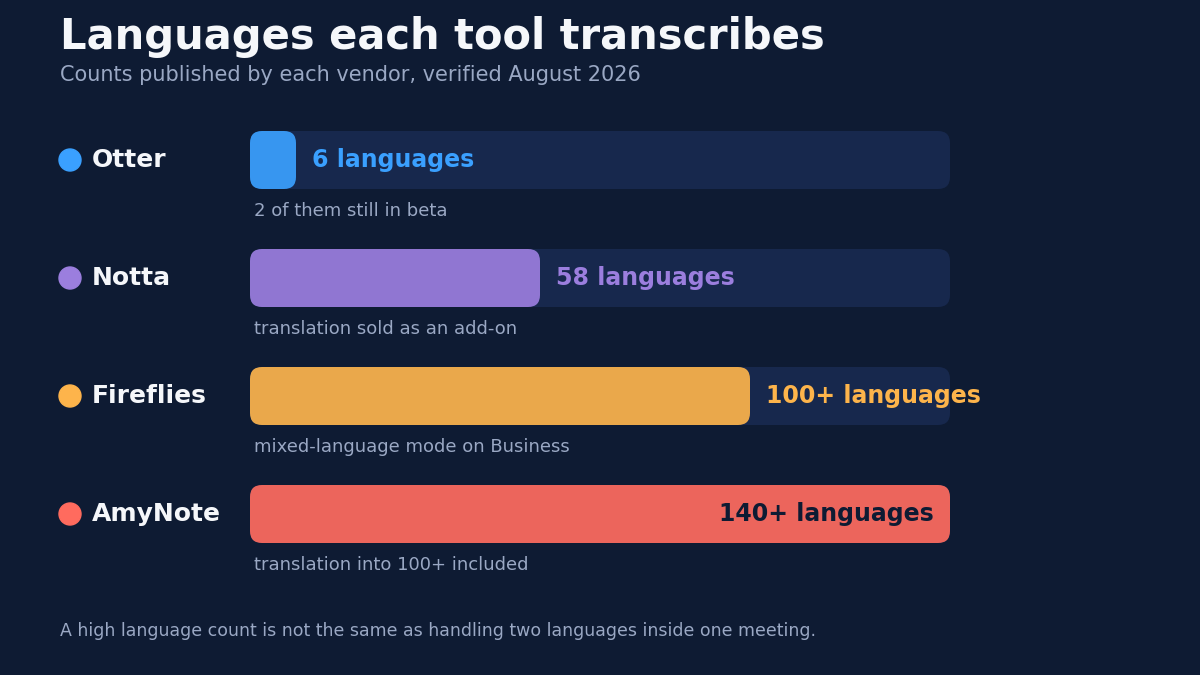
Otter is the English accuracy leader and the weakest fit here. Six languages, two still in beta, one language per conversation.
Fireflies has the broadest coverage on paper at 100+ languages, but the Multi-language Mode that handles mixed-language meetings only appears on Business.
Notta is the specialist, with the most granular multilingual feature set of the four including true bilingual transcription, sold as an add-on stacked on the plan price.
AmyNote covers the most languages at 140+ with translation into 100+ included, and is the only one built to record an in-person conversation without a bot. It is also iOS only, which rules it out for many teams before language matters.
What We Compared
- Real language coverage. Not the marketing number, the published transcription list.
- Mixed-language meetings. Whether two languages can coexist in one conversation, and what tier that costs.
- Translation cost. Included, tier-gated, or billed separately.
- In-person capture. Cross-language work skews in-person: site visits, conferences, partner meetings. A bot that joins video calls cannot help there.
That last criterion is the one most roundups skip, and for a team working across languages it is often the deciding one. The meetings where language friction is highest — a factory walkthrough with a supplier, a partner dinner, a conference hallway conversation that turns into a term sheet — are exactly the meetings with no calendar invite and no video link for a bot to join.
Otter: Strong English, Thin Everywhere Else
Otter transcribes English, Spanish, French, German, Japanese, and Chinese (Simplified). German and Chinese are still labeled beta. That is the whole list, on every plan — there is no higher tier that unlocks more languages.
The harder limit is structural rather than numeric. Otter transcribes one language per conversation, chosen in settings before you start. A meeting that moves between English and Japanese gives you one usable half and one half of noise. Multi-language transcription is on the roadmap but is not shipping today, and no amount of paying more changes that.
Strengths. Best-in-class accuracy on clean English audio, real-time collaborative notes, OtterPilot auto-join across Zoom, Meet and Teams, and mature speaker identification. If your team is English-first with occasional Spanish or French sessions that stay entirely in one language, none of the limits above will bite.
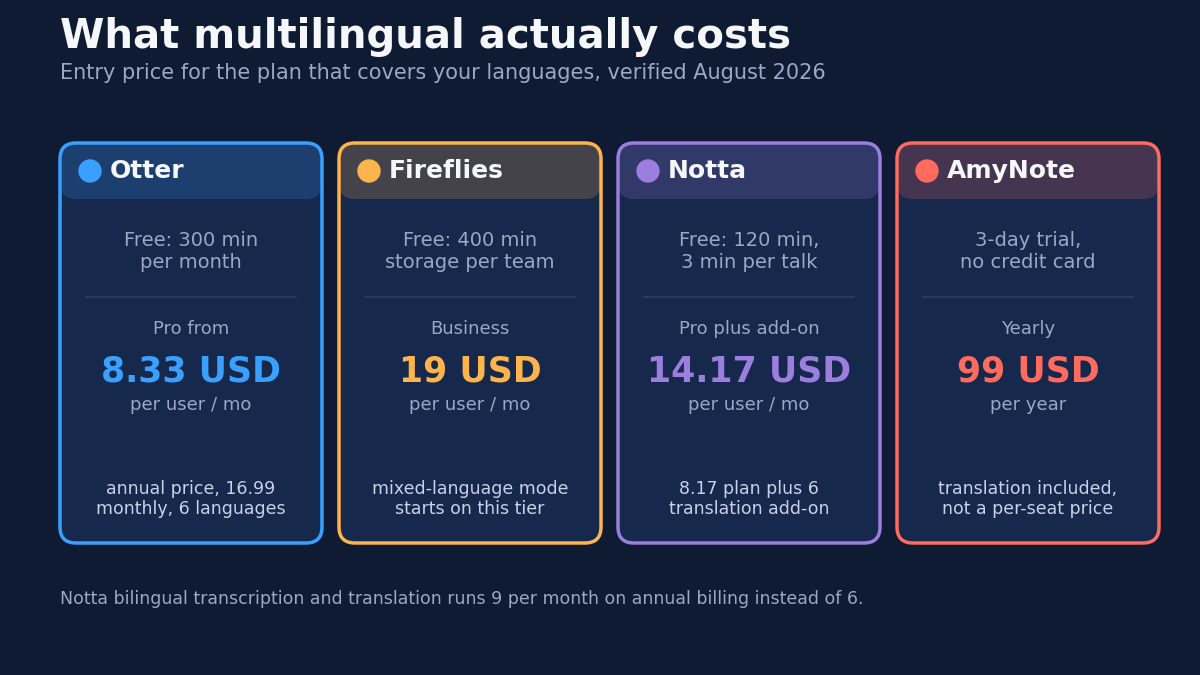
Weaknesses. Six languages, two in beta. No multi-language mode. No translation at all, so a Japanese transcript stays Japanese and anyone who does not read Japanese gets nothing from it. Basic is free with 300 minutes a month and a 30-minute cap per conversation; Pro is 8.33 USD per user monthly on annual billing or 16.99 monthly for 1,200 minutes; Business is 19.99 annual or 30 monthly with unlimited meeting transcription.
Fireflies: Broad Coverage, Mixed-Language Behind a Tier
Fireflies transcribes 100+ languages with automatic detection, on every plan including free. For breadth alone it beats the other two incumbents, and the automatic detection means nobody has to remember to set the language before a call.
The catch is placement rather than capability. Multi-language Mode, which handles more than one language inside a single meeting, starts on Business at 19 USD per user monthly on annual billing, or 29 monthly. A five-person team that needs it commits to roughly 1,140 USD a year — for a feature that a team meeting across languages will use in most of its meetings, not as an occasional extra.
The free plan also reads better than it behaves. Unlimited transcription and unlimited AI summaries sound generous, but the team shares 400 minutes of storage and 20 AI credits. Recordings past that ceiling are not there when you go back for them, which is a different thing from not being transcribed — you find out weeks later, when you need the meeting.
Strengths. 100+ languages on every tier including free. AskFred search across the whole archive. Roughly 40 integrations, including CRM sync. Pro at 10 USD per user monthly on annual billing (18 monthly) with 8,000 minutes of storage per seat is competitive for monolingual work; Enterprise is 39 on annual billing only.
Weaknesses. A bot joins the meeting and everyone sees it, which lands differently with an external partner than with your own team. Mixed-language handling requires Business. No translation feature, so wide coverage still leaves you with a transcript in a language half your team cannot read. Built for video calls, so in-person means recording separately and uploading.
Notta: The Specialist, With an Add-On Bill
Notta publishes the most detailed multilingual breakdown here, and notably it is not one number:
- 58 languages for monolingual transcription
- 42 languages for translation after transcription
- 36 source and 61 target languages for real-time monolingual translation
- 23 languages for bilingual transcription and translation
The fact that these are four different numbers is the useful part. It reflects how the capability actually works: transcribing a language, translating it afterwards, translating it live, and handling two at once are four separate engineering problems, and no vendor solves all four across the same list. Notta is the only one of the four that publishes the distinction plainly.
That bilingual mode is the real differentiator. It handles a conversation where two languages are both live — exactly what Otter cannot do and Fireflies gates behind Business — across 23 language pairs.
Pricing is where it complicates. Pro is 8.17 USD monthly on annual billing (97.99 a year) for 1,800 minutes; Business is 16.67 per seat monthly on annual billing (199.99 a year) for unlimited minutes. Translation is in neither. Monolingual translation is a 6 USD monthly add-on on annual billing; bilingual transcription and translation is 9 monthly on annual billing, or 15 on monthly billing. A Pro seat with bilingual capability is 17.17 per month, which is above Fireflies Business — so the 8.17 headline is not the number a multilingual team pays. The free plan is effectively a demo: 120 minutes monthly with a three-minute cap per conversation.
Strengths. The most precise multilingual feature set of the four. Speaker-labeled transcripts, custom vocabulary on Pro, mobile apps plus optional hardware.
Weaknesses. Translation stacks on the plan price. Bot-based for web meetings. The three-minute free cap makes real evaluation impossible — you cannot test bilingual handling on a three-minute conversation, which is the exact thing you would want to test.
AmyNote: Widest Coverage, Bundled Translation, One Platform
AmyNote transcribes 140+ languages and translates into 100+, with real-time processing and automatic speaker detection across languages. It specifically calls out optimization for East Asian and Arabic, where thinner tools degrade first — which matters, because a generic "100+ languages" claim usually means excellent coverage for the top ten and something much rougher for the rest.
Two things separate it structurally rather than incrementally. Translation is included rather than metered or tier-gated — one price for both capabilities, so the multilingual math is the same as the monolingual math. And it records the room in front of you with no bot joining anything, which is the case none of the bot-based tools cover.
Pricing is 12.99 USD weekly, 19.99 monthly, or 99 yearly, with a three-day trial and no credit card. It is a flat account price rather than per seat, which changes the arithmetic against 19-per-user tools in a way that gets more pronounced as the team grows — though see the team-tier caveat below before reading that as a straight win.
On privacy: transcription runs through the OpenAI Speech API, analysis through Anthropic's Claude Opus. Both providers contractually guarantee zero training on user data. Audio is encrypted in transit and not retained after processing, and transcripts are stored locally on device with end-to-end encryption. For partner negotiations and supplier conversations conducted across languages, that default is worth more than a feature checkbox.
Weaknesses, honestly. AmyNote is iOS only. No Android, no desktop, no web client — a hard stop for many distributed teams regardless of language coverage, and a particular problem for exactly the international teams this article is about, where Android share is high in a lot of markets. No CRM integrations, so nothing flows into HubSpot or Salesforce the way Fireflies and Notta manage. No video recording. No team tier, which means no SSO, no admin console, and no centralized billing — so the flat price is a per-person purchase your team members each make, not a plan an admin provisions.
Side-by-Side Comparison
| Otter | Fireflies | Notta | AmyNote | |
|---|---|---|---|---|
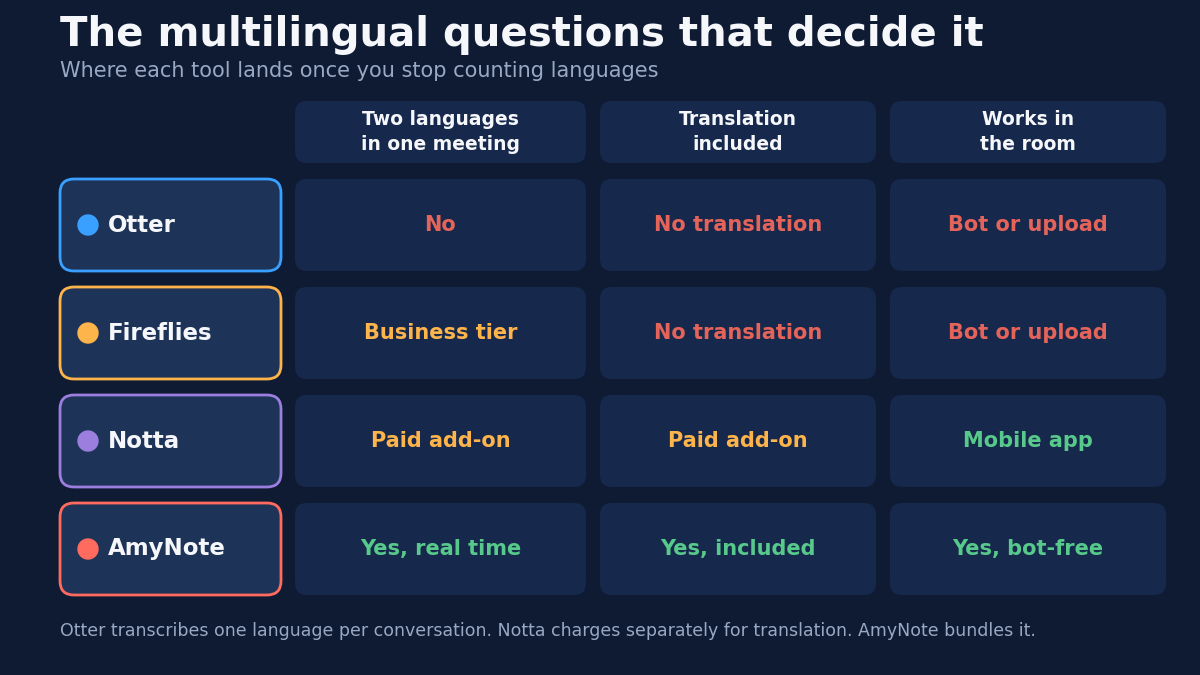
| Transcription languages | 6 (2 beta) | 100+ | 58 | 140+ |
| Translation | None | None | Paid add-on, 6 or 9 USD/mo | Included, into 100+ |
| Two languages in one meeting | No | Business only | Bilingual add-on, 23 languages | Yes, real time |
| In-person capture | Bot or upload | Bot or upload | Mobile app | Bot-free, built for it |
| Entry price for multilingual work | 8.33 USD/user/mo | 19 USD/user/mo (Business) | 14.17 USD/mo (8.17 + 6) | 99 USD/yr flat |
| Free tier reality | 300 min/mo | 400 min team storage | 120 min, 3-min cap | 3-day trial only |
| Platforms | Web, iOS, Android | Web, iOS, Android | Web, iOS, Android | iOS only |
| Biggest limitation | Six languages, one at a time | Mixed-language gated to Business | Translation billed separately | iOS only, no team tier |
How to Choose in Practice
The decision usually collapses to two questions, asked in order.
First: does any single meeting contain more than one language? If every meeting stays inside one language and you simply have many languages across the org, this is an easy call — Fireflies covers 100+ on every tier and you never touch the Business gate. If meetings genuinely mix languages, Otter is out entirely, and the real contest is between paying Fireflies Business, adding Notta's bilingual add-on, or using a tool that bundles it.
Second: where do the conversations that matter actually happen? If they are on Zoom, the bot-based tools are fine and the integrations are a real advantage. If the important ones happen across a table — and for cross-border work they usually do — then three of these four are solving a different problem than the one you have.
One practical note on evaluation: test each tool on your hardest meeting, not your easiest. Every one of these transcribes a clean English Zoom call well. The differences only appear when two people talk over each other in different languages, in a room, with background noise. That is also the meeting you most need a record of.
The Bottom Line
English-first teams with occasional Spanish or French should stay on Otter. Teams spanning many languages where each meeting stays inside one of them get the broadest coverage from Fireflies. Teams needing real bilingual transcription in a supported pair should take Notta, as long as they price the add-on in rather than reading the 8.17 headline.
If the cross-language conversations that decide things happen face to face, the calculation changes. A bot that joins Zoom cannot help in a room, and three of these four are built around that bot. That is the gap AmyNote was built for: 140+ languages with translation into 100+ included, no bot, transcription by OpenAI and analysis by Anthropic's Claude Opus, zero training on your data from either, transcripts encrypted on your own device. Three days free at amynote.app, no credit card. The honest cost is iOS only, no CRM sync, no video, no team tier.
Pick the tool that matches how your team actually meets, not how the category assumes it does.
Originally published as an X Article by @AmyNoteApp. Pricing and language coverage verified August 2026; check each vendor's pricing page before purchasing.